About this Web Portal Architecture Diagram
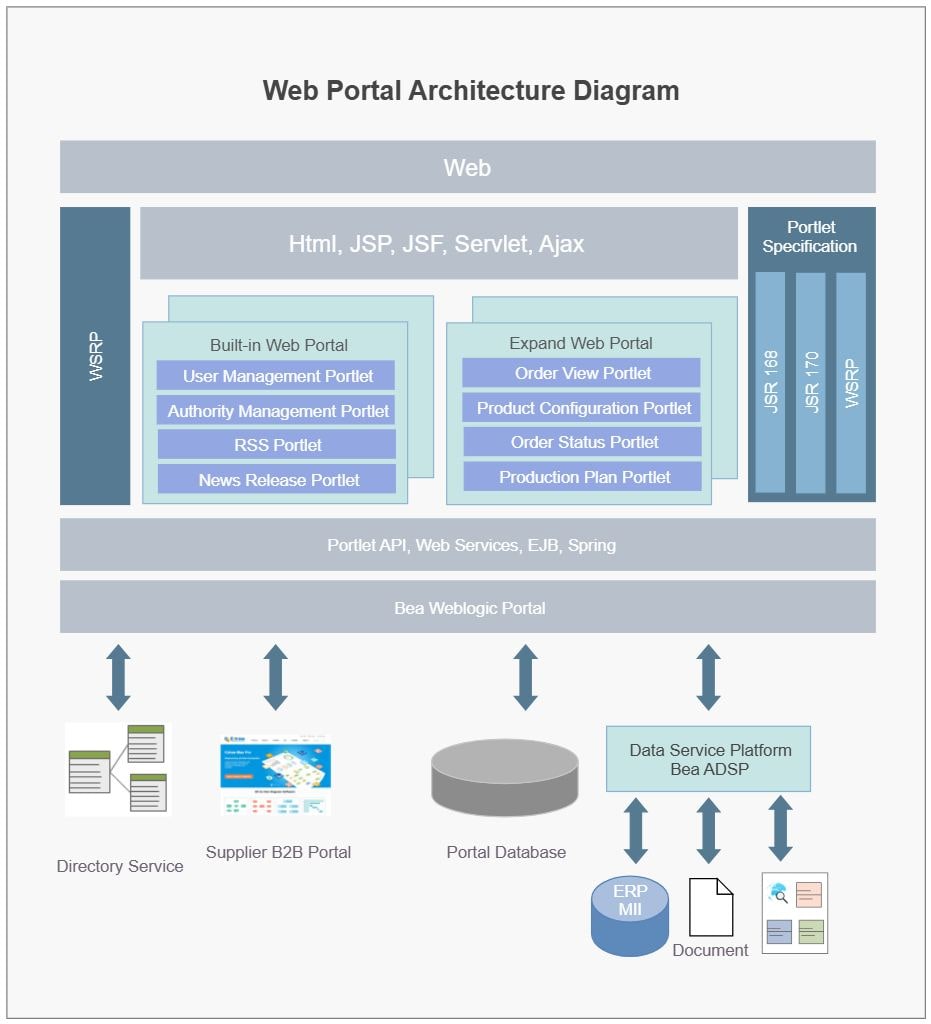
This diagram shows the main structure of a web portal architecture diagram, with the visible layers or blocks separated so each part of the system can be explained more clearly.
Web and Presentation Layer
The Web and Presentation Layer section groups the visible components in this part of the diagram. In this layout, it includes Web, HTML, JSP, JSF, Servlet, Ajax, which helps define what this block is responsible for in the wider architecture.
- Web
- HTML, JSP, JSF, Servlet, Ajax
Portal Modules and Portlets
The Portal Modules and Portlets section groups the visible components in this part of the diagram. In this layout, it includes Built-in Web Portal, Expand Web Portal, User Management Portlet, Authority Management Portlet, which helps define what this block is responsible for in the wider architecture.
- Built-in Web Portal
- Expand Web Portal
- User Management Portlet
- Authority Management Portlet
- RSS Portlet
- News Release Portlet
- Order View Portlet
- Product Configuration Portlet
- Order Status Portlet
- Production Plan Portlet
Portal Standards and Platform Services
The Portal Standards and Platform Services section groups the visible components in this part of the diagram. In this layout, it includes Portlet Specification, JSR 168, JSR 170, WSRP, which helps define what this block is responsible for in the wider architecture.
- Portlet Specification
- JSR 168
- JSR 170
- WSRP
- Portlet API, Web Services, EJB, Spring
- Bea Weblogic Portal
Data and Backend Systems
The Data and Backend Systems section groups the visible components in this part of the diagram. In this layout, it includes Data Service Platform Bea ADSP, Portal Database, Directory Service, Supplier B2B Portal, which helps define what this block is responsible for in the wider architecture.
- Data Service Platform Bea ADSP
- Portal Database
- Directory Service
- Supplier B2B Portal
- ERP MII
- Document
FAQs about this Template
-
How do teams document web application architecture?
Teams usually document web application architecture with a diagram that separates user access, application logic, data handling, and supporting infrastructure. This makes it easier to explain how requests move through the platform, where services interact, and how the main responsibilities are divided across sections such as Web and Presentation Layer, Portal Modules and Portlets, and Portal Standards and Platform Services.
-
What is the difference between web application architecture and system architecture?
Web application architecture focuses on the structure behind a browser-based or portal-style application, while system architecture can describe a broader technical environment. Web application diagrams are especially useful when teams need to explain front-end entry points, back-end services, APIs, storage, session flow, and the request path behind a live user-facing platform.
-
What should a web application architecture diagram include?
A strong web application architecture diagram should include user entry points, application services, data storage, and the main request flow. It should also show where authentication, APIs, caching, integrations, infrastructure controls, or monitoring connect, so the design can be reviewed for scalability, maintainability, and user-facing reliability. This also makes technical review, stakeholder communication, and future changes easier to manage.
-
Can AI generate web application architecture diagrams automatically?
Yes, AI can generate a draft web application architecture diagram, but it should still be reviewed by engineers. AI can help organize common layers and interactions, while the team should validate the real APIs, service boundaries, security logic, hosting model, data movement, and support assumptions before using the diagram for design review or implementation planning.
-
Which diagram type is best for documenting web portal systems?
An architecture diagram is usually the best first choice for documenting web portal systems because it shows the full relationship between users, application layers, services, and storage in one place. Teams can add sequence, deployment, or integration views later when they need more detail for troubleshooting, onboarding, release planning, or support alignment.

 (AI & Web)