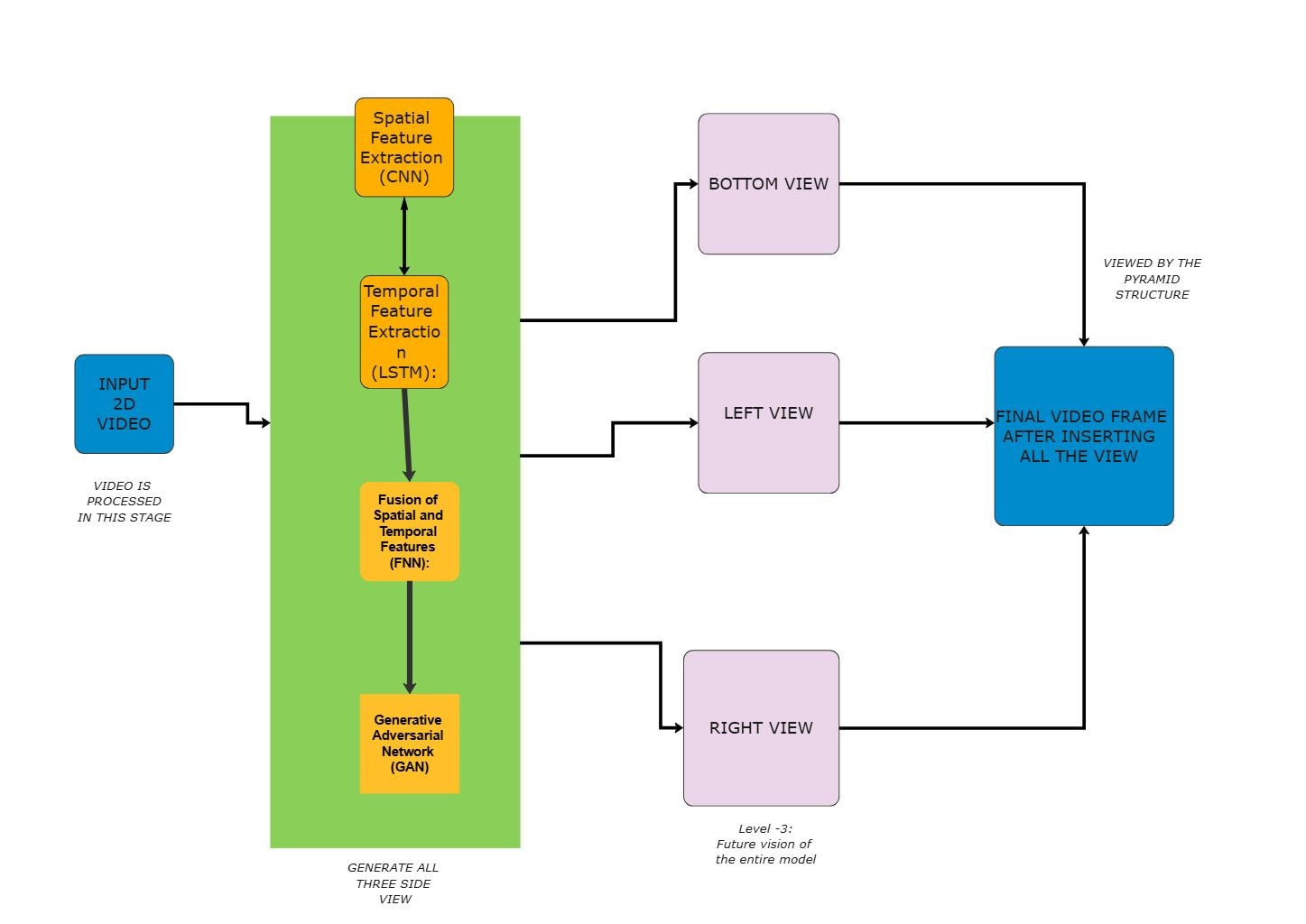
About this Business Model Architecture Video Processing Diagram
This diagram shows the main structure of a business model architecture video processing diagram, with the visible layers or blocks separated so each part of the system can be explained more clearly.
Feature Extraction Layer
The Feature Extraction Layer section groups the visible components in this part of the diagram. In this layout, it includes Feature Processing, which helps define what this block is responsible for in the wider architecture.
- Feature Processing
Feature Fusion Layer
The Feature Fusion Layer section is one visible block in the diagram. Its position helps explain how this part fits into the wider architecture without mixing it into unrelated layers.
- Feature Fusion Layer
FAQs about this Template
-
How do teams visualize Business Model Architecture Video Processing Diagram AI architecture?
Teams usually visualize Business Model Architecture Video Processing Diagram AI architecture with a diagram that separates input flow, model processing, orchestration, and supporting data or control layers. This makes it easier to review how requests move through sections such as Feature Extraction Layer and Feature Fusion Layer, and where inference, retrieval, feedback, external integrations, or support logic fit in the workflow.
-
Can AI generate Business Model Architecture Video Processing Diagram architecture diagrams automatically?
Yes, AI can generate a first draft of a Business Model Architecture Video Processing Diagram architecture diagram, but it still needs human review. AI is useful for proposing flow structure and major groupings, while engineers should validate the real model pipeline, data dependencies, security boundaries, tool integrations, and support assumptions before using the diagram in delivery or technical review.
-
What is the difference between AI architecture and application architecture?
AI architecture focuses more directly on model flow, inference logic, retrieval, orchestration, and feedback loops, while application architecture describes broader software structure. AI diagrams are more useful when teams need to explain how prompts, data, models, outputs, support services, and control layers connect inside an intelligent system or agent workflow.
-
What should a Business Model Architecture Video Processing Diagram AI architecture diagram include?
A strong Business Model Architecture Video Processing Diagram AI architecture diagram should include the main inputs, model or agent layer, data or retrieval sources, and the core output path. It should also show where orchestration, monitoring, external tools, feedback loops, or support controls connect, so readers can understand the real processing flow instead of seeing only isolated technical blocks.
-
Which diagram type is best for documenting AI workflows?
An architecture diagram is usually the best place to start because it shows the main workflow, dependencies, and support layers in one view. Teams often add sequence, agent flow, or data pipeline diagrams later when they need to explain prompt handling, retrieval order, model interaction, operations detail, or escalation paths more precisely.

 (AI & Web)