About this C4 Context Diagram
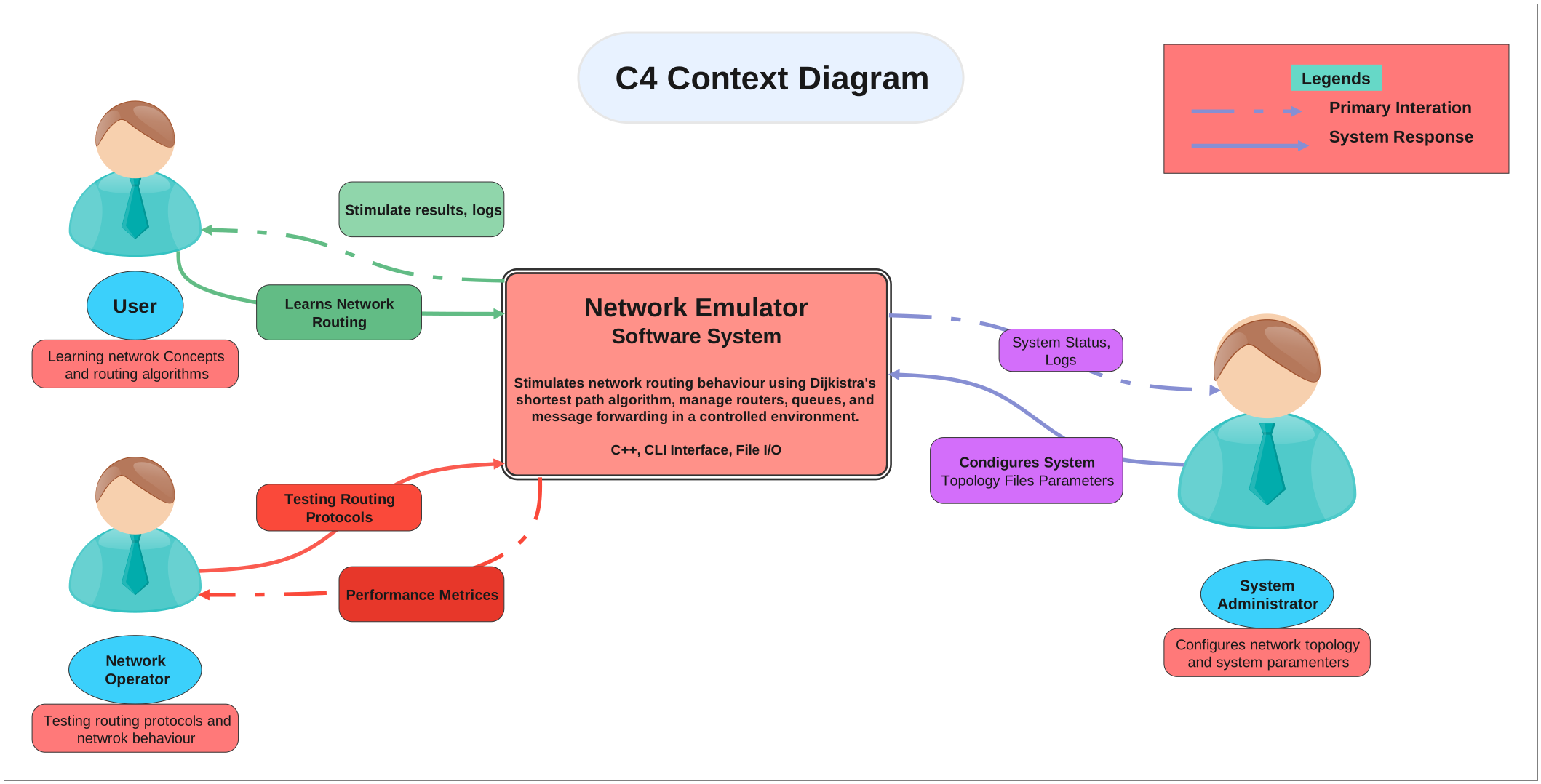
This C4 Context Diagram is meant to clarify system scope first, showing what sits at the center, which outside actors connect to it, and what information or actions move across that boundary.
Central System Boundary
The middle of the diagram is anchored by System Response, System Status, Logs. In a context diagram, that central placement matters because it tells the reader what belongs inside the system before any lower-level design discussion begins.
- System Response
- System Status, Logs
- Condigures System Topology Files Parameters
- System Administrator
- Configures network topology and system paramenters
External Actors
The external side is represented by User. Those actors matter because they show who depends on the system, who sends requests into it, and who receives outputs from it.
- User
Inputs, Outputs, and Business Exchanges
Labels such as Legends, C4 Context Diagram, Primary Interation, help define what actually crosses the boundary. That makes the page useful for scope definition, requirements discussion, and early system explanation.
- Legends
- C4 Context Diagram
- Primary Interation
- Stimulate results, logs
- Learns Network Routing
- Learning netwrok Concepts and routing algorithms
- Testing Routing Protocols
- Performance Metrices
FAQs about this Template
-
What does this c4 Context Diagram clarify at a technical-system level?
It clarifies where the system boundary sits and which outside users, platforms, or services touch it from the outside. That high-level framing is useful because it keeps the page focused on system context rather than dropping too quickly into internals.
-
Why should a technical context diagram keep external roles visible?
External roles make it easier to see who interacts with the system and where dependencies begin. That is valuable in technical discussions because it separates outside relationships from the internal architecture, which belongs on a different kind of diagram.
-
What do labeled exchanges add to a technical context diagram?
They show the nature of the interaction, such as requests, responses, logs, reports, or administrative actions. Those labels help the reader understand the boundary behavior of the system without mistaking the page for a component or sequence diagram.
-
When is a technical context diagram the right starting point?
It is the right starting point when teams need a top-level shared view before discussing deployment, components, or detailed flows. By agreeing on the system boundary first, later technical diagrams become easier to interpret and less likely to mix levels of abstraction.





 (AI & Web)