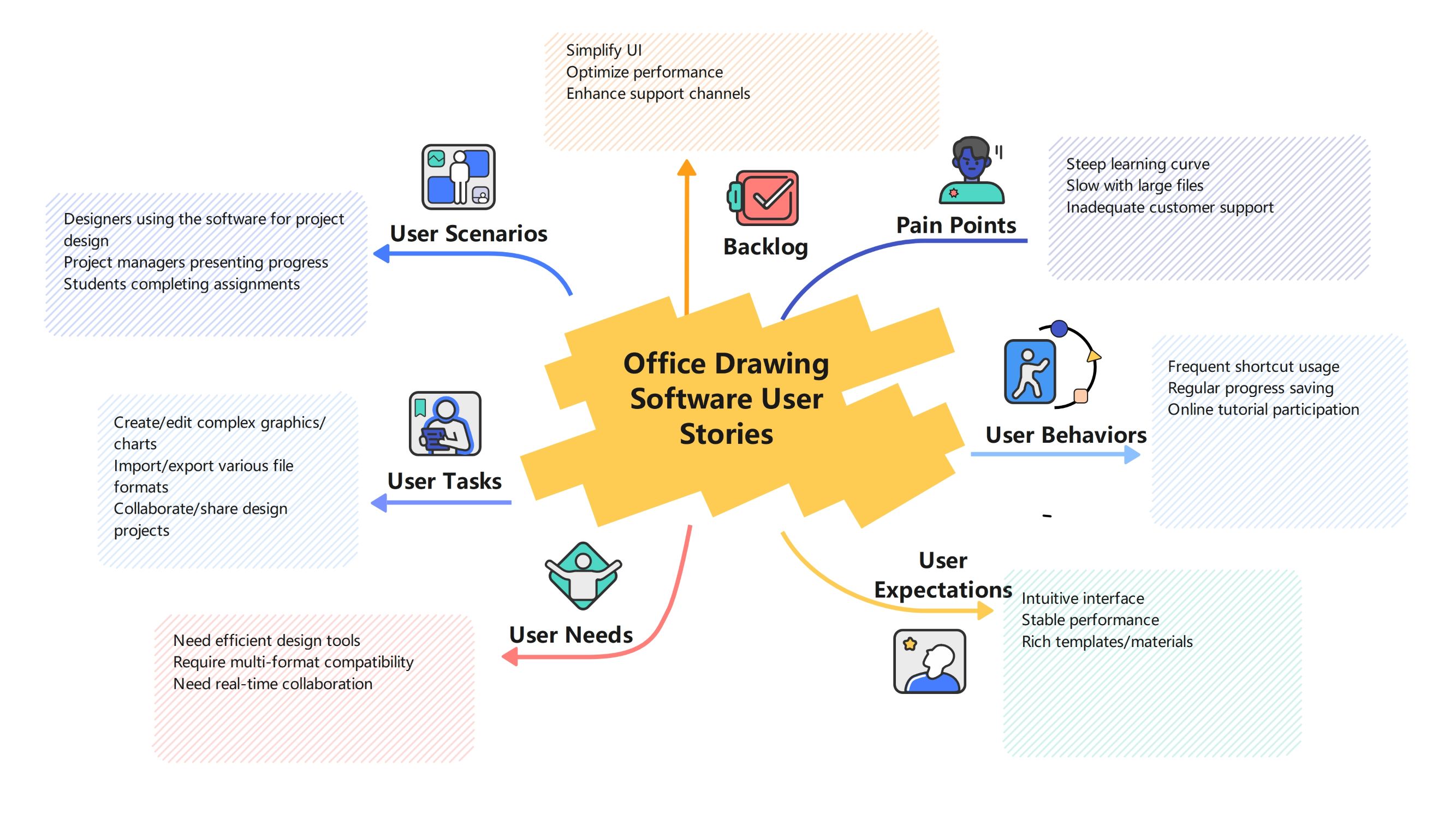
About this Office Drawing Software User Story Mapping template
This template provides a comprehensive visual map of the user journey for drawing software. It categorizes user types, tasks, and expectations to help product managers and developers prioritize essential features and solve common technical challenges.
User Scenarios
Understanding who uses the software is the first step in creating a user-centric product. Different roles require specific functionalities to achieve their goals, ranging from academic assignments to high-level corporate presentations and complex professional designs.
- Designers using the software for project design
- Project managers presenting progress
- Students completing assignments
User Tasks
This section outlines the primary actions users perform within the drawing application. Mapping these tasks helps developers ensure that the core workflow is smooth, efficient, and supports a wide variety of professional and creative file operations.
- Create/edit complex graphics/charts
- Import/export various file formats
- Collaborate/share design projects
User Needs
User needs focus on the fundamental requirements for a successful drawing experience. Modern users demand tools that are not only powerful but also allow for seamless integration with other software and real-time team collaboration features.
- Need efficient design tools
- Require multi-format compatibility
- Need real-time collaboration
User Expectations
Expectations define the quality of the user experience. Users look for a balance between ease of use and technical stability. Providing a rich library of materials and templates is also key to satisfying long-term professional users.
- Intuitive interface
- Stable performance
- Rich templates/materials
User Behaviors
Monitoring how users interact with the tool reveals valuable insights into their habits. Frequent use of shortcuts and regular saving habits suggest a need for high-performance software that supports fast-paced, high-intensity design work environments.
- Frequent shortcut usage
- Regular progress saving
- Online tutorial participation
Pain Points
Identifying frustrations is critical for software improvement. Common issues like performance lag with large files or a difficult learning process can drive users away. Addressing these hurdles is vital for maintaining a competitive edge in the market.
- Steep learning curve
- Slow with large files
- Inadequate customer support
Backlog
The backlog serves as a roadmap for future updates based on gathered user data. By focusing on simplifying the interface and optimizing performance, the development team can resolve existing pain points and meet user expectations.
- Simplify UI
- Optimize performance
- Enhance support channels
FAQs about this Template
-
Why is user story mapping important for drawing software?
User story mapping is vital because it bridges the gap between technical requirements and the actual user experience. In drawing software, where workflows can be complex, mapping allows teams to visualize how designers and project managers interact with features. This clarity helps prioritize development efforts on high-impact tools, ensuring the software remains intuitive, efficient, and aligned with the specific goals of its diverse user base.
-
How can developers address common pain points in office software?
Developers can address pain points by focusing on performance optimization and user education. For instance, if users struggle with large files, improving memory management is essential. Additionally, simplifying the user interface and providing accessible, high-quality tutorials can flatten the steep learning curve. Consistent updates and responsive customer support channels further help in resolving technical frustrations and building long-term trust with professional office users.
-
What role does real-time collaboration play in modern design tools?
Real-time collaboration is no longer a luxury but a necessity in the modern workspace. It allows multiple team members to work on a single design project simultaneously, significantly reducing feedback loops and speeding up the approval process. By integrating cloud-based sharing and live editing features, office drawing software enables distributed teams to stay synchronized, fostering creativity and ensuring project consistency across different locations.

 (AI & Web)