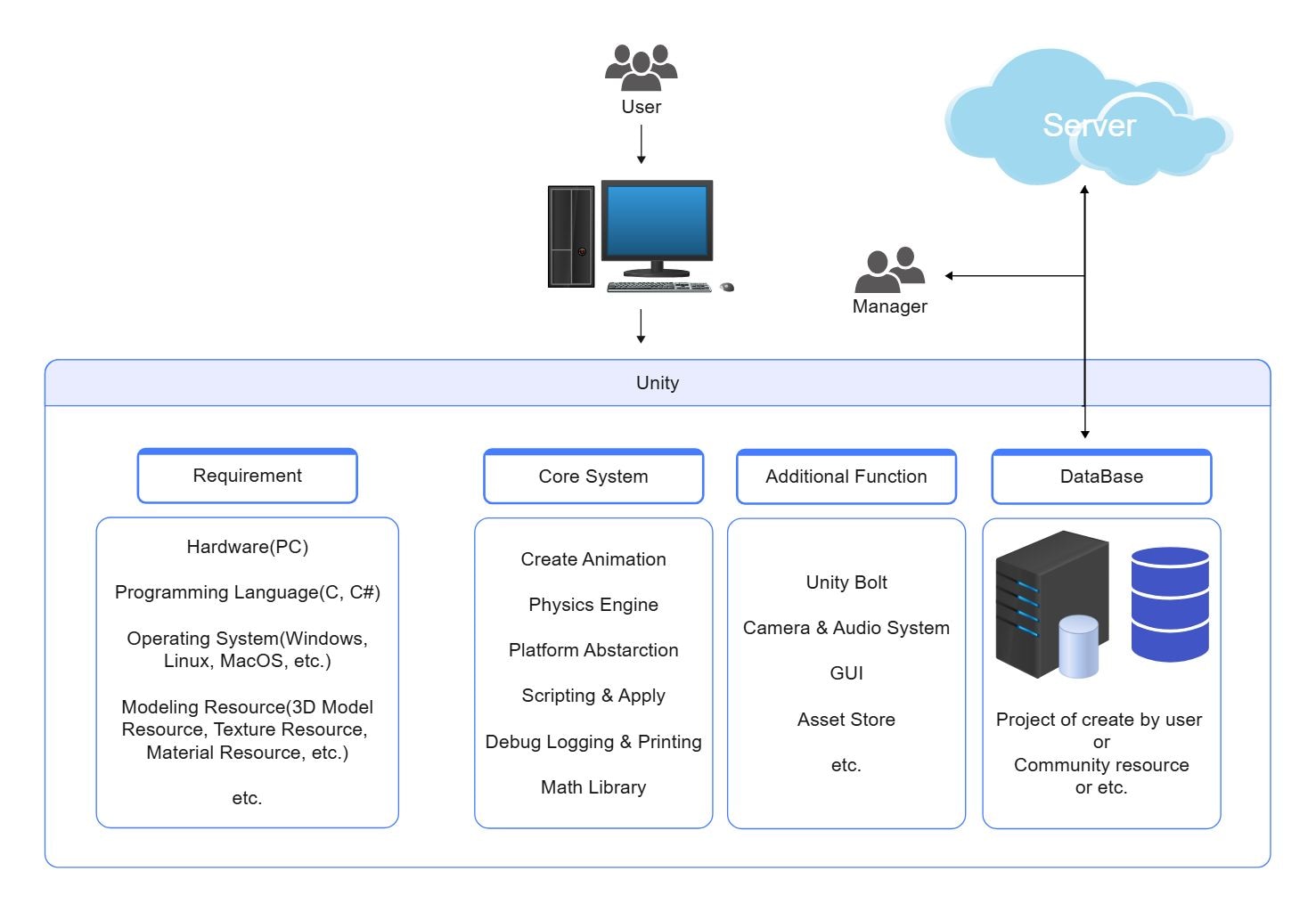
About this Unity App Server Architecture Diagram
This diagram shows unity app server architecture diagram in a clearer structure, so the main layers or modules are easier to explain.
Physics Engine
The Physics Engine section is one visible block in the diagram. Its placement helps explain how this part fits into the overall architecture without collapsing the layout into a single undifferentiated system view.
- Physics Engine
Core System
The Core System section is one visible block in the diagram. Its placement helps explain how this part fits into the overall architecture without collapsing the layout into a single undifferentiated system view.
- Core System
Camera & Audio System
The Camera & Audio System section is one visible block in the diagram. Its placement helps explain how this part fits into the overall architecture without collapsing the layout into a single undifferentiated system view.
- Camera & Audio System
FAQs about this Template
-
How do teams visualize Unity App Server architecture?
Teams usually visualize Unity App Server architecture with a layered diagram that separates core areas such as Physics Engine, Core System, and Camera & Audio System. This makes it easier to review dependencies, handoffs, and system boundaries, especially when architects need one view that shows how services, users, data, support layers, and technical responsibilities connect.
-
Can AI generate Unity App Server architecture diagrams automatically?
Yes, AI can generate a first draft of a Unity App Server architecture diagram, but it still needs human review. AI is useful for suggesting layers, flows, and component groupings, while engineers should verify the real services, security boundaries, data paths, naming, system dependencies, and support assumptions before using the diagram in delivery or documentation.
-
What is the difference between system architecture and application architecture?
The difference is mainly about scope. system architecture focuses on technical layers, service relationships, and operational structure, while application architecture usually describes broader software structure or behavior. Teams use system architecture views when they need to explain deployment logic, integration points, hosting layers, cross-system dependencies, and the way major technical responsibilities are separated.
-
What should a Unity App Server architecture diagram include?
A strong Unity App Server architecture diagram should include the main layers, core components, and the key data or request flow. It should also show where users, services, storage, external systems, controls, monitoring points, or support links connect, so readers can understand the design logic, ownership boundaries, and the path between major functions without guessing.
-
Which diagram type is best for documenting Unity App Server systems?
The best diagram type depends on the decision you need to support. A high-level architecture diagram works best for explaining the overall structure, while sequence, deployment, network, or microservices views help with implementation detail. Most teams start with an overview like this, then add focused diagrams for troubleshooting, onboarding, delivery planning, or support coordination.

 (AI & Web)