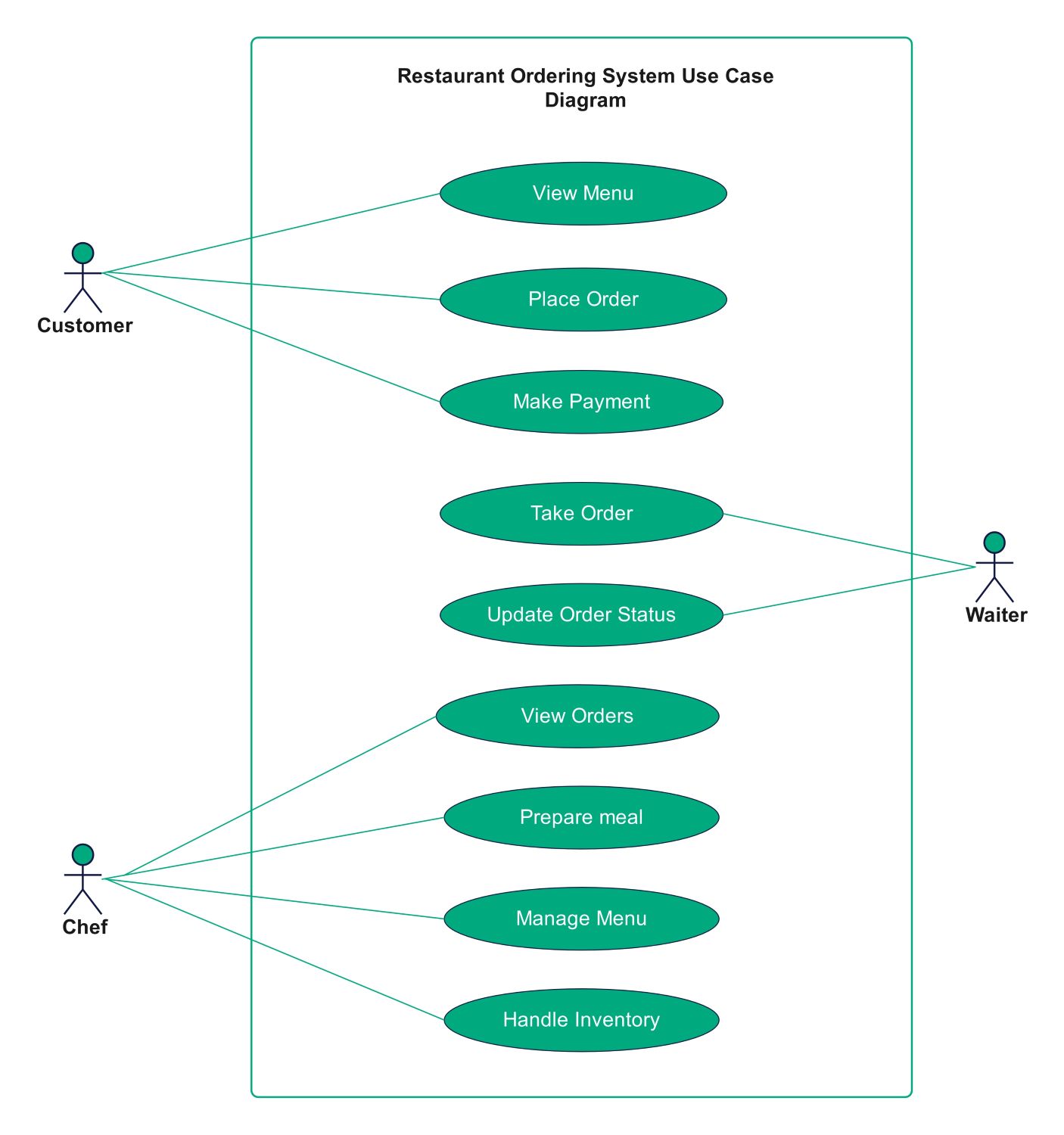
About this Restaurant Ordering System Use Case Diagram template
This template provides a professional visual map for modern dining technology. It clearly illustrates the interactions between customers, waiters, and chefs within a software environment. Using this diagram helps development teams build efficient systems that improve both service speed and data accuracy.
Customer Interaction
The customer represents the primary end-user of the ordering system. This role initiates the dining process by browsing the menu and finalizing their purchase. These actions are vital for creating a smooth and positive digital user experience.
- View Menu
- Place Order
- Make Payment
Waiter Operations
Waiters bridge the gap between the customers and the kitchen staff. They use the system to ensure order accuracy and keep guests informed. This role focuses on service efficiency and real-time communication during the entire meal.
- Take Order
- Update Order Status
Chef and Kitchen Management
The chef manages the back-of-house operations through this digital system. This role handles meal production and complex backend tasks like stock tracking. It ensures the kitchen stays organized and the food menu remains up to date.
- View Orders
- Prepare meal
- Manage Menu
- Handle Inventory
FAQs about this Template
-
Why is a use case diagram important for a restaurant system?
A use case diagram is essential because it defines the scope of your software project. It identifies every person who will use the system and exactly what they need to do. By mapping these interactions early, you can avoid missing features like inventory tracking or payment processing. This visual guide helps both technical teams and business owners align on system goals.
-
Who are the primary actors in a restaurant ordering system?
The primary actors usually include the customer, the waiter, and the chef. The customer uses the system to browse and pay. The waiter manages the flow of information between the front and back of the house. Finally, the chef uses the system to receive orders and manage food supplies. Each actor plays a unique role in ensuring a functional workflow.
-
Can I customize this use case diagram for a food delivery app?
Yes, you can easily adapt this template for a delivery service. You would simply add a new actor for the delivery driver. You might also include specific use cases like tracking GPS locations or rating the delivery experience. This flexibility makes use case diagrams perfect for various food industry models, from fine dining restaurants to quick-service mobile applications.

 (AI & Web)