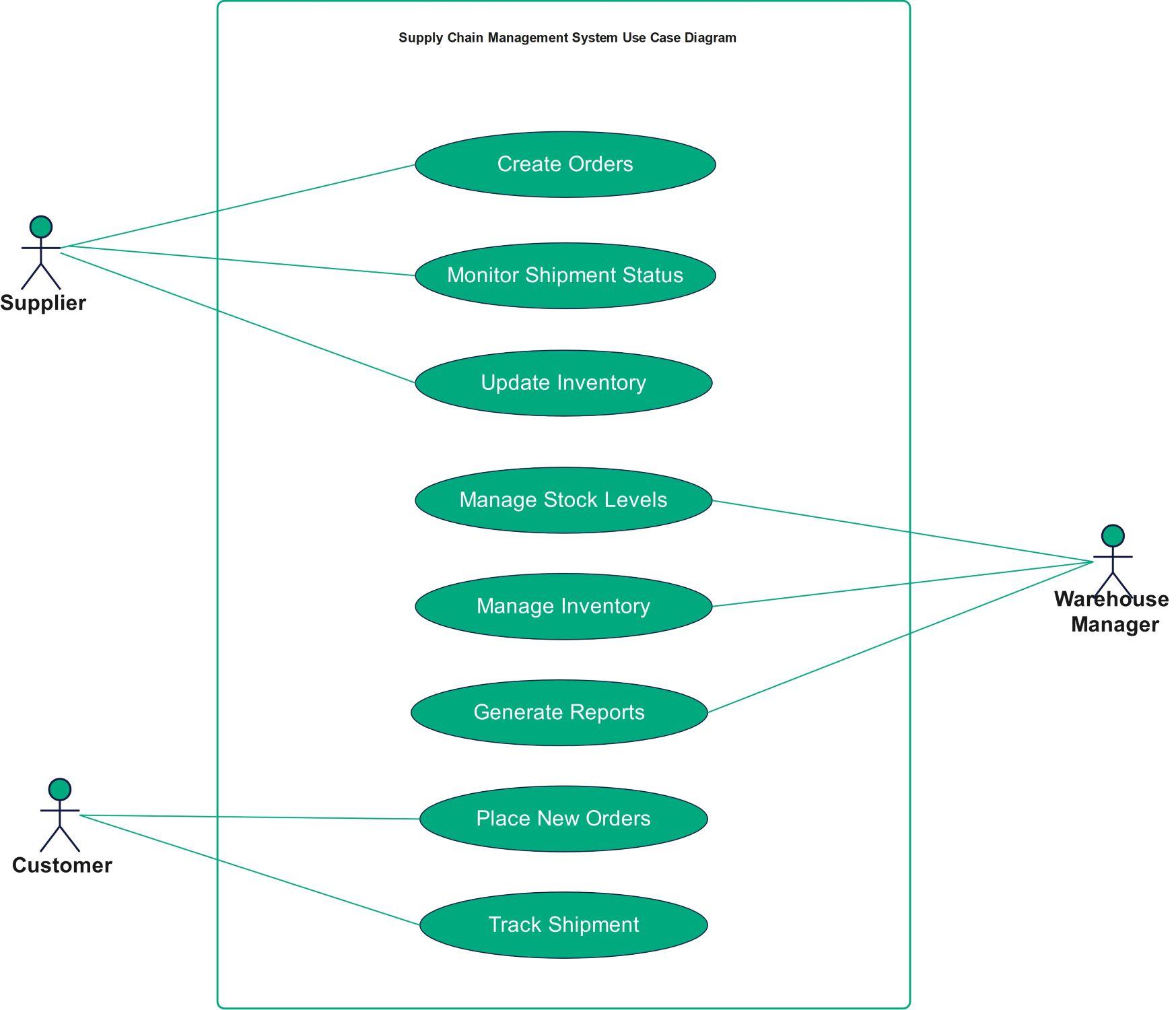
About this Supply Chain Management System Use Case Diagram template
This template outlines the primary interactions within a supply chain software system. It defines how suppliers, customers, and warehouse managers use the platform to perform daily tasks. It is a vital tool for technical planning and identifying essential functional requirements for business logistics.
Supplier Actions
Suppliers are critical stakeholders who provide the necessary goods or raw materials. This section of the diagram highlights how they use the system to manage their shipments and keep inventory data accurate for the company.
- Create Orders
- Monitor Shipment Status
- Update Inventory
Warehouse Manager Operations
Warehouse Managers oversee the physical storage and flow of items. Their system interactions focus on maintaining optimal stock levels and generating data-driven reports to ensure the warehouse operates smoothly without any major stockouts.
- Manage Stock Levels
- Manage Inventory
- Generate Reports
Customer Interactions
The customer is the end-user who drives demand in the supply chain. This section identifies the basic touchpoints where customers interact with the platform to buy products and check the status of their deliveries.
- Place New Orders
- Track Shipment
FAQs about this Template
-
Why is a use case diagram important for supply chain management?
A use case diagram is important because it provides a clear visual map of user interactions. It helps developers and stakeholders identify exactly what the system needs to do. By defining these roles early, teams can avoid missing critical features like inventory tracking or order processing. This clarity reduces errors during the software development phase and improves overall business efficiency.
-
Who are the main actors in a typical supply chain use case?
The main actors typically include suppliers, warehouse managers, and customers. Suppliers handle the intake of goods, while warehouse managers control internal storage and reporting. Customers interact with the front-end to place orders. Some diagrams might also include logistics providers or system administrators to represent every stage of the product journey from the initial creation to the final delivery.
-
Can this diagram help in identifying system requirements?
Yes, this diagram is a foundational tool for identifying functional requirements. Each oval represents a specific task the system must perform. For example, 'Track Shipment' implies the system needs a database and a tracking interface. By analyzing these nodes, project managers can create a detailed list of features and technical specifications needed to build a working software system.

 (AI & Web)