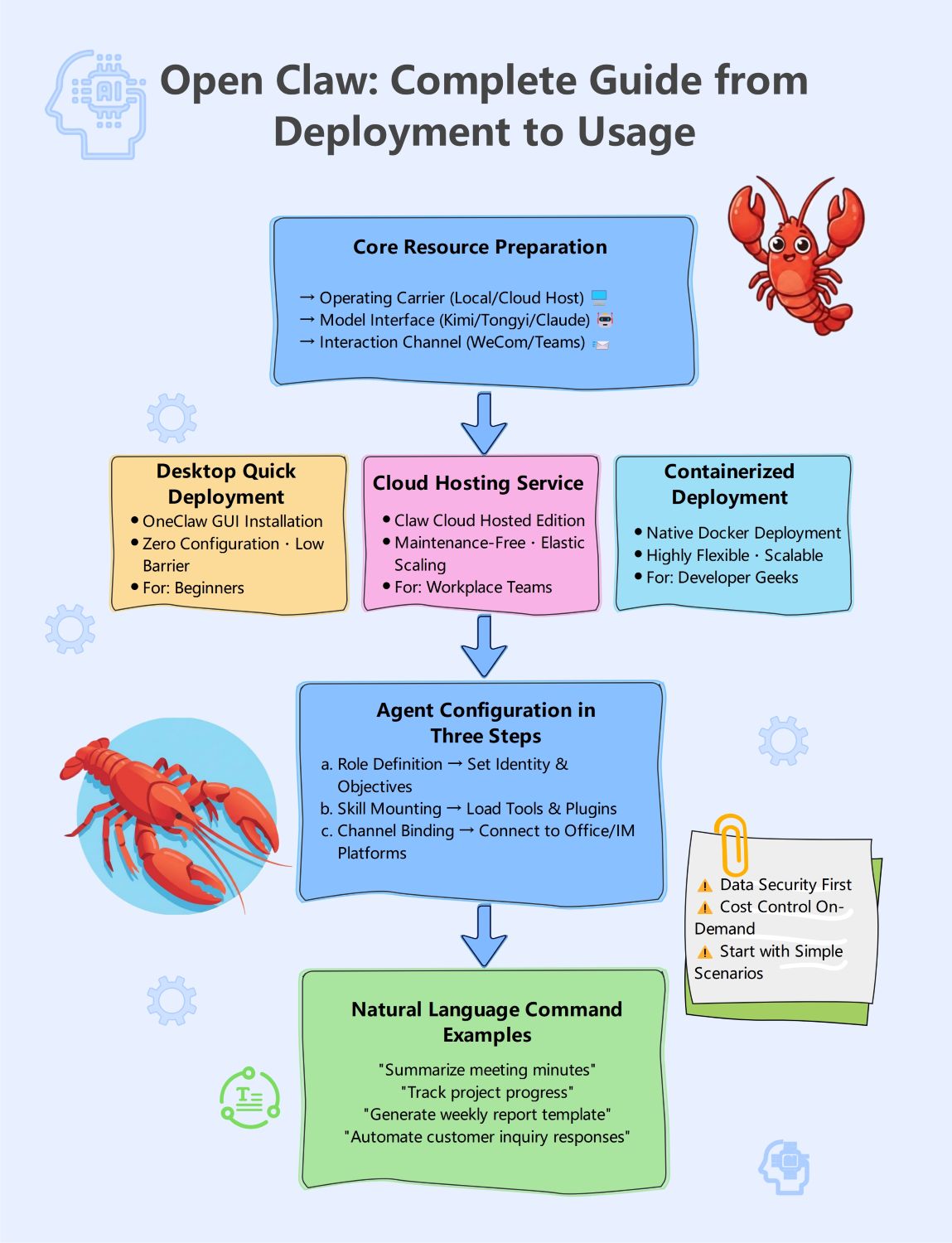
About this OpenClaw Deployment Tutorial template
This template provides a clear visual roadmap for setting up Open Claw. It covers everything from initial resource gathering to final command execution, making it perfect for teams looking to adopt AI solutions efficiently.
Core Resource Preparation
Before starting your deployment, you must gather essential resources. This phase ensures your infrastructure is ready to support the AI agent by defining the hosting environment, the model interface, and the primary communication channel.
- Operating Carrier: Choose between Local or Cloud Host
- Model Interface: Select providers like Kimi, Tongyi, or Claude
- Interaction Channel: Integrate with platforms like WeCom or Teams
Flexible Deployment Options
Open Claw offers three distinct deployment methods tailored to different technical skill levels. Whether you prefer a simple desktop interface or a scalable containerized environment, there is a configuration that fits your specific business needs.
- Desktop Quick Deployment: Best for beginners with zero configuration
- Cloud Hosting Service: Maintenance-free solution for workplace teams
- Containerized Deployment: Highly flexible Docker setup for developer geeks
Agent Configuration Steps
Configuring your AI agent involves a simple three-step process to define its purpose and capabilities. This stage transforms the raw software into a functional assistant capable of interacting within your professional workspace effectively.
- Role Definition: Set the identity and core objectives
- Skill Mounting: Load specific tools and plugins
- Channel Binding: Connect the agent to Office or IM platforms
Natural Language Command Examples
Once deployed, users can interact with the agent using simple natural language commands. These examples demonstrate how the AI can handle complex administrative tasks, allowing your team to focus on higher-value creative and strategic work.
- Summarize meeting minutes automatically
- Track project progress across your team
- Generate weekly report templates instantly
- Automate customer inquiry responses
FAQs about this Template
-
Which deployment method is best for a small team with no IT staff?
For teams without dedicated IT support, the Cloud Hosting Service is the most efficient choice. This maintenance-free edition provides elastic scaling and requires very little technical knowledge to manage. It allows your workplace team to focus on using the AI tools rather than worrying about the underlying server infrastructure or complex software updates.
-
How can I ensure data security when using Open Claw?
Security should be your top priority during deployment. You can maintain control by choosing private local hosting for your operating carrier. Additionally, start with simple, non-sensitive scenarios to test the agent's behavior. Always review the data policies of your chosen model interface providers, such as Claude or Kimi, to ensure they meet your standards.
-
What are the benefits of using containerized deployment for Open Claw?
Containerized deployment using native Docker is ideal for advanced developers who need maximum flexibility. This method allows for high scalability, making it easy to grow the system as your team's needs expand. It provides a consistent environment across different servers, ensuring that your Open Claw agent runs reliably regardless of the specific hardware used.


 (AI & Web)