About this Open Claw Illustrated Guide template
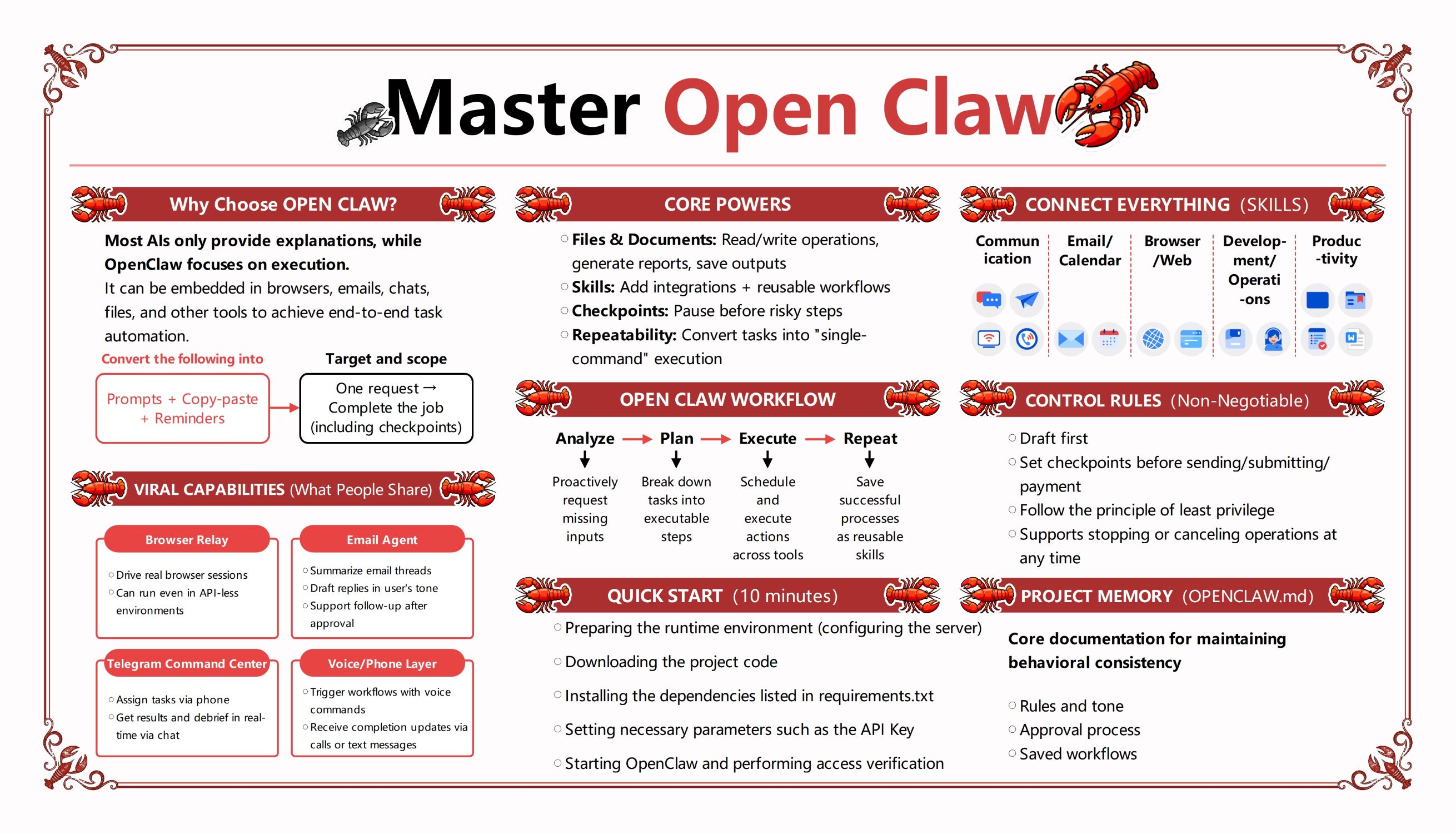
This template provides a comprehensive visual breakdown of Open Claw, an execution-focused AI tool. It illustrates how the system transitions from simple prompts to complete task automation. Use this guide to understand its core functionalities, integration capabilities, and the essential workflow steps required for success.
Why Choose OPEN CLAW?
Open Claw stands out because it focuses on execution instead of just providing information. It embeds into daily tools like browsers and emails to automate end-to-end tasks, turning complex manual requests into streamlined, completed jobs efficiently.
- Execution-focused AI framework
- Embeds in browsers and chats
- End-to-end task automation
- Converts prompts into actions
Core Powers of Open Claw
The system possesses unique capabilities that allow it to manage files and generate reports automatically. It supports reusable workflows and integrates various skills while maintaining safety through checkpoints. These features ensure that tasks are repeatable and reliable.
- File and document operations
- Reusable workflow integrations
- Safety checkpoints for risky steps
- Single-command task repeatability
Open Claw Workflow
Success with this tool follows a structured four-step process. First, it analyzes inputs to identify missing data. Then, it plans executable steps before scheduling actions across different tools. Finally, it saves the successful process as a reusable skill.
- Analyze: Proactively request inputs
- Plan: Break down executable steps
- Execute: Schedule actions across tools
- Repeat: Save processes as skills
Viral Capabilities
Users often share Open Claw because of its impressive specialized agents. These include browser relays that drive real sessions and email agents that draft replies. It even offers voice layers and Telegram integration for managing tasks via phone or chat.
- Browser Relay for session driving
- Email Agent for thread summaries
- Telegram Command Center
- Voice and Phone layer integration
Quick Start and Project Memory
Setting up Open Claw takes only ten minutes by configuring the server and installing dependencies. Maintaining consistency is achieved through the OPENCLAW.md file. This document tracks rules, tone, and approval processes to ensure the AI behaves predictably every time.
- Configure server runtime environment
- Install requirements.txt dependencies
- Define rules in OPENCLAW.md
- Track approval and saved workflows
FAQs about this Template
-
What makes Open Claw different from standard AI assistants?
Most AI assistants focus solely on generating text or providing explanations for user queries. In contrast, Open Claw is built for execution. It can actually perform tasks within your browser, manage your email inbox, and manipulate files. By integrating directly into your existing software, it moves beyond conversation to achieve real, automated results that save you significant time.
-
How does the Checkpoints feature ensure task safety?
Safety is a priority when using automated execution tools for sensitive tasks. The Checkpoints feature allows Open Claw to pause before performing any risky operations, such as sending a payment or submitting a final form. This gives the user a chance to review the planned action and provide approval, preventing costly mistakes or unauthorized changes during the automated process.
-
Is Open Claw easy to set up for beginners?
Yes, the platform is designed for a quick start within ten minutes. Beginners simply need to prepare their runtime environment, download the project code, and install necessary dependencies. Once you set your API keys and parameters, you can start the program immediately. The structured workflow and clear documentation in the project memory file make it accessible even for new users.


 (AI & Web)