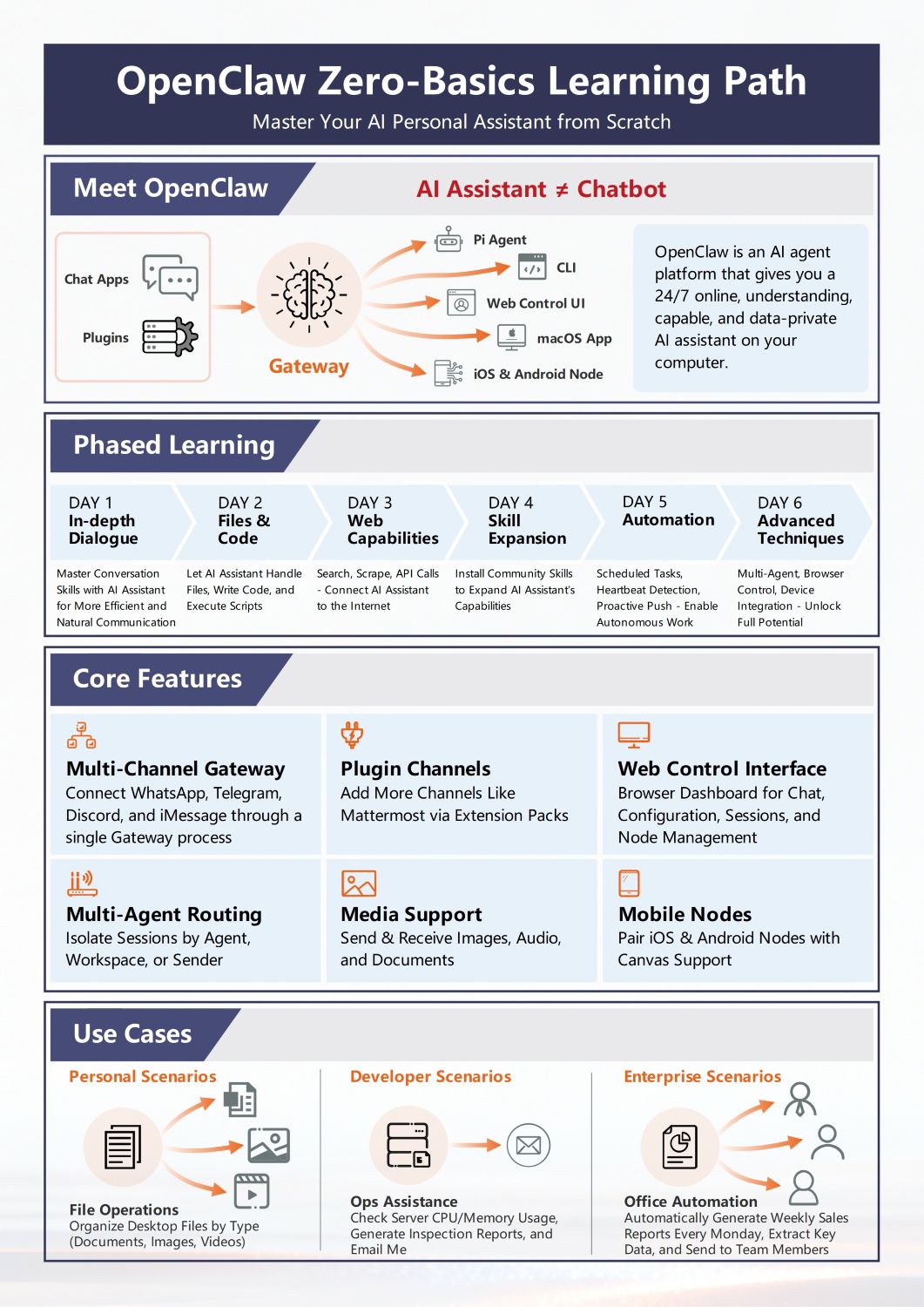
About this OpenClaw Beginner's Guide template
This template provides a comprehensive roadmap for anyone looking to master the OpenClaw AI assistant platform. It breaks down technical concepts into a simple six-day learning path and highlights the core features needed for successful deployment.
Understanding the OpenClaw Ecosystem
OpenClaw serves as a private gateway between your favorite chat apps and advanced AI capabilities. It prioritizes data security while offering multiple interfaces like CLI and mobile nodes. This structure allows the AI to function autonomously.
- Central Gateway Process
- Pi Agent and CLI Access
- Web Control User Interface
- MacOS and Mobile Application Nodes
- Integration with Chat Apps and Plugins
The 6-Day Phased Learning Roadmap
The learning path is structured to build your skills gradually over one week. You start with natural dialogue techniques and move toward complex script execution. By the final day, you will unlock full autonomous work potential.
- Day 1: Mastering In-depth Dialogue
- Day 2: Handling Files and Executing Code
- Day 3: Utilizing Web Search and API Calls
- Day 4: Expanding Skills with Community Plugins
- Day 5: Setting Up Scheduled Automation Tasks
- Day 6: Implementing Advanced Multi-Agent Techniques
Core Features and Multi-Channel Support
OpenClaw offers robust features that allow it to communicate across various platforms simultaneously. It supports diverse media types and provides a dashboard for session management. This flexibility makes it a versatile tool for various digital environments.
- Multi-Channel Gateway for WhatsApp and Discord
- Plugin Extensions for Enhanced Capabilities
- Web Dashboard for Node Management
- Multi-Agent Routing for Isolate Sessions
- Full Media Support for Images and Audio
Practical Use Case Scenarios
This section explores how OpenClaw can be applied to real-world situations for different users. Whether you are a developer or an office worker, the platform offers specific tools to boost efficiency. It simplifies repetitive digital tasks significantly.
- Personal: Automated Desktop File Organization
- Developer: Server Monitoring and Inspection Reports
- Enterprise: Weekly Sales Report Generation
- Enterprise: Automated Data Extraction and Sharing
- Developer: Resource Usage Alerts via Email
FAQs about this Template
-
How does OpenClaw differ from a standard AI chatbot?
OpenClaw is a persistent AI agent rather than a simple chatbot. While chatbots only react to direct user prompts, OpenClaw can perform autonomous tasks in the background 24/7. It functions as a gateway that connects various communication channels like Telegram or Discord to your local computer, ensuring that your data remains private and secure at all times.
-
Can I use OpenClaw on my mobile phone while away from home?
Yes, OpenClaw supports mobile nodes for both iOS and Android devices. These nodes allow you to interact with your AI assistant and manage tasks remotely. The mobile interface includes Canvas support, which makes it easier to handle visual data and complex interactions. This ensures you stay connected to your automated workflows regardless of your current location.
-
What kind of automation can I expect to perform with OpenClaw?
OpenClaw allows for diverse automation ranging from simple file organization to complex enterprise reporting. For example, you can schedule the AI to monitor server CPU usage or automatically generate and send weekly sales reports to your team every Monday. It can also scrape web data, call APIs, and execute custom scripts to handle repetitive digital chores without manual intervention.


 (AI & Web)