About Risk Management Process Flowchart
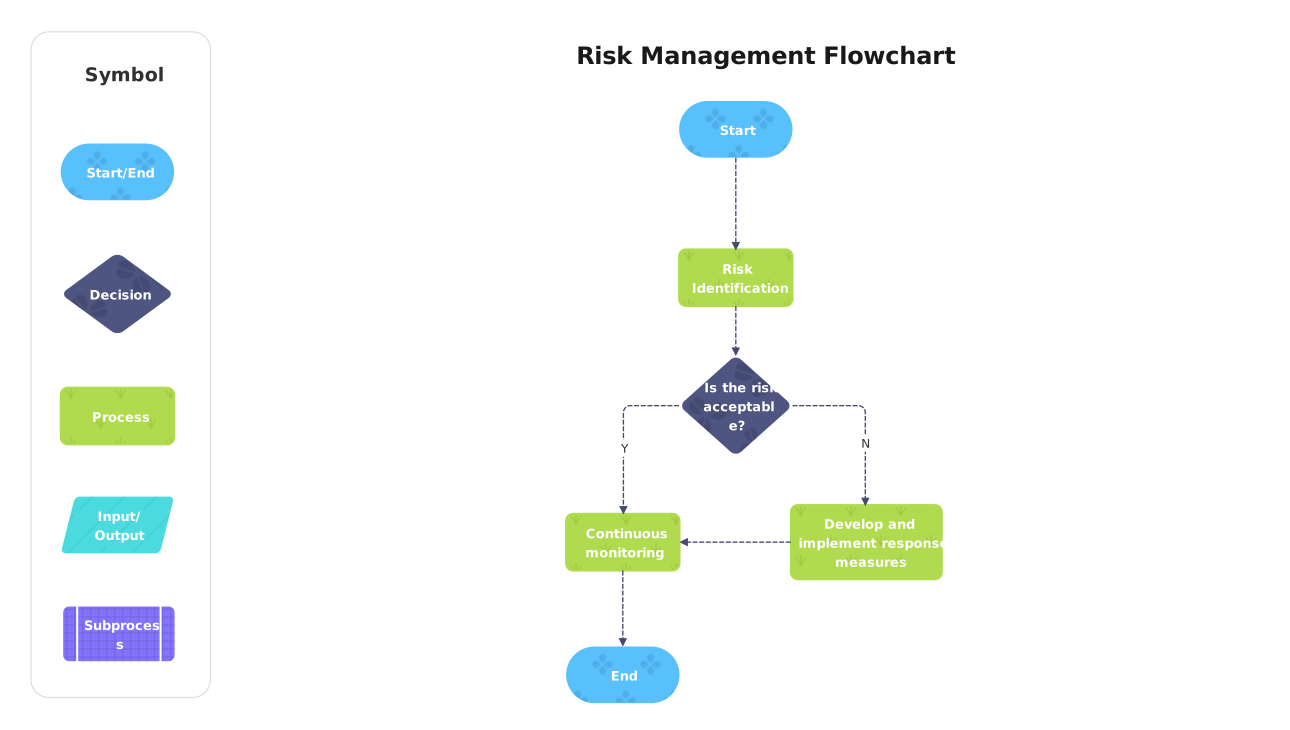
This risk management process flowchart lays out the visible sequence of steps, decisions, and outcomes in one process view. It is most useful when a reader needs to...
Starting Point and Inputs
The flow begins with labels such as Risk Management Flowchart, Symbol, and Start. These first nodes establish where the process starts and what information or action triggers the rest of the diagram.
- Risk Management Flowchart
- Symbol
- Start
- Start/End
Process Steps and Decisions
The middle of the diagram is built around steps such as Start, Start/End, Risk Identification, Decision, Is the risk acceptabl e?, and Process. That sequence is what gives the template its value as a working process map instead of a static concept chart.
- Start
- Start/End
- Risk Identification
- Decision
- Is the risk acceptabl e?
- Process
End State and Practical Use
By keeping the steps in a visible order, the flowchart helps readers review process logic, discuss exceptions, and spot where decisions or handoffs happen before the workflow reaches its final outcome.
FAQs about this Template
-
What makes this risk Management Process Flowchart clearer than a paragraph explanation?
It shows the process as a sequence of steps and choices that can be scanned visually. That helps readers follow the logic of the page much faster than if the same information were buried inside a long block of written instructions.
-
Why are decision nodes important in a general flowchart?
Decision nodes show where the path can split based on a condition or result. They keep the flowchart honest by showing that the process is not always one straight line from start to finish.
-
When should a general flowchart template be used instead of plain text?
It should be used when order, branching, or handoff points matter. If the reader needs to see how one step leads to another or where the process can change direction, the flowchart format is easier to interpret.
-
What should be checked before a general flowchart is finalized?
The creator should check the sequence, branch conditions, labels, and end states before finalizing the chart. It is also helpful to confirm that the wording on each node matches the real process rather than a simplified guess.





 (AI & Web)