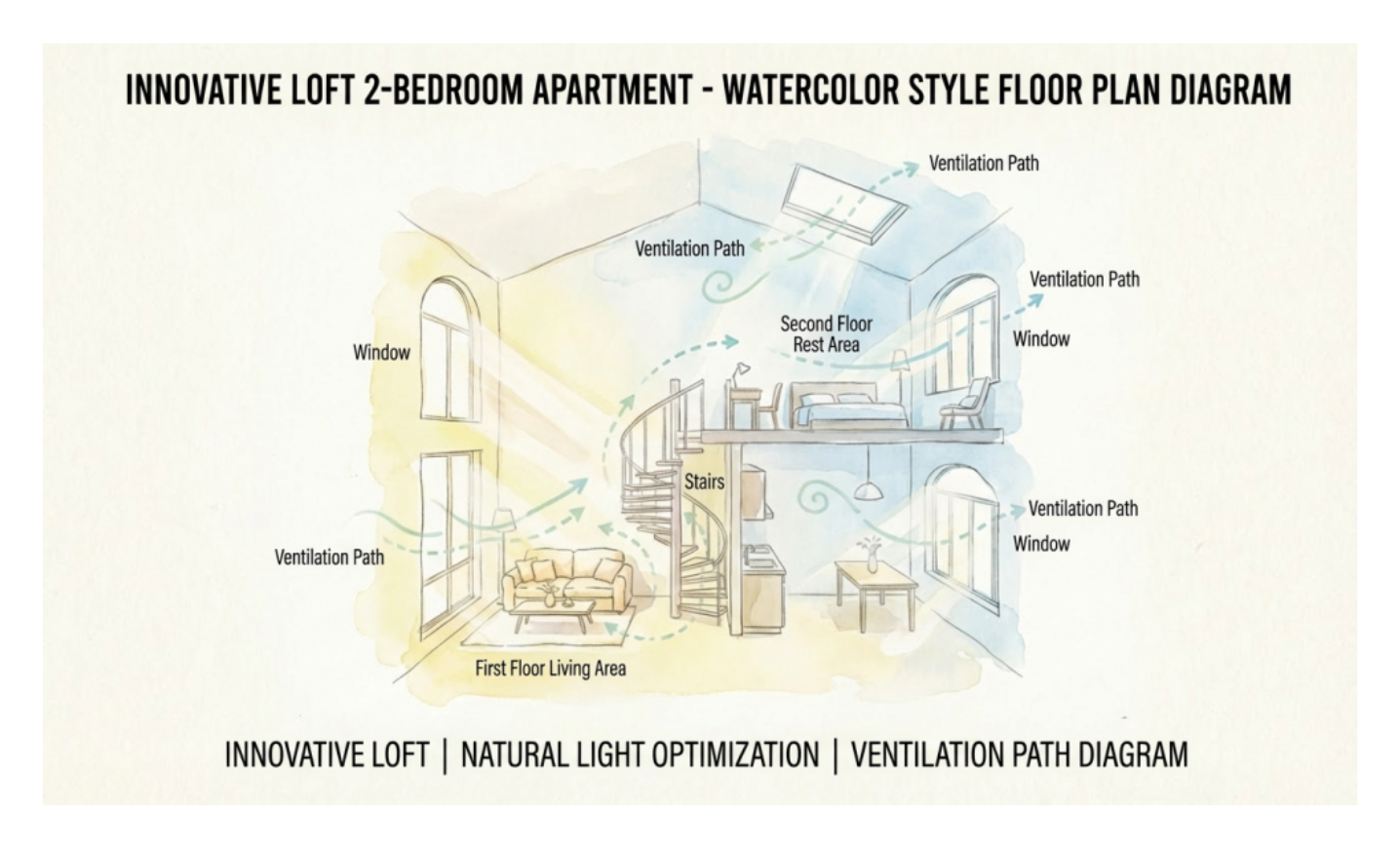
About Loft Apartment Ventilation and Natural Light Diagram Template
This apartment environmental diagram template shows how airflow, daylight, and spatial relationships may be organized across a loft-style residential layout. It helps users explain environmental behavior more clearly than a plain room plan by showing how the living space interacts with air and light.
Loft spatial structure
The diagram appears to highlight the major spaces that define the loft environment, which is important because ventilation and light behavior are often shaped by the openness and relationship of the main zones. This makes the layout easier to explain from an environmental perspective.
- Helps explain the main spatial structure of the loft
- Supports residential environmental planning discussion
- Useful for layout review and presentation
Airflow and light relationships
The visual arrangement also helps users review how air and natural light may move through or affect the space. These relationships matter because comfort in a loft often depends not only on room arrangement, but on how environmental conditions are distributed across the layout.
- Shows how airflow and daylight relate to the space
- Supports discussion of environmental layout logic
- Useful for explaining comfort-related design considerations
Planning and design value
Beyond the environmental factors themselves, the diagram helps users communicate how the loft may be improved or evaluated through design. This is useful because environmental layout diagrams often support planning, renovation discussion, and clearer user understanding.
- Useful for planning, review, and environmental explanation
- Supports clearer communication around comfort and design
- Helps make environmental relationships easier to reuse as a reference
FAQs about this Template
-
What is a loft apartment ventilation and natural light diagram?
A loft apartment ventilation and natural light diagram is a structured visual or planning reference used to organize a topic more clearly. It helps readers understand the main idea, relationships, or steps involved without relying only on long-form text explanation.
-
What should a loft apartment ventilation and natural light diagram include?
A loft apartment ventilation and natural light diagram should include the most important sections, labels, relationships, or checkpoints needed to explain the topic properly. The right content depends on the use case, but the structure should always improve clarity and make the subject easier to follow.
-
How do you create a loft apartment ventilation and natural light diagram?
To create a loft apartment ventilation and natural light diagram, define the purpose first, identify the main sections, and arrange them in a logical order. A good result should make the topic easier to explain, review, or present rather than simply filling space with generic blocks.
-
Why is a loft apartment ventilation and natural light diagram important?
A loft apartment ventilation and natural light diagram is important because it improves communication and understanding around a specific subject. A clear structure makes information easier to explain, compare, and apply, especially when the topic includes multiple parts or decision points.



 (AI & Web)