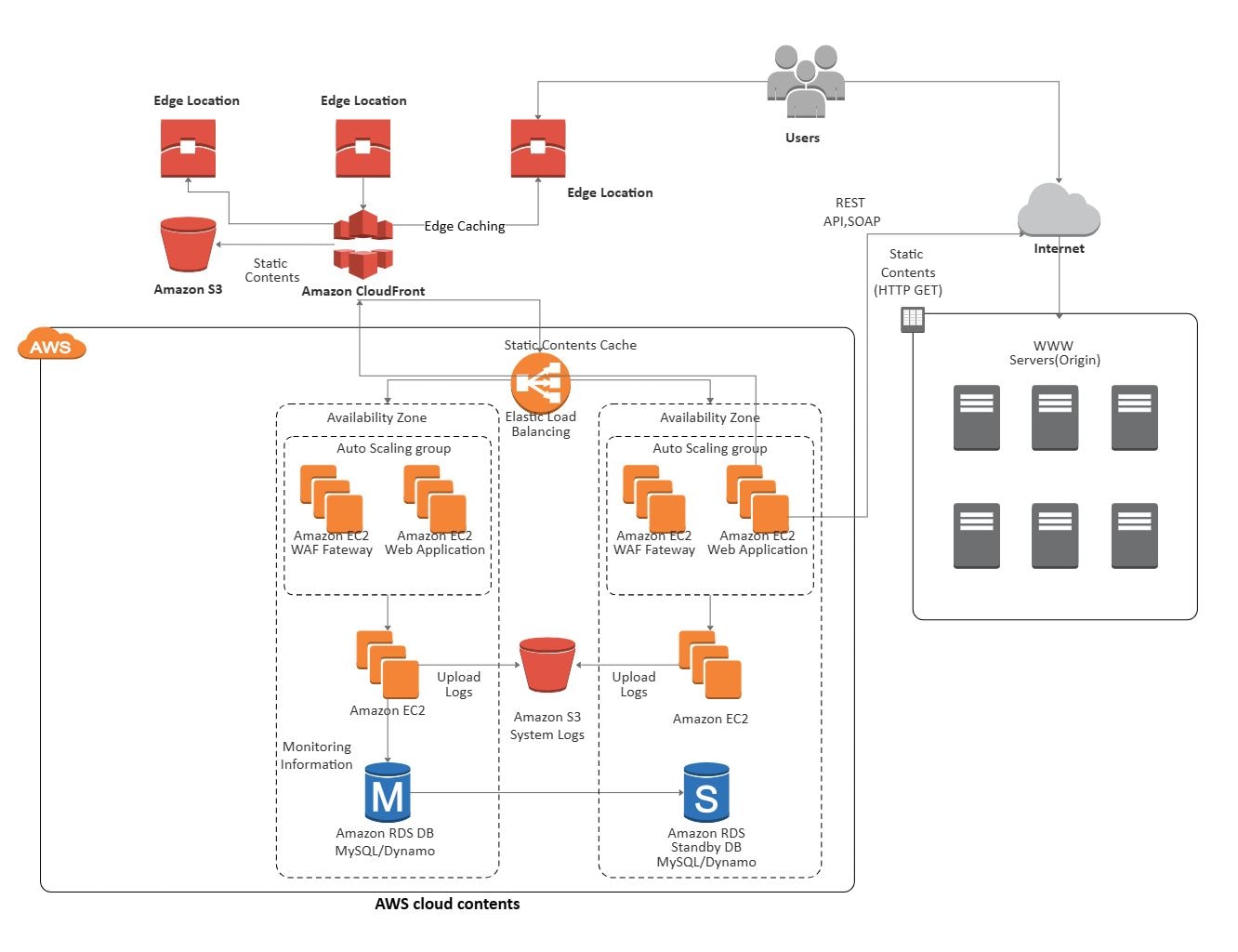
About this AWS Architecture Diagram Sample
This diagram shows aws architecture diagram sample in a clearer structure, so the main layers or modules are easier to explain.
Edge Delivery and Static Content
The Edge Delivery and Static Content section marks one visible part of the architecture. In this diagram, it includes Users, Edge Location, Amazon CloudFront, Amazon S3, so the section reads as a specific functional block rather than a generic label.
- Users
- Edge Location
- Amazon CloudFront
- Amazon S3
- Static Contents
- Edge Caching
Origin Compute and Load Balancing
The Origin Compute and Load Balancing section marks one visible part of the architecture. In this diagram, it includes Internet, Elastic Load Balancing, Availability Zone, Auto Scaling group, so the section reads as a specific functional block rather than a generic label.
- Internet
- Elastic Load Balancing
- Availability Zone
- Auto Scaling group
- Amazon EC2 Web Application
Data, Logging, and Monitoring
The Data, Logging, and Monitoring section marks one visible part of the architecture. In this diagram, it includes Amazon RDS DB MySQL/Dynamo, Amazon RDS Standby DB MySQL/Dynamo, Amazon S3 System Logs, Upload Logs, so the section reads as a specific functional block rather than a generic label.
- Amazon RDS DB MySQL/Dynamo
- Amazon RDS Standby DB MySQL/Dynamo
- Amazon S3 System Logs
- Upload Logs
- Monitoring Information
FAQs about this Template
-
How do teams document AWS architecture clearly?
Teams usually document AWS architecture with a layered diagram that separates compute, storage, networking, and access services. This approach makes it easier to review service dependencies, traffic paths, scaling logic, and operating boundaries across sections such as Edge Delivery and Static Content, Origin Compute and Load Balancing, and Data, Logging, and Monitoring, especially when multiple AWS services work together in one deployment.
-
Can AI generate AWS architecture diagrams automatically?
Yes, AI can generate a first draft of an AWS architecture diagram, but it still needs human validation. AI is helpful for suggesting service groupings and flow paths, while architects should verify the exact AWS components, security boundaries, failover logic, naming, and support assumptions before using the diagram for delivery, review, or internal documentation.
-
What is the difference between AWS architecture and cloud architecture?
The difference is specificity. AWS architecture focuses on how AWS services such as compute, storage, networking, and security are arranged, while cloud architecture is a broader concept that can also include Azure, Google Cloud, or hybrid environments. AWS diagrams are usually more service-specific and more useful for implementation planning, technical review, and environment design.
-
What should an AWS architecture diagram include?
A strong AWS architecture diagram should include the main services, network boundaries, user entry points, and the core data or request flow. It should also show how application services, databases, load balancing, storage, permissions, and monitoring connect, so engineers can understand deployment logic without filling in missing system relationships themselves.
-
Which diagram type is best for AWS system documentation?
A high-level architecture diagram is usually the best starting point for AWS system documentation because it shows service relationships and infrastructure boundaries in one view. Teams often add sequence, network, or deployment diagrams later when they need to explain traffic flow, environment setup, troubleshooting paths, operational responsibilities, or failover logic in more detail.

 (AI & Web)