About this Open Claw Architecture Diagram
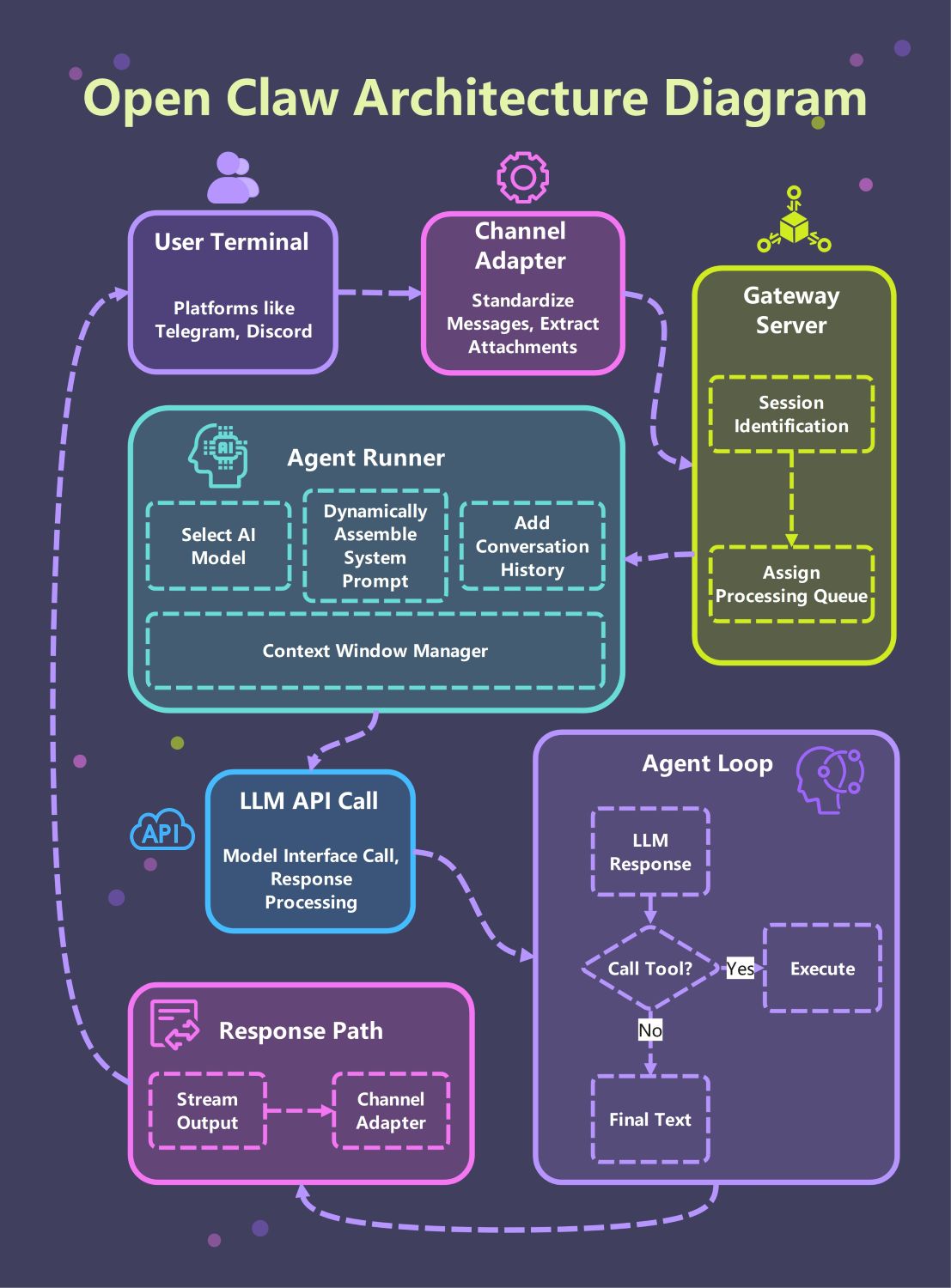
This template provides a comprehensive visual guide to the Open Claw system. It highlights the critical path from user terminals through the gateway to the core agent loop, making it easier to understand how modular AI components interact in a professional environment.
User Terminal and Channel Adapter
The system begins at the user terminal, where people interact via platforms like Telegram or Discord. The channel adapter then standardizes these incoming messages and extracts any relevant attachments for further processing.
- Telegram and Discord integration
- Message standardization
- Attachment extraction
- Multi-platform support
Gateway Server Layer
The gateway server acts as the primary traffic controller for the entire architecture. It performs session identification to maintain user state and assigns requests to processing queues to ensure smooth and balanced performance.
- Session identification
- Processing queue assignment
- Traffic management
- Request routing
Agent Runner Core
The agent runner is the heart of the system where prompt assembly happens. It selects the appropriate AI model, adds conversation history, and uses a context window manager to keep the data within token limits.
- AI model selection
- Dynamic prompt assembly
- Conversation history tracking
- Context window management
LLM API Call and Agent Loop
The agent enters an iterative loop where it communicates with the LLM. It processes responses and decides whether to execute a tool or provide final text, ensuring that actions are grounded in real-time results.
- Model interface calls
- Response processing
- Tool execution logic
- Iterative reasoning cycle
Response Path and Output
Once the agent completes its reasoning, the response path handles the delivery. The output is streamed back through the channel adapter, ensuring the user receives the final text instantly on their chosen chat platform.
- Streaming output
- Final text generation
- Channel-specific formatting
- Real-time user feedback
FAQs about this Template
-
What is the primary role of the Gateway Server in this architecture?
The Gateway Server acts as the traffic controller for the entire architecture. It performs session identification to keep track of individual users and their specific interactions. Additionally, it assigns requests to processing queues to balance the system load. This ensures that the AI agents handle multiple requests smoothly without crashing the server or losing important data.
-
How does the Agent Runner manage conversation context?
The Agent Runner functions as an assembly line for the AI's intelligence. It selects the appropriate AI model and dynamically builds system prompts by merging history and instructions. Additionally, the Context Window Manager prevents data overflow by monitoring token counts and triggering summarization when necessary. This ensures the agent remains focused and coherent throughout long conversations without losing important user details.
-
What happens during the Agent Loop process?
The Agent Loop is an iterative process where the AI decides how to respond. If the LLM identifies a task requiring external data, it triggers a tool call for execution. Once the tool provides a result, the loop restarts to process the new information. This cycle repeats until the model generates the final text, ensuring that every response is grounded in real-world actions.


 (AI & Web)