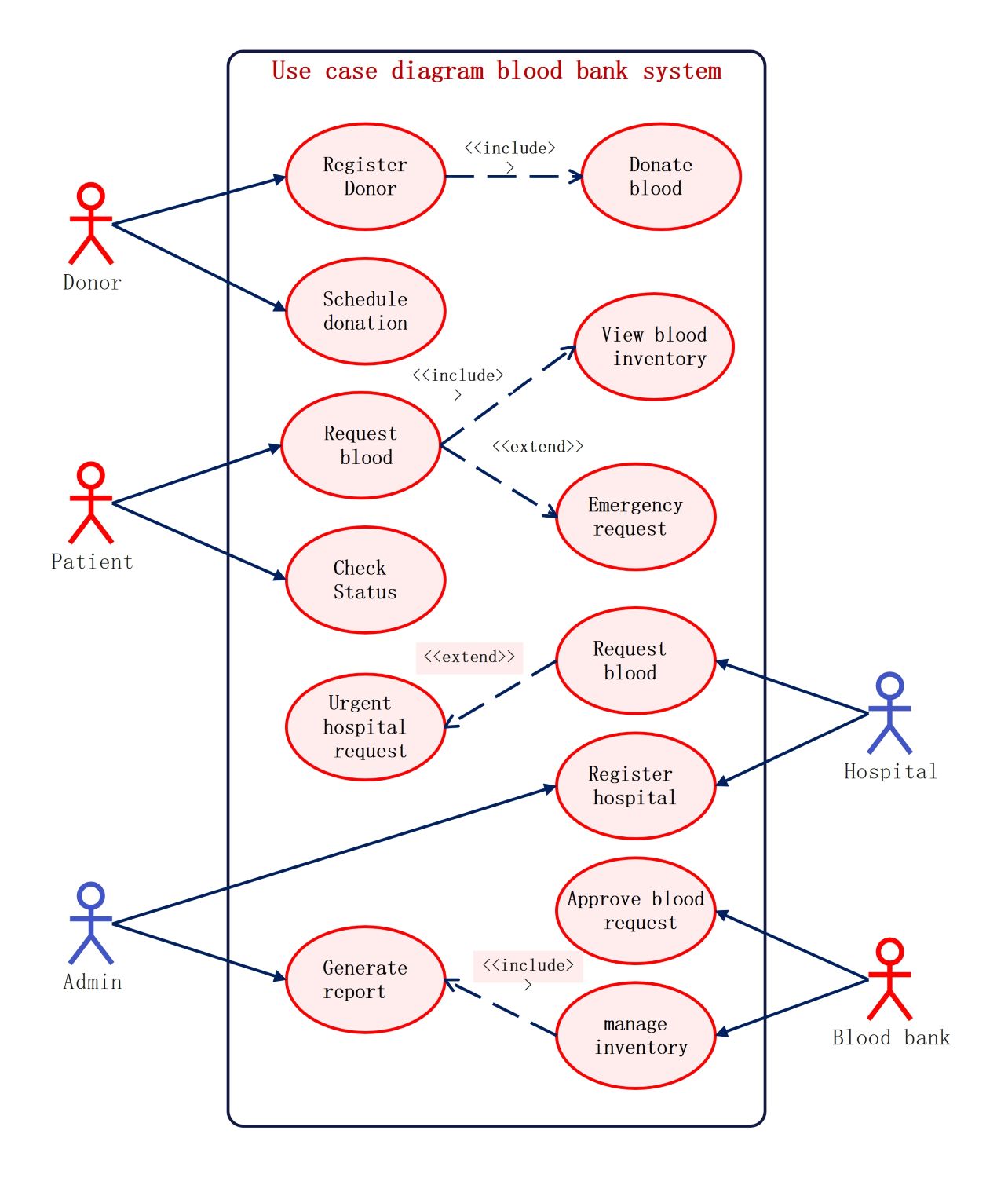
About this Use Case Diagram for Blood Bank System template
This template provides a clear visual map of a blood bank management software. It outlines the essential interactions between donors, patients, and administrators to ensure the efficient handling of blood supplies and urgent requests.
Donor Interactions
Donors are the primary source of supply for the blood bank. This section shows how individuals enter the system to contribute. It focuses on the initial steps required to safely collect and process blood donations.
- Register Donor
- Donate blood (<
>) - Schedule donation
Patient Requests
Patients interact with the system to find and secure the blood types they need. This part of the diagram highlights the search process and how the system handles critical, time-sensitive needs for individual users.
- Request blood
- View blood inventory (<
>) - Emergency request (<
>) - Check Status
Hospital Coordination
Hospitals act as large-scale entities that request blood for multiple patients. This section manages the relationship between medical facilities and the central blood bank, specifically handling registration and high-priority orders for medical procedures.
- Register hospital
- Request blood
- Urgent hospital request (<
>)
System Administration and Management
Administrators and blood bank staff oversee the entire operation to maintain stock levels. They are responsible for verifying requests and generating data reports to ensure the system remains functional and reliable for all parties.
- Approve blood request
- Manage inventory
- Generate report (<
>)
FAQs about this Template
-
What is the purpose of an "Include" relationship in this diagram?
In this blood bank diagram, an include relationship represents a mandatory step within a process. For example, registering a donor automatically includes the donation phase to complete the workflow. Similarly, managing inventory includes generating a report to keep records updated. This ensures that essential sub-tasks are never missed by the system developers or the end users during operations.
-
How does the system handle urgent requests differently from standard ones?
The diagram uses "Extend" relationships to show how the system handles special cases like emergency or urgent hospital requests. While a standard request follows a typical path, an urgent request adds extra steps or priority levels to the base process. This allows the software to trigger faster alerts or bypass certain non-essential delays when blood is needed immediately for life-saving surgery.
-
Who are the primary actors in a Blood Bank System diagram?
The primary actors include Donors, Patients, Hospitals, Admin, and the Blood Bank itself. Donors provide the supply, while Patients and Hospitals represent the demand. The Admin manages the technical side of the reports, and the Blood Bank staff handle the manual approval of requests and inventory oversight. Together, these actors ensure the system facilitates the safe movement of blood products.

 (AI & Web)