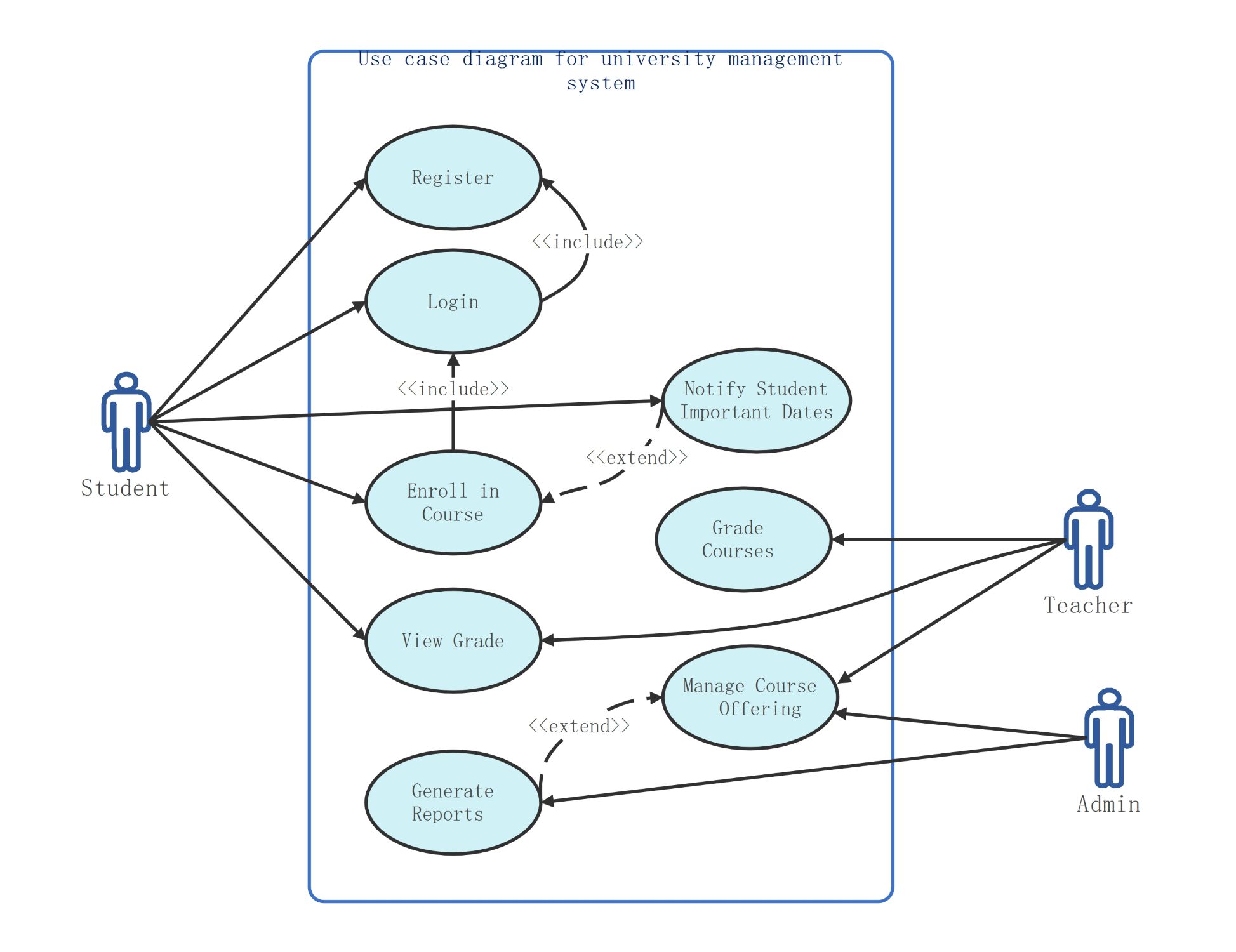
About this use case diagram for university management system template
This template provides a clear visual map of a university system. It shows how students, teachers, and admins interact with various functions. Use it to streamline your software development process and define user requirements clearly.
Student Actor Interactions
The student is a primary user who interacts with basic academic functions. This section tracks how students access the system to manage their personal data and academic progress through secure login and registration portals.
- Register for a new account
- Login to the student portal
- Enroll in university courses
- View personal academic grades
- Receive notifications for important dates
Teacher Actor Interactions
Teachers focus on instructional management and student evaluation tasks within the system. Their roles involve updating academic records and managing specific course materials to ensure students receive accurate feedback on their performance and academic progress.
- Grade specific courses
- View student grades
- Manage individual course offerings
Admin Actor Interactions
The admin role manages the technical and broad administrative aspects of the university platform. They ensure the system remains organized by handling high-level course logistics and generating data-driven reports for institutional analysis.
- Manage broad course offerings
- Generate detailed system reports
FAQs about this Template
-
What is the purpose of include and extend relationships in this diagram?
Include relationships show mandatory steps, like how enrolling requires a login first. Extend relationships represent optional or conditional actions that might occur under specific circumstances. In this university system, notifying students of dates is an extension of enrollment. These labels help developers understand the logic flow and dependencies between different features within the software.
-
Who are the primary users shown in a university management system?
This diagram identifies three main actors: students, teachers, and administrators. Students use the system for learning and registration tasks. Teachers focus on grading and managing their specific courses. Administrators oversee the entire platform, handling data reports and broader course logistics. Defining these roles clearly ensures that every user has the right permissions and tools to succeed.
-
How does this diagram help in building a university database?
A use case diagram acts as a blueprint for the database structure. Each use case, such as enrollment or grading, points to specific data tables that need to be created. By seeing how actors interact with these cases, database designers can identify necessary relationships between students, courses, and instructors. This prevents missing data and ensures the system works smoothly.

 (AI & Web)