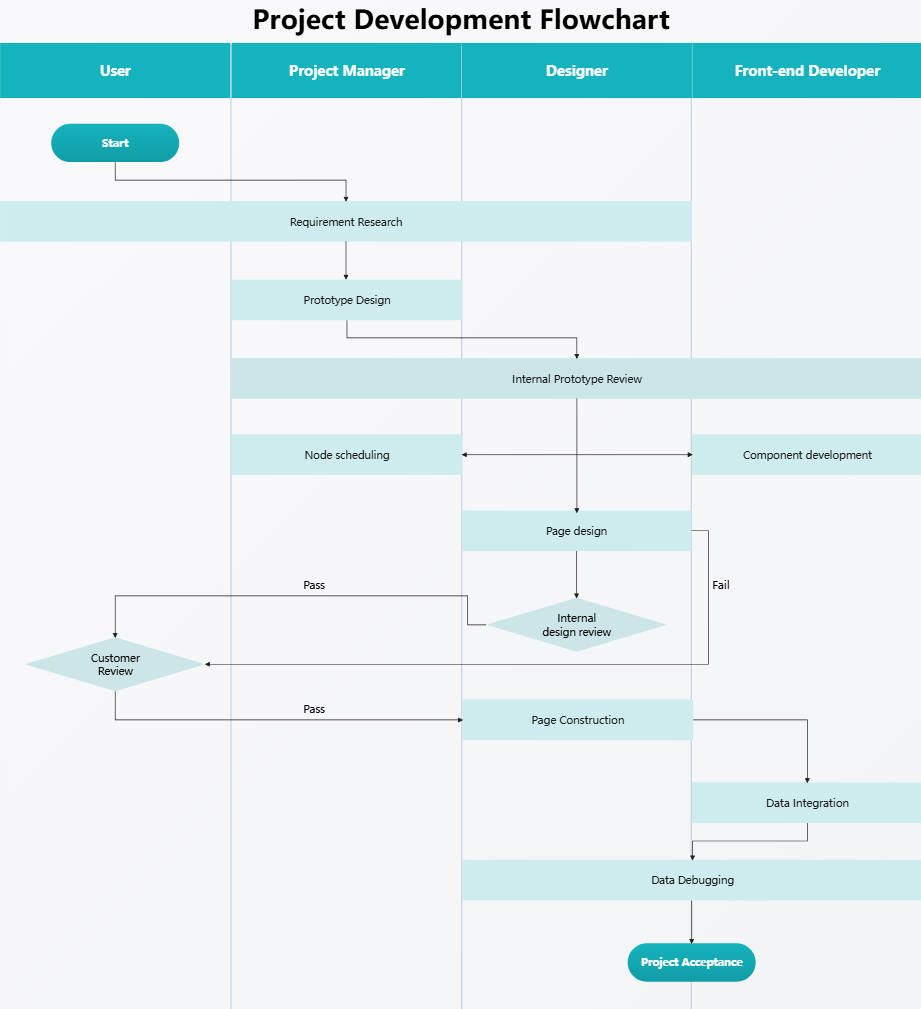
About this project development flowchart template
This template provides a clear roadmap for teams building digital products. It uses a swimlane layout to show how tasks move between users, managers, designers, and developers. Use this to streamline your internal processes and improve stakeholder transparency.
Project Manager Phase
The project manager initiates the workflow by defining the core needs and structure. This stage focuses on gathering research and creating initial prototypes to ensure the project goals align with the client expectations and specific technical requirements.
- Requirement Research
- Prototype Design
- Node Scheduling
Design and Review Phase
Designers take the prototypes and turn them into functional visual layouts. This phase includes rigorous internal reviews to ensure the user interface meets quality standards before it moves to the customer for final approval or critical feedback.
- Internal Prototype Review
- Page Design
- Internal Design Review
User and Customer Interaction
Stakeholders play a vital role in validating the design and functionality. By participating in customer reviews, they ensure the project stays on track. Their feedback determines if the process continues or requires further design revisions and updates.
- Project Start
- Customer Review
- Pass/Fail Decisions
Development and Technical Integration
The development team builds the actual components and integrates data into the design. This technical phase involves coding, debugging, and testing to ensure the final product is stable and ready for official project acceptance and market launch.
- Component Development
- Page Construction
- Data Integration
- Data Debugging
- Project Acceptance


 (AI & Web)