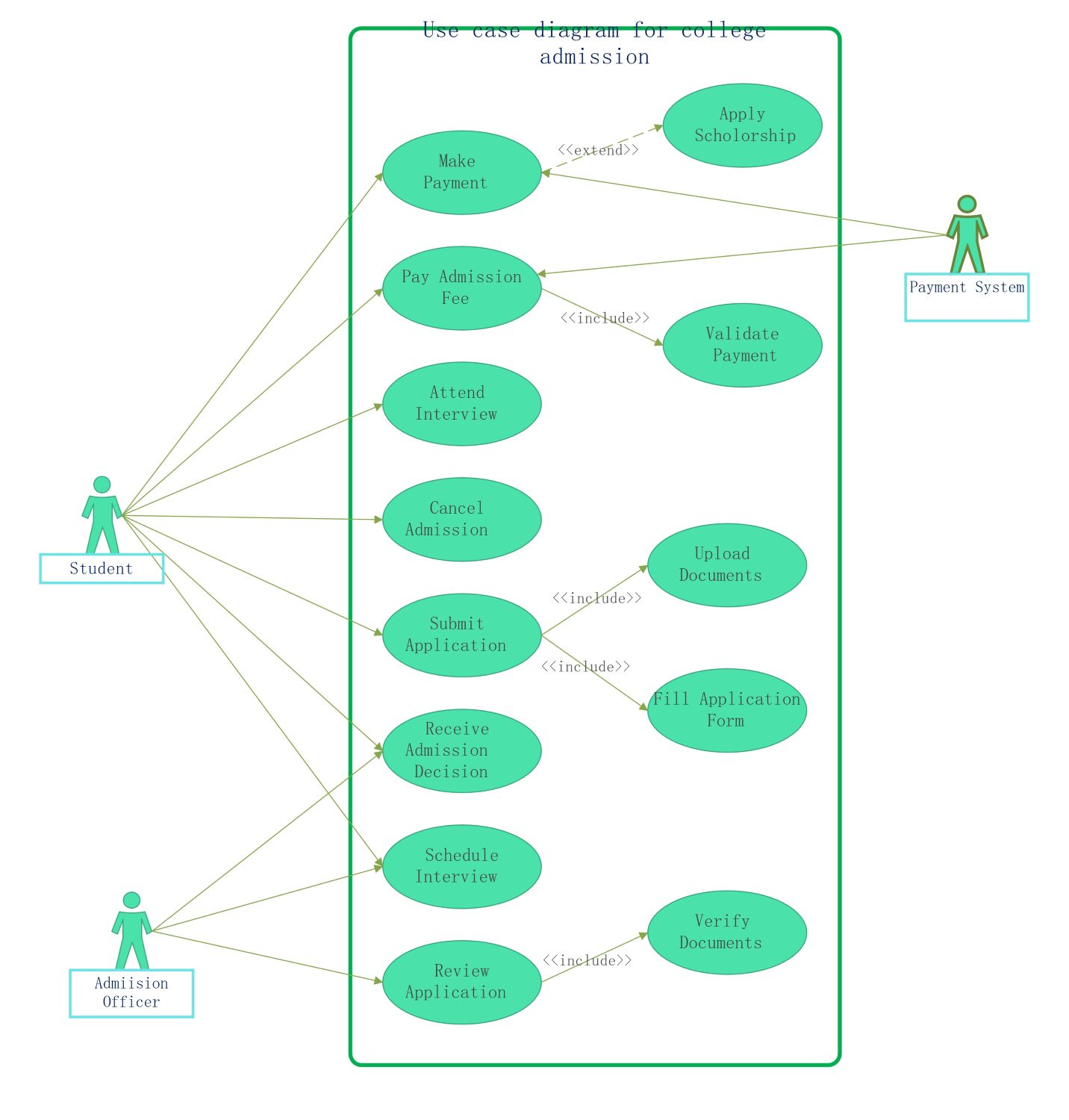
About this Use Case Diagram for College Admission template
This template provides a clear roadmap for the university enrollment cycle. It highlights the roles of applicants and administrators. By using this UML model, you can streamline system requirements and improve the overall user experience.
Student Interactions
Students represent the primary users who interact with the admission system to secure a spot. They perform essential tasks starting from the initial application phase through to the final enrollment and payment steps.
- Submit Application
- Fill Application Form
- Upload Documents
- Pay Admission Fee
- Make Payment
- Apply Scholarship
- Attend Interview
- Receive Admission Decision
- Cancel Admission
Admission Officer Responsibilities
The Admission Officer manages the backend flow of the enrollment process. They ensure all applicant data is accurate and valid. Their role is critical for evaluating candidates and making the final selection for the college.
- Review Application
- Verify Documents
- Schedule Interview
- Send Admission Decision
Payment System Functionality
The Payment System acts as an external entity that handles all financial transactions. It communicates with the main portal to confirm that fees are paid. This integration ensures the financial part of admission is secure.
- Process General Payments
- Receive Admission Fee
- Validate Payment Status
FAQs about this Template
-
What is the benefit of a use case diagram for college admission?
A use case diagram provides a high-level visual summary of the entire enrollment process. It helps stakeholders identify the specific roles of students and staff members. By mapping out these interactions, developers can ensure no critical steps are missed during software creation. This clarity reduces errors, improves communication between departments, and leads to a more efficient registration system for everyone.
-
How do include and extend relationships work in this model?
In this diagram, include relationships represent mandatory steps that must occur for a process to complete. For example, submitting an application always requires filling out forms. Conversely, extend relationships represent optional actions that only happen under certain conditions. Applying for a scholarship is an extension because not every student will choose or qualify for financial aid during the payment process.
-
Which actors are involved in a college admission system?
The primary actors usually include the Student, who initiates the process, and the Admission Officer, who manages approvals. Additionally, a Payment System acts as a secondary actor to handle financial data. Each actor has specific goals, such as submitting documents or verifying records. Identifying these roles clearly ensures that the software permissions and user interfaces are designed correctly for each group.

 (AI & Web)