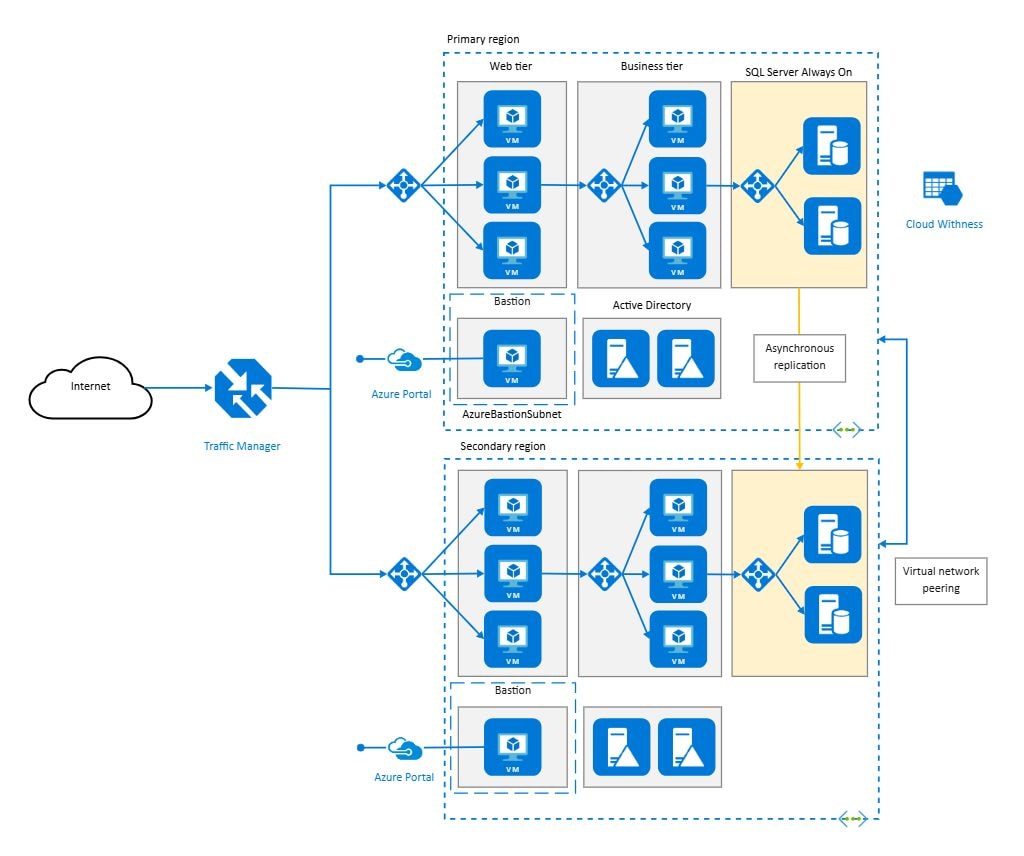
About Azure Cloud Architecture Diagram Template
This Azure cloud architecture diagram template focuses on how cloud services and system relationships are organized inside an Azure-based environment. It helps users explain platform structure, dependency logic, and service interaction more clearly than a text-heavy technical note.
Cloud service components
The diagram appears to highlight the major service blocks that define the Azure environment. This matters because cloud architecture review often begins with understanding which service layers or components carry the key platform responsibilities.
- Helps explain the major cloud service components
- Supports cloud-system review and planning
- Useful for technical communication and documentation
Service interaction structure
The visual arrangement also helps users review how the services work together as one platform rather than as isolated tools. In cloud architecture, these relationships matter because system behavior depends on how the services interact across the environment.
- Shows how service relationships shape the architecture
- Supports review of dependency and interaction logic
- Useful for explaining cloud structure more clearly
Architecture planning value
Beyond naming the components, the diagram helps users discuss how the Azure environment may be deployed, maintained, or documented over time. This is useful because architecture diagrams often serve both planning and cross-team explanation roles.
- Useful for planning, review, and implementation discussion
- Supports clearer architecture communication
- Helps make the cloud structure reusable as a reference
FAQs about this Template
-
What is an Azure architecture diagram?
An Azure architecture diagram is a visual representation of Azure services, components, and connections inside a cloud solution. It helps teams explain how workloads are deployed, how services interact, and how infrastructure is organized across environments, networks, or application layers.
-
How do you make an Azure architecture diagram?
To make an Azure architecture diagram, identify the main Azure services, application layers, data stores, security boundaries, and external integrations first. Then arrange them by function and connection so the final view clearly shows system structure, deployment logic, and data flow.
-
What is cloud architecture?
Cloud architecture is the overall structure of cloud-based systems, including compute, storage, networking, security, and service relationships. It explains how cloud resources are organized to support scalability, reliability, and operational management across one or more environments.
-
What is the difference between Azure architecture and cloud architecture?
Azure architecture refers specifically to solutions built with Azure services and platform logic, while cloud architecture is a broader concept that can apply across Azure, AWS, Google Cloud, or hybrid environments. The difference is platform specificity versus overall cloud design thinking.



 (AI & Web)