About this New Year Return-to-Work monthly work plan template
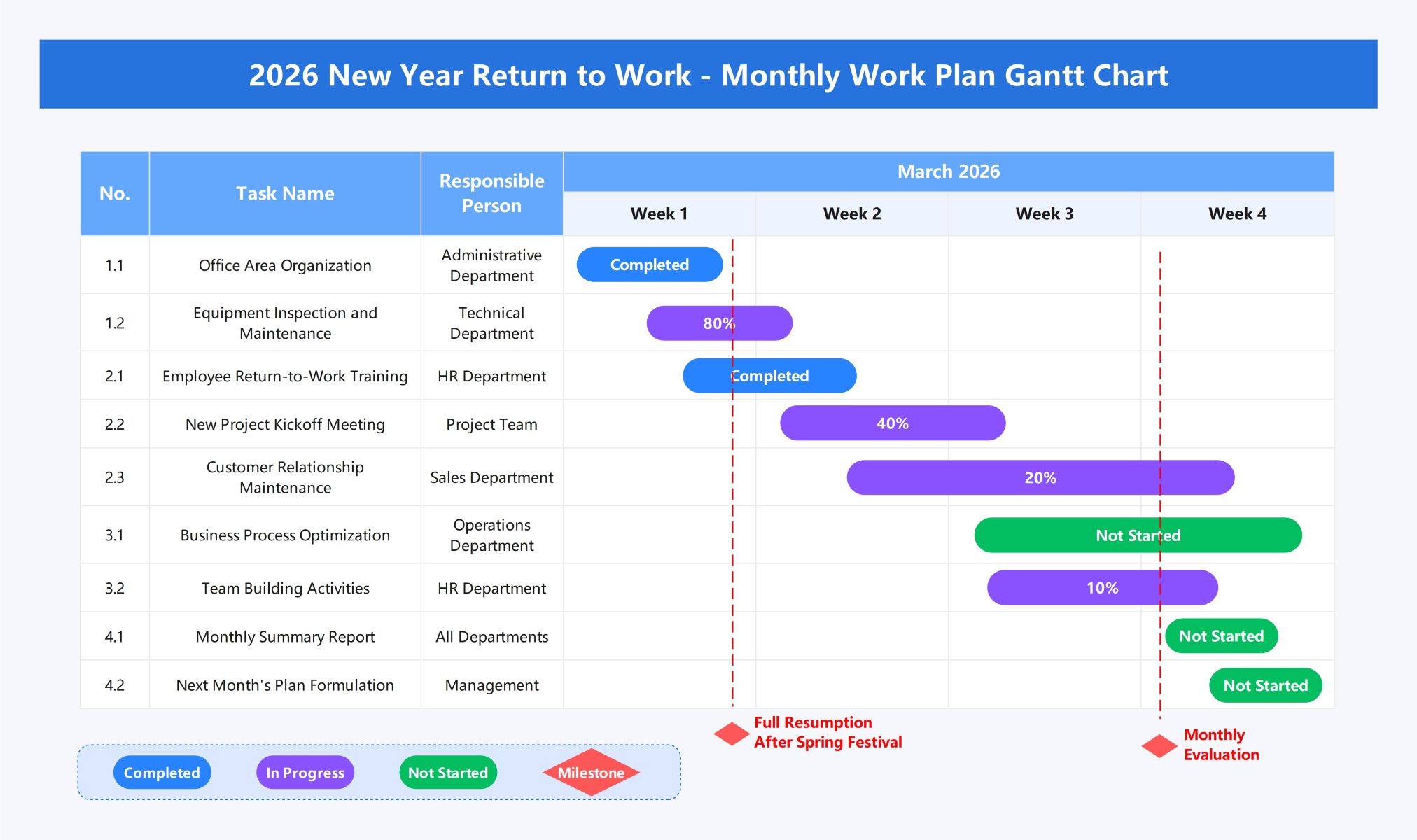
This template provides a clear roadmap for organizations restarting operations after the Spring Festival. It uses a Gantt chart format to visualize departmental tasks, timelines, and progress statuses across four weeks of March 2026.
Infrastructure and Readiness
The first week focuses on preparing the physical and technical workspace for full resumption. This phase ensures the environment is organized and all critical equipment functions properly before employees return to their regular duties.
- Office Area Organization (Administrative Department)
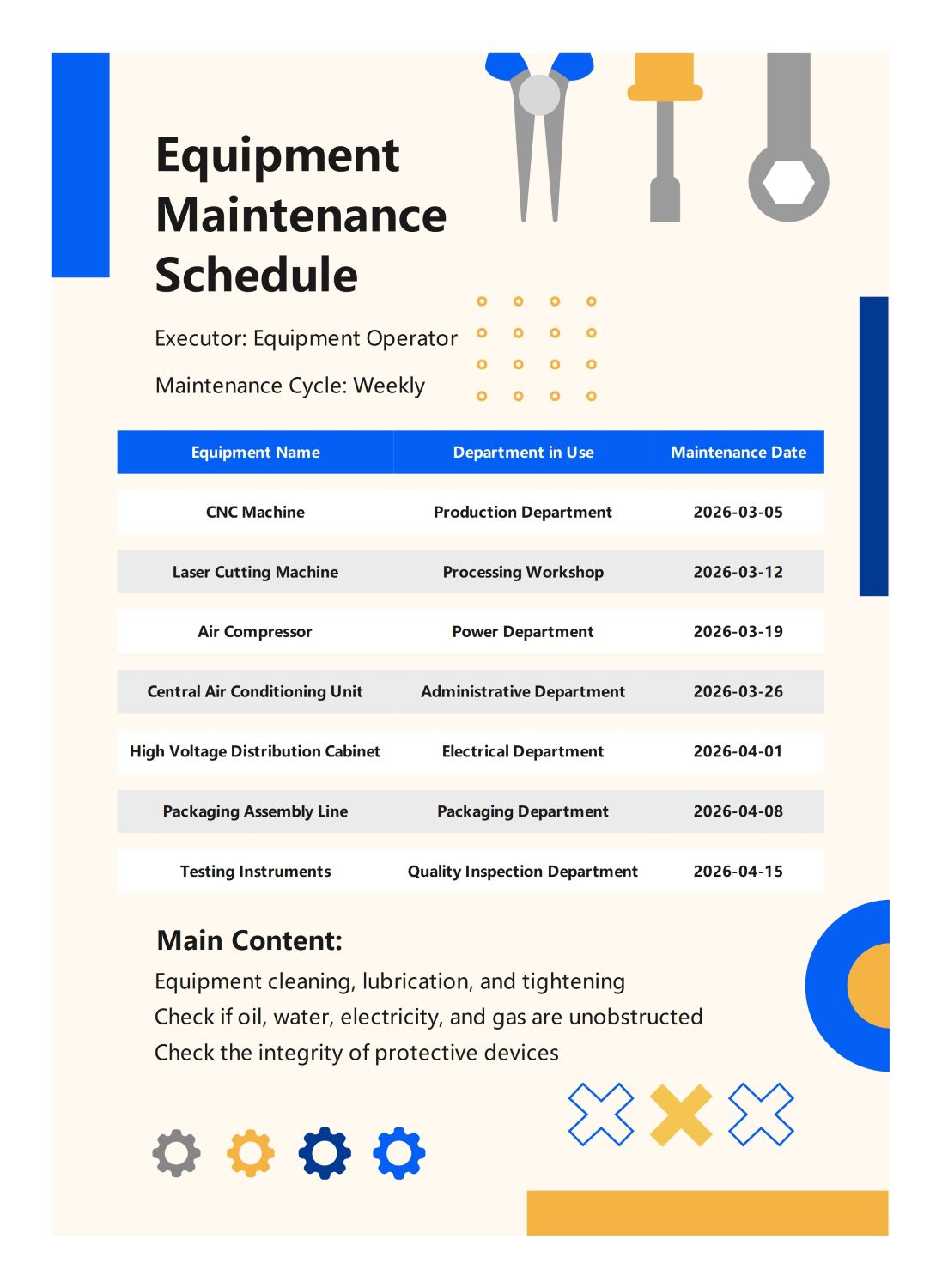
- Equipment Inspection and Maintenance (Technical Department)
- Full Resumption Milestone
Employee Alignment and Kickoff
During the second week, the focus shifts toward human resources and initial project launches. It includes training sessions to reintegrate staff and kickoff meetings to set objectives for the new business cycle ahead.
- Employee Return-to-Work Training (HR Department)
- New Project Kickoff Meeting (Project Team)
- Customer Relationship Maintenance (Sales Department)
Optimization and Culture
The third week emphasizes internal process improvements and team cohesion. Operations teams refine business workflows while HR organizes activities to boost morale and strengthen professional relationships within the workforce after the holiday break.
- Business Process Optimization (Operations Department)
- Team Building Activities (HR Department)
Reporting and Future Planning
The final week is dedicated to performance evaluation and strategic planning for the upcoming month. Teams compile reports to assess current progress and management outlines the next steps to maintain organizational momentum.
- Monthly Summary Report (All Departments)
- Next Month's Plan Formulation (Management)
- Monthly Evaluation Milestone
FAQs about this Template
-
How do I customize this return-to-work plan for my specific industry?
You can customize this plan by identifying the specific operational needs of your business. Start by replacing the general tasks with industry-specific requirements, such as safety audits for manufacturing or client onboarding for agencies. Adjust the responsible departments and timelines in the Gantt chart to reflect your internal structure and ensure all key stakeholders are aligned with the resumption goals.
-
What are the benefits of using a Gantt chart for a return-to-work plan?
A Gantt chart provides a visual timeline that helps managers track task dependencies and deadlines simultaneously. It offers a high-level overview of department responsibilities, making it easier to spot potential bottlenecks early. By visualizing progress statuses like 'In Progress' or 'Completed,' teams can stay motivated and focused on meeting milestones, ensuring a smooth transition back to full operational capacity.
-
Who should be responsible for updating the monthly work plan?
Typically, a project manager or department head should oversee the updates to the monthly work plan. They collect progress data from various teams, such as HR, IT, and Operations, to update task statuses in real-time. This centralized coordination ensures that the data remains accurate and provides a single source of truth for the entire organization during the transition period.

 (AI & Web)