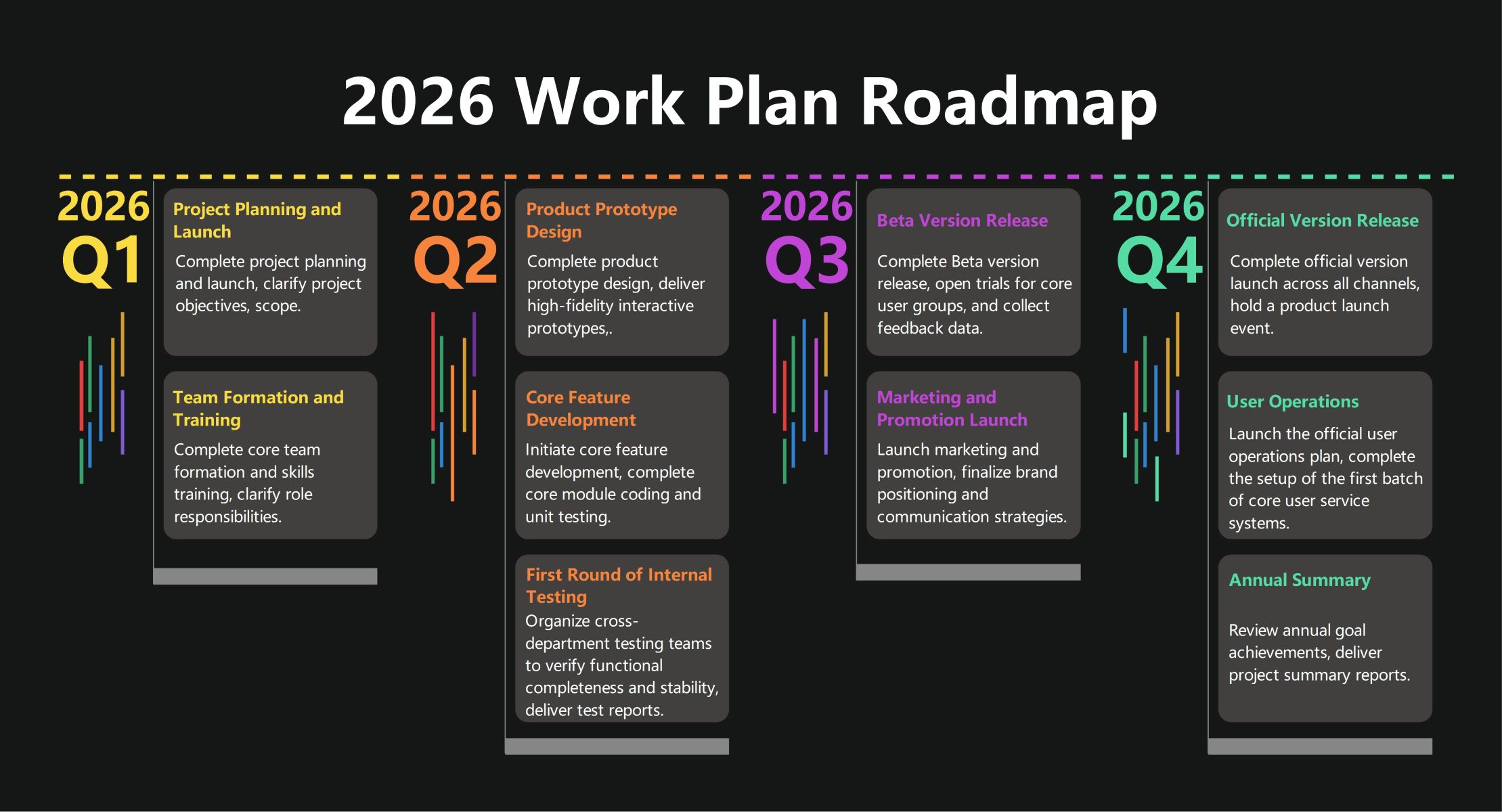
About this Work Planning Roadmap template
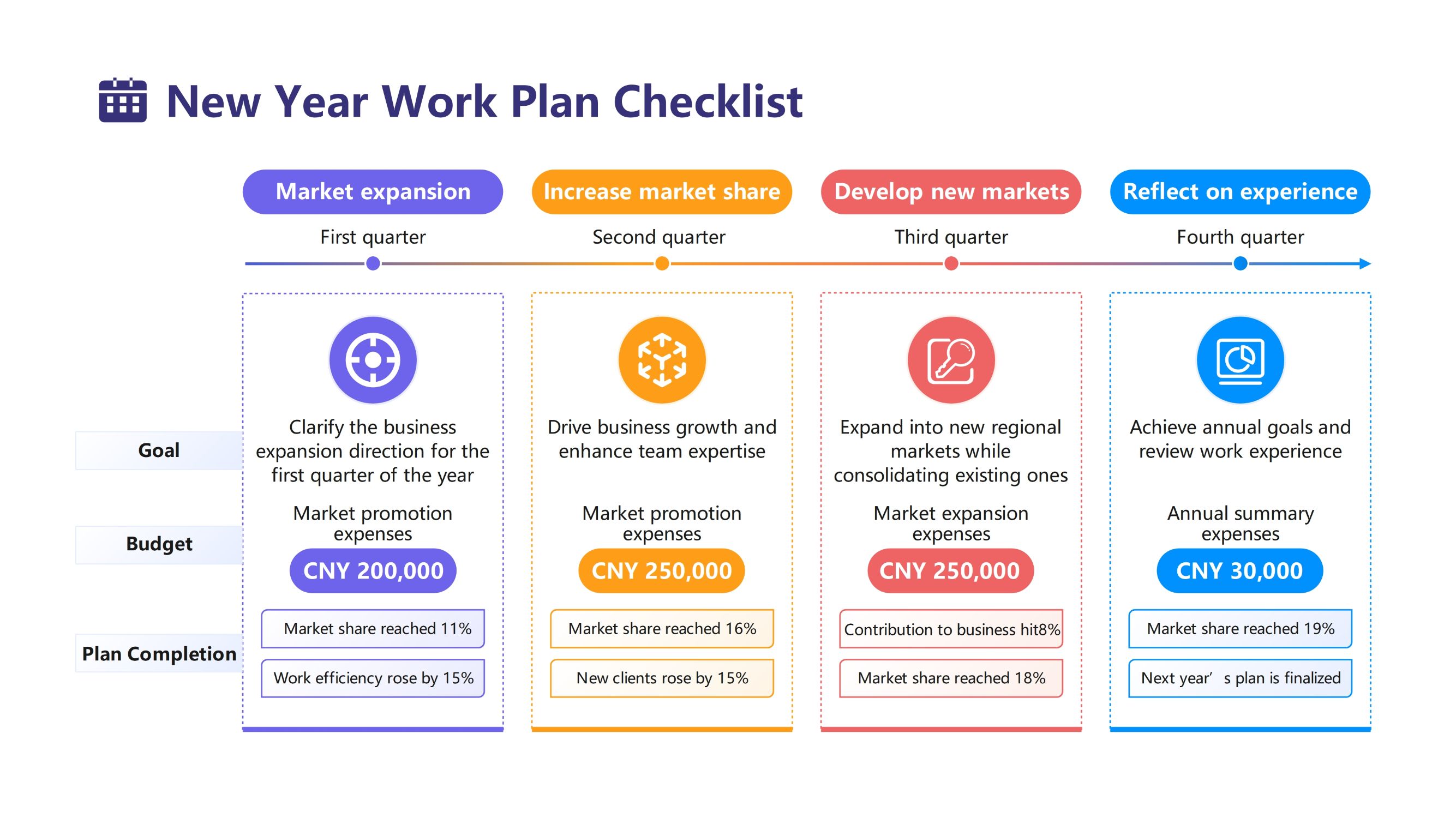
This 2026 work plan roadmap template helps teams visualize their project lifecycle from initiation to final summary. It breaks down a complex year-long project into manageable quarterly milestones. This ensures that every department stays aligned with the overall strategy and timeline.
Q1: Project Foundation and Initiation
The first quarter focuses on setting the groundwork for success. Teams establish clear project scopes and objectives while assembling the right talent. This phase ensures everyone understands their roles before moving into active development cycles.
- Project Planning and Launch
- Objective and Scope Clarification
- Team Formation and Skills Training
- Defining Role Responsibilities
Q2: Development and Internal Testing
During the second quarter, the focus shifts to creating tangible results and verifying quality. Developers work on high-fidelity prototypes and core coding tasks. Internal testing ensures that functional stability meets the project requirements early on.
- Product Prototype Design
- High-Fidelity Interactive Prototypes
- Core Feature Development and Coding
- First Round of Internal Testing
Q3: Beta Release and Marketing
Quarter three marks the transition from internal development to user feedback. By releasing a Beta version, teams can gather valuable data from core user groups. Simultaneously, marketing strategies are finalized to prepare for the launch.
- Beta Version Release
- Core User Trials and Feedback
- Marketing and Promotion Launch
- Brand Positioning and Communication
Q4: Launch and Performance Review
The final quarter centers on the official product launch across all channels. After going live, the focus turns to user operations and long-term support. Finally, an annual summary evaluates the project's success against the initial goals.
- Official Version Release
- Multi-channel Product Launch Event
- User Operations and Service Systems
- Annual Summary and Goal Review
FAQs about this Template
-
How do I use a work planning roadmap?
To use this roadmap, start by identifying your major yearly goals and breaking them into four quarters. Assign specific tasks and milestones to each quarter based on the project's natural progression. Share the roadmap with your stakeholders to ensure alignment and use it as a living document to track progress regularly.
-
Why is quarterly planning effective for projects?
Quarterly planning is effective because it provides a balance between long-term vision and short-term execution. It allows teams to focus on immediate priorities without losing sight of the annual goal. Breaking a project into 90-day increments makes it easier to manage resources, adapt to changes, and maintain high momentum throughout the year.
-
What tools are best for creating roadmaps?
Professional diagramming software like EdrawMax is ideal for creating roadmaps. These tools offer pre-designed templates, drag-and-drop features, and collaborative options that make complex planning simple. Using dedicated software ensures your roadmap is visually appealing, easy to read, and professional enough for executive presentations or internal team meetings.

 (AI & Web)