About this Activity Diagram for Airline Reservation System template
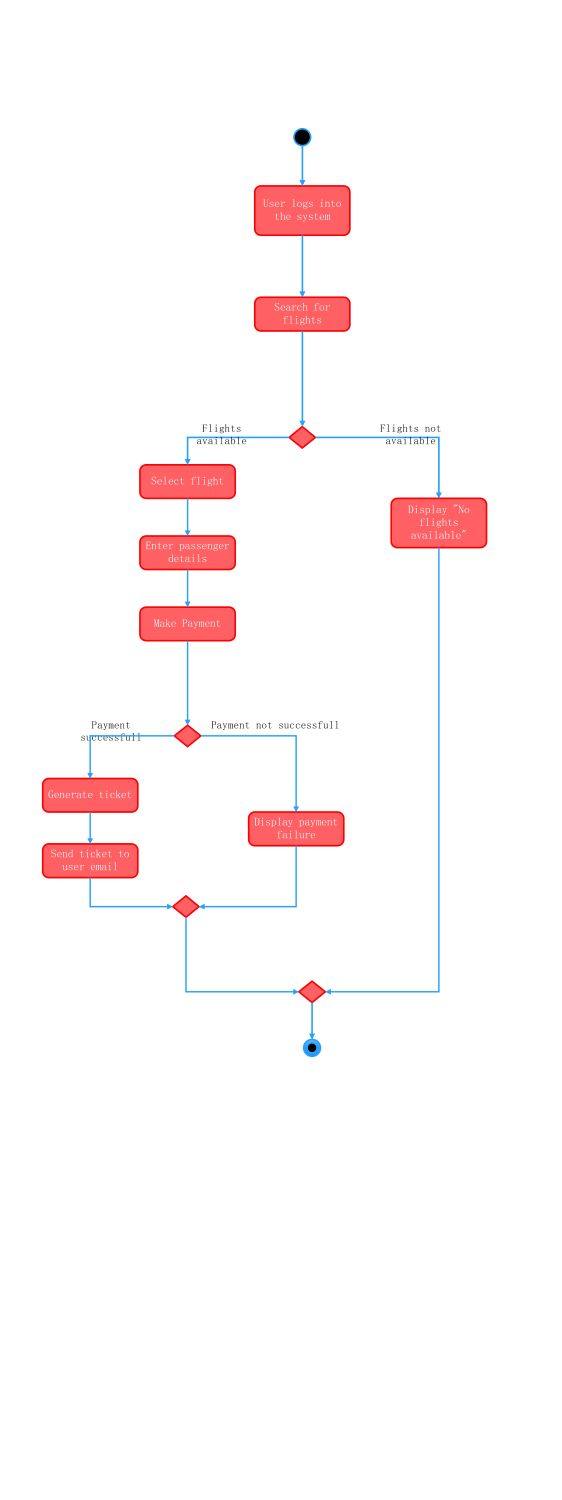
This template provides a clear visual flow for a flight booking process. It covers essential steps including login, search, and payment. It is ideal for software developers designing robust airline management applications or reservation software.
User Authentication and Search
The process starts with the user entering the system to find suitable travel options. This stage ensures only authorized users can access the booking portal. The system then processes the user's flight search parameters.
- User logs into the system
- Search for flights
Booking Selection and Data Entry
When the system finds matching flights, the user proceeds to choose their preferred journey. This segment captures vital passenger information required for the airline's manifest. It bridges the search and payment stages effectively.
- Select flight
- Enter passenger details
Payment and Ticket Issuance
This critical phase handles the financial transaction and confirmation of the booking. The diagram accounts for both successful payments and failures. Upon success, the system automates ticket delivery to ensure the user receives immediate confirmation.
- Make Payment
- Generate ticket
- Send ticket to user email
- Display payment failure
FAQs about this Template
-
What is the main purpose of an airline reservation activity diagram?
The main purpose of this activity diagram is to visualize the step-by-step workflow of booking a flight online. It helps system analysts and developers understand the logical sequence of user interactions and system responses. By mapping out decision points like flight availability and payment status, teams can identify potential bottlenecks and ensure the system handles various scenarios correctly during development.
-
Why are decision nodes important in a flight booking system diagram?
Decision nodes are crucial because they manage the conditional logic inherent in airline software. For instance, the system must react differently if a flight is sold out or if a credit card transaction fails. Including these nodes ensures that the software design covers all possible outcomes. This prevents system crashes and provides a better user experience by giving clear feedback to the traveler.
-
Can I customize this activity diagram template for other booking systems?
Yes, this template serves as a flexible foundation for various booking platforms like hotel or train reservations. You can easily modify the steps to include seat selection, loyalty program integration, or multi-city itineraries. The logic remains similar across most reservation systems. Using a professional diagramming tool allows you to add or remove specific nodes to match your unique business requirements and user flows.

 (AI & Web)