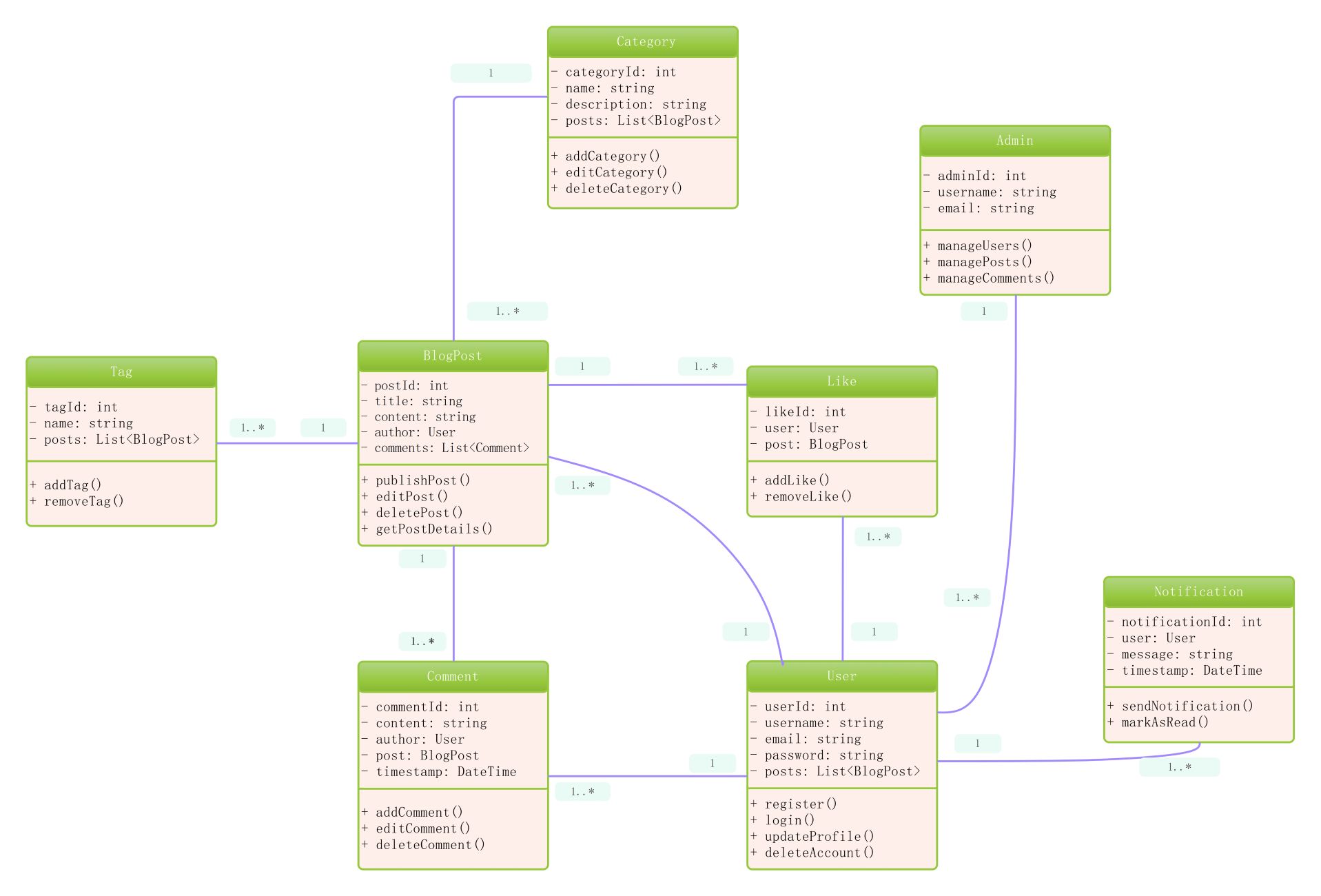
About this Class diagram for blogging website template
This template provides a clear visual structure for developing a professional blog platform. It maps out essential data entities like users, posts, and notifications. Use this UML diagram to streamline your software design process and ensure your database schema supports all necessary blogging features.
User and Admin Management
User and Admin classes handle the core authentication and oversight of the blogging platform. They manage profile data, registration, and high-level content moderation tasks. These nodes define how individuals interact with the site securely.
- userId: int
- username: string
- register()
- login()
- adminId: int
- manageUsers()
- managePosts()
Content Creation and Organization
The BlogPost, Category, and Tag classes form the backbone of content delivery. They define how articles are written, grouped, and labeled for easy discovery. This structure ensures a logical hierarchy for all published materials.
- postId: int
- title: string
- publishPost()
- categoryId: int
- addCategory()
- tagId: int
- addTag()
Interaction and Notifications
These classes manage social engagement through comments, likes, and system alerts. They facilitate communication between users and the platform, tracking interactions in real-time. This logic is vital for building an active, engaged online community.
- commentId: int
- content: string
- likeId: int
- removeLike()
- notificationId: int
- message: string
- sendNotification()
FAQs about this Template
-
What are the primary benefits of using a class diagram for blogging website development?
Using a class diagram for blogging website development allows developers to visualize complex relationships between data entities like users and posts. This proactive planning prevents logic errors during the coding phase. It acts as a shared technical guide for the entire team, ensuring that database schemas are consistent and scalable. Ultimately, it saves time by identifying potential architectural flaws before deployment begins.
-
How does this template handle user roles and permissions within the blog system?
This template specifically separates User and Admin classes to define clear role-based access controls. The User class focuses on standard actions like writing posts or adding comments. Meanwhile, the Admin class includes methods for managing users and high-level site moderation. This distinction is crucial for maintaining security and ensuring that only authorized personnel can perform administrative tasks on the blogging platform.
-
Can I customize this class diagram for a specific niche blogging platform?
Yes, this class diagram for blogging website is fully customizable to fit unique requirements. You can easily add new attributes, such as social media links to the User class or video URLs to BlogPosts. Modification allows you to tailor the system for specific needs, such as subscription models or multi-author workflows. Using a flexible template ensures your software design evolves alongside your project goals.

 (AI & Web)