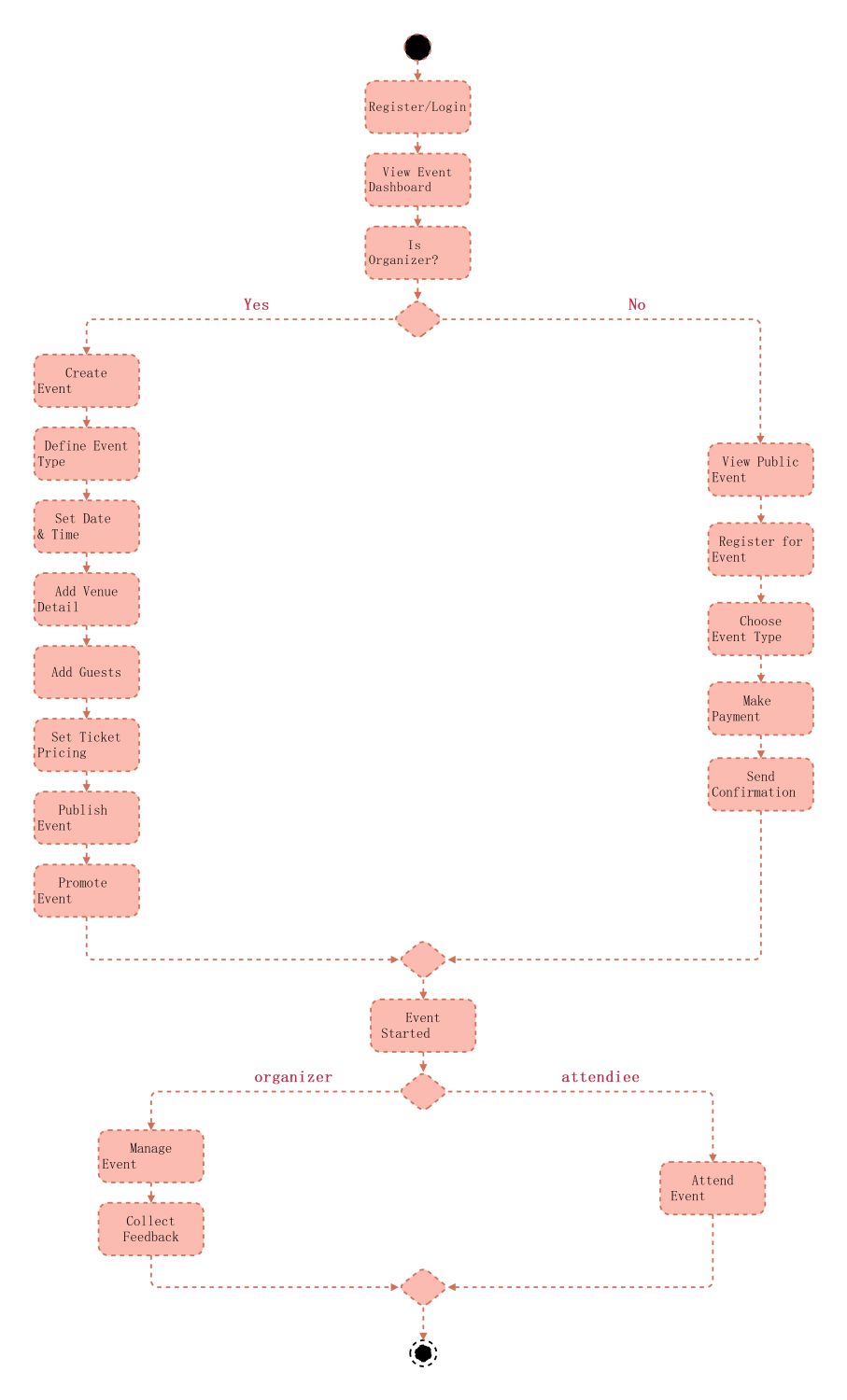
About this activity diagram for event management system template
This template provides a clear visual guide for building an event planning application. It breaks down user actions into logical steps. Use it to streamline your development process and improve team communication during the design phase.
User Authentication and Initial Access
The workflow begins with standard security measures for every user. This section ensures that individuals are identified before they access the dashboard. It serves as the gateway to all specific features within the management system.
- Register or Login to the platform
- Access the main Event Dashboard
- Determine if the user is an Organizer or Attendee
Organizer Event Creation Path
When a user is identified as an organizer, they enter a detailed setup phase. This part of the diagram outlines the essential administrative tasks required to launch a successful public or private gathering.
- Create and define the event type
- Set specific dates and times
- Add venue details and guest lists
- Configure ticket pricing and publish the event
- Promote the event to potential audiences
Attendee Registration and Payment
This path focuses on the user experience for someone looking to join an event. It covers the discovery phase through to the final confirmation. Clear steps help reduce friction and improve registration rates.
- View public event listings
- Register for a specific event
- Select the preferred event type
- Process secure payments
- Receive an official booking confirmation
Event Execution and Follow-up
Once the event begins, the system tracks roles to manage ongoing activities. This section ensures that both the management team and the participants have structured goals while the event is live and afterward.
- The event officially starts for all participants
- Organizers manage the live event
- Attendees participate in the scheduled activities
- Organizers collect feedback for future improvements
FAQs about this Template
-
What is an activity diagram for an event management system?
An activity diagram for an event management system is a visual representation of the operational workflow. It illustrates the sequence of actions taken by users like organizers and attendees. By mapping these steps, developers can identify logic errors early. This ensures that the final software handles registration, payment, and event management tasks accurately and efficiently.
-
How do organizers benefit from using this UML diagram?
Organizers benefit because this diagram clarifies the entire administrative lifecycle. It shows every step required to set up a venue, manage guests, and set ticket prices. Having a clear roadmap helps organizers understand the system requirements. It also ensures that no critical steps are missed during the event promotion and feedback collection phases of the project.
-
Why is the decision node important in this system?
The decision node is vital because it separates the user experience based on specific roles. In an event system, an organizer needs administrative tools while an attendee needs browsing and payment options. This branching logic allows the system to direct users to the correct interface. It prevents confusion by showing only relevant features to each specific user group.

 (AI & Web)