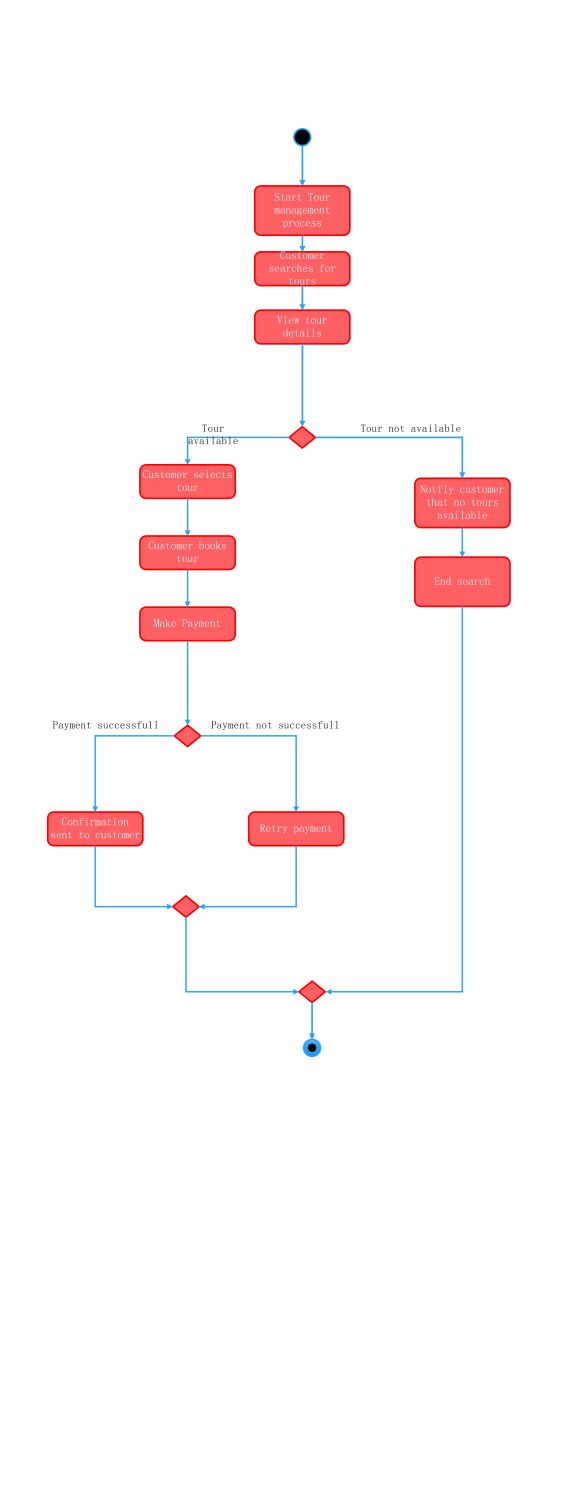
About this Activity Diagram for Tour Management System template
This template provides a clear visual flow for travel booking software. It tracks the customer journey from the initial search to the final booking confirmation. Using this diagram helps teams identify potential bottlenecks in the payment and reservation process.
Tour Search and Selection
The initial phase focuses on how users find their ideal travel packages. It details the steps taken to browse available options and view specific details. This section ensures customers can navigate the initial search stage easily.
- Start tour management process
- Customer searches for tours
- View tour details
Booking and Payment Workflow
This part of the diagram outlines the critical steps for securing a reservation. It includes the logic for tour availability and handles the transition from selection to payment. It manages the core transactional logic of the entire system.
- Tour availability check
- Customer selects tour
- Customer books tour
- Make payment
Payment Confirmation and Retries
Handling financial transactions requires precise logic to manage success or failure. This section shows what happens when a payment is processed or if a retry is needed. It concludes the process with a final customer notification.
- Payment status verification
- Confirmation sent to customer
- Retry payment logic
- Process termination
FAQs about this Template
-
What is the primary purpose of this activity diagram?
This activity diagram serves as a logical blueprint for developers and stakeholders. It maps the specific steps a user takes within a tour management application. By visualizing transitions between searching, booking, and paying, the team can spot logic errors early. It ensures that every possible outcome, such as an unavailable tour or a failed payment, is properly handled by the software.
-
How do you handle failed payments in this system?
In this specific workflow, the system includes a dedicated decision node for payment status. If a transaction is not successful, the flow directs the user to a retry payment step. This loop allows the customer to attempt the transaction again without restarting the entire search process. It improves conversion rates by providing a direct path back to the payment stage for the user.
-
Why should I use a template for a tour management system?
Using a template saves significant time during the initial design phase of software development. It provides a standardized structure that follows UML best practices. Instead of building from scratch, you can modify existing nodes to fit your specific business rules. This approach ensures that you do not miss critical steps like tour availability checks or confirmation notifications during the design process.

 (AI & Web)