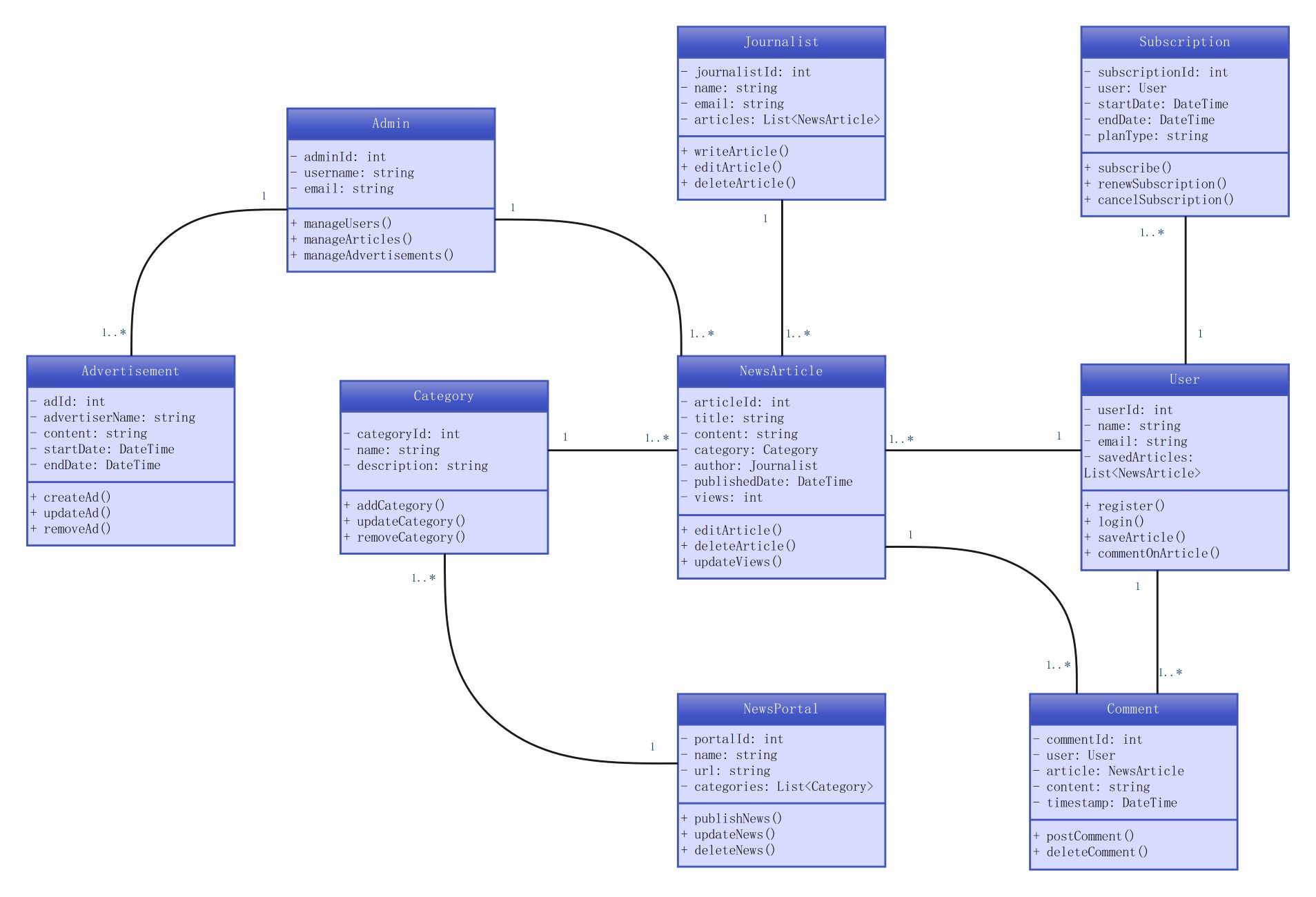
About this News Portal System template
This template showcases the internal architecture of a modern news website. It outlines the core components needed to handle content creation, user management, and monetization. It is ideal for software architects building scalable media applications.
Admin Management
The Admin class handles the overarching management tasks of the news portal. This entity is responsible for moderating users, articles, and advertisements. It ensures that the system runs smoothly and that all content meets standards.
- Admin ID
- Manage Users
- Manage Articles
- Manage Advertisements
Content Creation and Journalists
Journalists are the primary authors of the system who create and manage news articles. This section defines how articles are linked to authors and how they are categorized. It also tracks views for each story.
- Journalist ID
- Write Article
- Edit Article
- News Article Content
User Interaction and Subscriptions
Users interact with the portal by reading news, leaving comments, and managing their subscriptions. This part of the diagram defines the logic for user registration, authentication, and the financial relationship through various subscription plans.
- User Registration
- Post Comment
- Subscription ID
- Renew Subscription
News Portal Infrastructure
The News Portal and Category classes represent the organizational structure of the website. These elements manage how news is displayed across different sections. They help in organizing content into logical groups for better navigation.
- Portal ID
- Category Management
- Publish News
- Article Categories
FAQs about this Template
-
How does a class diagram improve the development of a news portal?
A class diagram maps out the relationships between different entities like journalists, users, and articles before coding begins. This visual blueprint helps developers identify potential flaws in logic early in the design phase. By defining clear attributes and methods, teams can ensure that the database and backend logic are synchronized, leading to faster development cycles.
-
What role does the subscription class play in the system architecture?
The subscription class is vital for managing the monetization strategy of the news portal. It links specific users to paid plans, tracking start and end dates to ensure access is valid. By centralizing this logic, the system can automatically handle renewals or cancellations. This prevents unauthorized access to premium content while providing a seamless experience for paying customers.
-
Why are category and comment classes separated in this diagram?
Separating these classes ensures that the news portal remains modular and easy to maintain. The category class focuses on content organization, while the comment class handles user-generated feedback for specific articles. This separation follows the principle of single responsibility. It allows developers to update the commenting system or the site’s organizational structure independently without breaking other core features.

 (AI & Web)