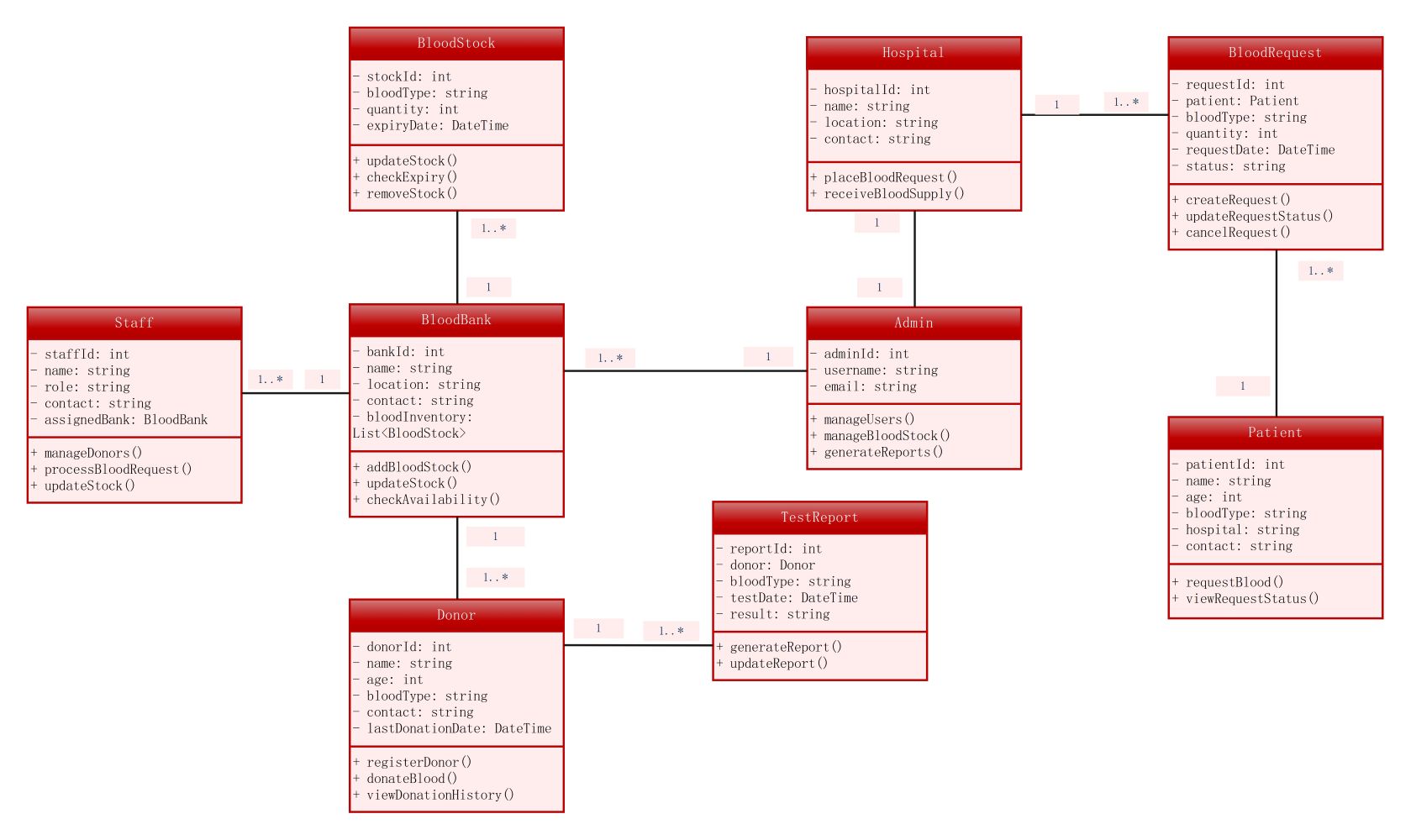
About this blood bank system class diagram template
This UML template visualizes the structural design of a blood management database. It displays how users, medical institutions, and inventory interact. Use this professional diagram to simplify your software development process and improve your system architecture.
BloodBank and BloodStock
The BloodBank class serves as the central hub for storing and managing medical resources. It tracks inventory levels and locations. The BloodStock class handles specific details like blood types, quantities, and expiration dates.
- bankId: Unique identifier for the facility
- bloodInventory: List of available blood stock
- bloodType: Classification for different blood groups
- expiryDate: Critical date to ensure blood safety
User Management Classes
The system defines distinct roles for Staff, Admin, and Donors to ensure security and efficiency. Staff handle daily operations while Admins manage the entire system. Donors provide the vital resources needed for the bank.
- staffId: Identifier for bank employees
- adminId: Unique key for system administrators
- donorId: Personal record for blood contributors
- lastDonationDate: Tracks donor eligibility and history
Hospital and Patient Interactions
This section coordinates how medical facilities request blood for their patients. The Hospital class manages supply requests, while the Patient class stores health details. Together, they ensure the right blood reaches the correct recipient quickly.
- hospitalId: Unique code for healthcare facilities
- patientId: Tracking number for medical recipients
- requestId: Unique code for blood supply orders
- status: Current stage of the blood request
FAQs about this Template
-
What is the primary purpose of a class diagram for a blood bank system?
This diagram serves as a blueprint for building the software infrastructure. It defines how data like donor info and blood stock relate to each other. By mapping these classes, developers can create a robust database. This ensures that information flows correctly between hospitals and blood banks. It ultimately helps in managing life-saving resources more effectively during medical emergencies.
-
How does this system manage blood expiration and safety?
The BloodStock class includes an expiryDate attribute to monitor freshness. This is linked to the checkExpiry method, which regularly scans the inventory. If blood reaches its limit, the removeStock function triggers. This automated tracking prevents the use of unsafe blood. It ensures that patients only receive high-quality, viable supplies while reducing manual errors in the storage facility.
-
Can this template be customized for specific hospital requirements?
Yes, this template is fully flexible for different medical needs. You can add new attributes like refrigerated storage temperatures or specialized blood components like plasma. Developers can also modify the relationships to include multiple hospital branches or mobile donation units. Adjusting the methods allows for custom reporting or integration with existing electronic health record systems used by local clinics.

 (AI & Web)