About this Class Diagram for Gym Management System template
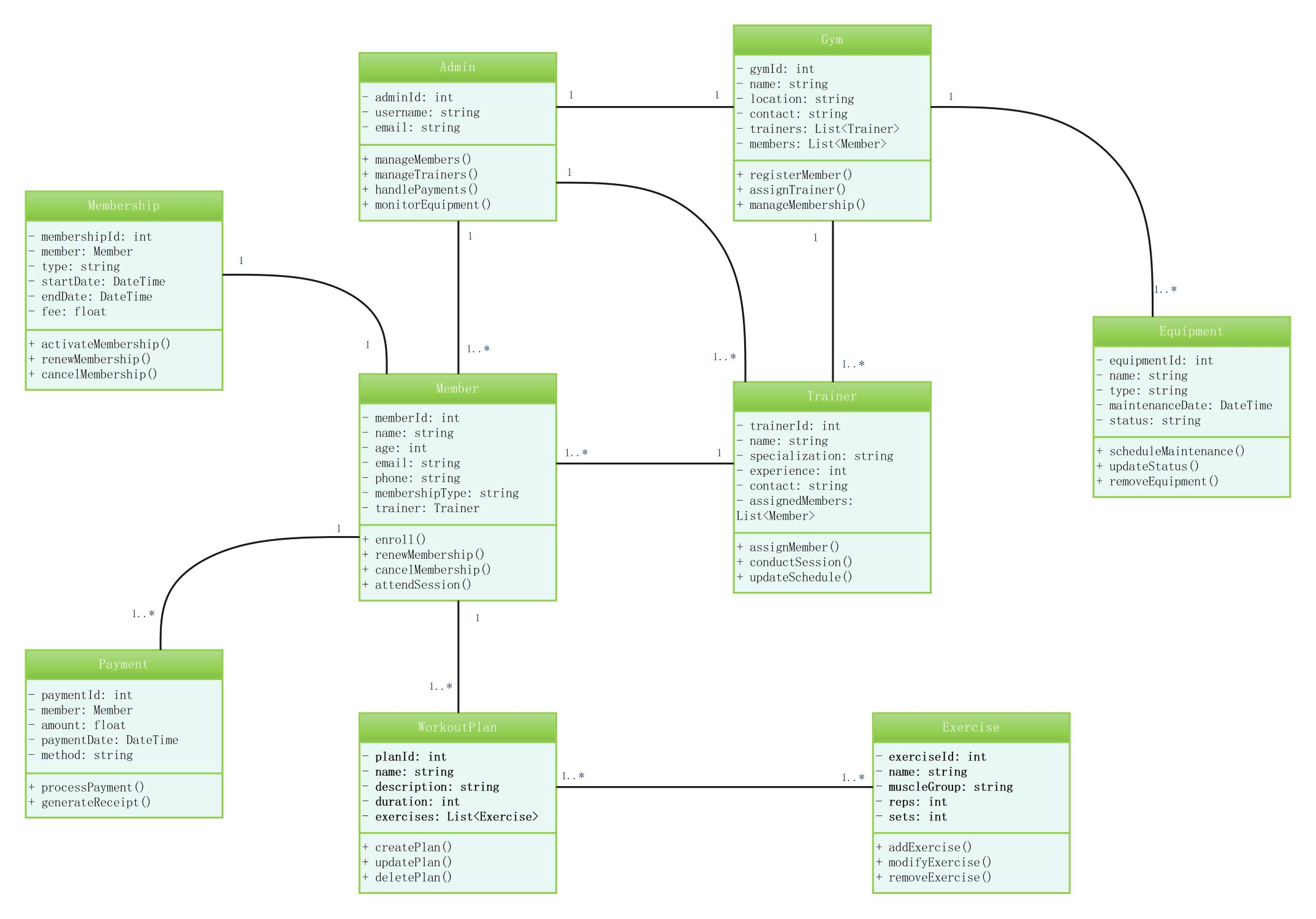
This template provides a clear blueprint for fitness facility software. It outlines essential classes like members and staff. It also shows how gym resources and financial records relate to ensure system integrity and high performance for gym administrators.
Gym and Admin Core
The Gym class acts as the central hub for facility details. The Admin class manages high-level operations. These entities control user registrations, staff assignments, and equipment oversight to keep the fitness center running efficiently.
- gymId, name, location, and contact attributes
- registerMember and assignTrainer methods
- Admin management of members and payments
- Monitoring functions for facility equipment
Member and Trainer Entities
These classes define the human interactions within the gym system. They track profiles, specializations, and schedules. This relationship ensures members receive professional guidance while trainers manage their client lists and sessions effectively through organized data.
- memberId, name, and membershipType
- trainerId and specialization details
- enroll and attendSession operations
- Trainer experience and contact information tracking
Membership and Payment Processing
Financial integrity is managed through these linked classes. They handle subscription types, expiration dates, and transaction history. This setup prevents unauthorized access and ensures that all gym revenue is recorded and processed via secure payment methods.
- membershipId, type, and fee details
- paymentId, amount, and method
- processPayment and generateReceipt methods
- Membership activation and cancellation logic
Workout Plans and Equipment Management
The system tracks physical assets and fitness goals. Workout plans connect to specific exercises to guide members. Meanwhile, the equipment class monitors the status and maintenance of gym machines to ensure safety and functionality for all users.
- WorkoutPlan with name and duration
- Exercise sets, reps, and muscle groups
- Equipment maintenanceDate and status tracking
- Methods to create, update, or delete plans
FAQs about this Template
-
Why is a class diagram essential for a gym system?
A class diagram serves as the structural foundation for your software development process. It defines the specific data types and methods required for gym operations. By mapping out entities like members and trainers before coding, developers can avoid logic errors. This visualization ensures the final application is scalable and handles complex relationships between users and services effectively for long-term growth.
-
How does the diagram handle membership renewals?
The diagram includes a dedicated Membership class linked to the Member and Payment classes. When a membership expires, the renewMembership method updates the end date and triggers a payment transaction. This automated workflow maintains accurate records and prevents service interruptions. It allows gym owners to track revenue cycles and identify active users without manual data entry or complicated spreadsheets.
-
Can I add customized features to this gym template?
Yes, this UML class diagram is highly flexible and can be customized to fit unique business needs. You can add classes for inventory management, group class scheduling, or nutrition tracking. By modifying the attributes and methods within the existing blocks, you can tailor the logic to support specialized services like personal training packages, guest passes, or digital locker systems easily.

 (AI & Web)