About this Personal Area Network (PAN) Topology Diagram template
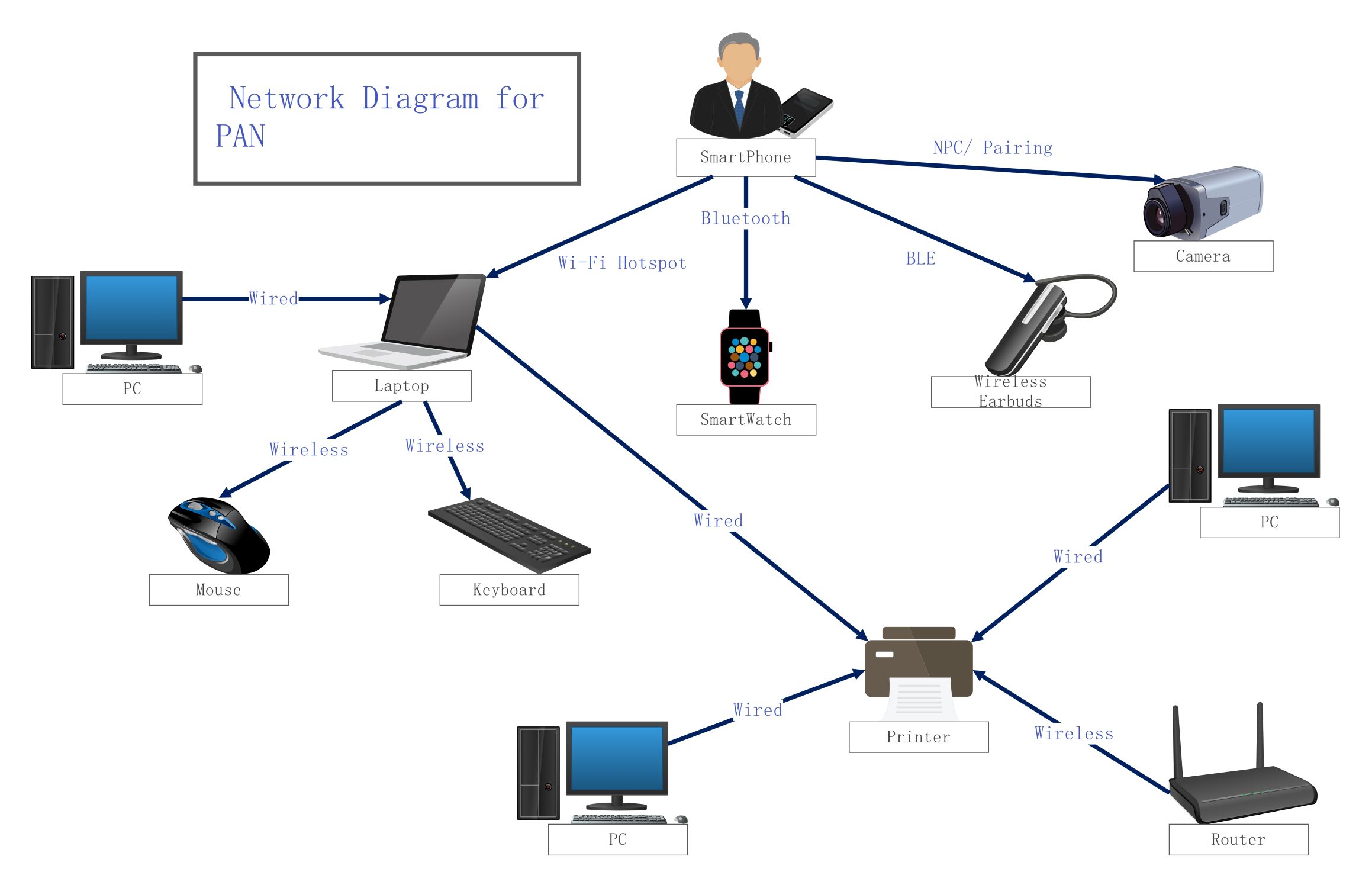
This Personal Area Network (PAN) topology diagram template helps you visualize how personal devices connect in a small workspace. It shows the links between mobile phones, computers, and peripherals to help you design efficient networks.
Smartphone Hub Connections
The smartphone serves as a central controller in many modern PAN layouts. It manages multiple short-range connections simultaneously to synchronize data and provide internet access. This setup is perfect for users who need constant connectivity.
- Bluetooth for SmartWatch sync
- BLE for Wireless Earbuds
- NFC/Pairing for Camera connection
- Wi-Fi Hotspot for Laptop access
Computing and Peripherals
Laptops and PCs form the core of the workstation within a PAN. These devices use a mix of wired and wireless connections to link with input tools and printing hardware. This ensures a stable and productive environment.
- Wired connections between PCs and Laptops
- Wireless Mouse and Keyboard inputs
- Wired connection to the Printer
- Shared Router access for all systems
Peripheral Output Devices
Output devices like printers and speakers receive data from multiple sources in the network. A PAN allows these units to be shared across various personal systems without needing complex setups or long cables. This streamlines the office workflow.
- Centralized Printer for PCs and Laptops
- Wired links for high-speed data transfer
- Wireless router for broad network coverage
FAQs about this Template
-
What is the primary purpose of a Personal Area Network?
The primary purpose of a Personal Area Network (PAN) is to facilitate communication between devices located within a person's immediate workspace. This type of network allows a user to synchronize data, share files, and connect peripherals like mice or headphones to a central device. It provides a simple way to manage personal gadgets and ensures seamless interaction between various smart electronics.
-
How does a Wireless Personal Area Network differ from a LAN?
A Wireless Personal Area Network (WPAN) covers a much smaller range than a Local Area Network (LAN). While a LAN typically connects devices across an entire building or office floor, a PAN is limited to the area around one individual. PANs usually rely on short-range technologies like Bluetooth, whereas LANs use more powerful Wi-Fi signals or Ethernet cables for wider coverage.
-
What are common examples of technologies used in a PAN?
Common technologies used in a Personal Area Network include Bluetooth, Near Field Communication (NFC), and Zigbee for wireless connections. For wired setups, Universal Serial Bus (USB) and FireWire are frequently employed to link devices. These protocols enable low-power, short-distance data exchange, making them ideal for connecting smartphones to wearables, cameras to laptops, or keyboards to desktop computer systems.

 (AI & Web)