

Contrary to popular belief, sequence diagrams are not just for large, complex software systems. You can use them to model any system, regardless of size or complexity. But what are they, and why are they important?
In this article
What Is a Sequence Diagram?

A sequence diagram is a type of Unified Modeling Language (UML) diagram showing the sequential interactions between objects in a system. It is a visual representation of how objects communicate with each other to complete a task. Keep reading to learn how they can help professionals understand and document system behavior. This article provides 10 sequence diagram templates to get you started.
10 Sequence Diagram Examples
Imagine you're designing a new e-commerce system. How will customers interact with the system to purchase products? A sequence diagram can help you visualize this process and identify potential problems. In this part, we will provide 10 pre-designed sequence diagrams from the Wondershare EdrawMax Templates Community for your projects.
As a dedicated diagram maker, Wondershare EdrawMax supports 280+ types of diagrams and offers 15,000+ ready-made templates. Download it and visit the templates community to find the one most suitable for you.
Sequence Diagram For Online Shopping Payment System

 below.
 below.


This sequence diagram is a simplified example. There may be additional steps in the online payment process depending on the specific store and payment gateway used. When you shop online, you choose items and add them to your cart.
Then, you enter your shipping and payment information. The online store sends the payment information to the payment gateway for authorization. Once the store receives the payment, they process your order.
Sequence Diagram for E-Commerce Retail Store

The UML sequence diagram starts with the user, who can log in or view products. If you log in, you can view your cart and make a payment. Once logged in, you can select a product to view its details and add it to your cart. The database section shows the steps that the system takes to process your requests.
When you search for a product, the system searches the database for the product information. When you add a product to your cart, the system updates the cart in the database. When you make a payment, the system processes the payment and updates the database accordingly.
Sequence Diagram for 3-Phase Commit (3PC) Protocol

The coordinator initiates the process by sending a pre-commit request to all participants. The participants execute the requested transaction and send a pre-commit reply to the coordinator. The coordinator then decides whether to commit or roll back the transaction and sends a request to all participants. This sequence diagram ensures that all participants commit or roll back the transaction together.
Sequence Diagram for Marketing

You can use this marketing system sequence diagram as a roadmap to introduce a new product. It begins with the idea of a product not yet available on the market. The solution is to conduct a market survey, discuss solutions, get market feedback, and implement the strategies.
This sequence diagram example can help you visualize the steps in addressing a marketing challenge. It can help to ensure that all the necessary steps are taken and that the team is working towards a common goal.
Sequence Diagram for Software Login
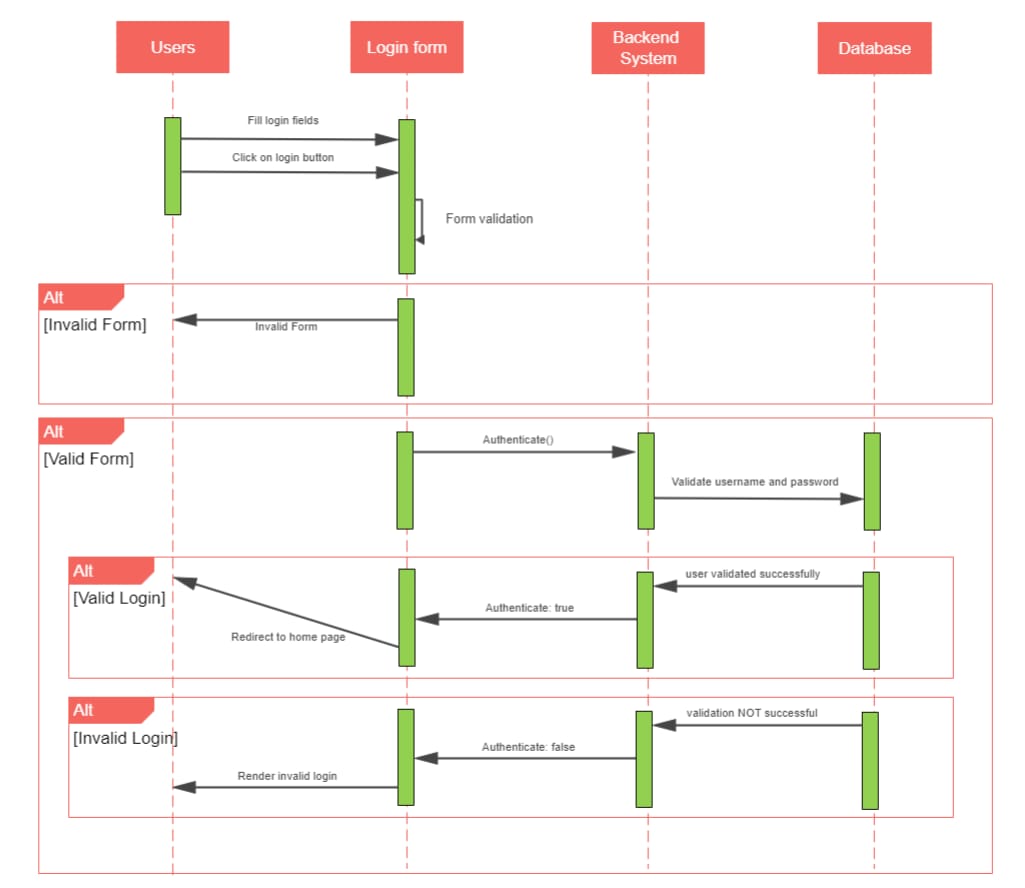
A software login sequence diagram shows the steps in logging in to a software system. The user enters their credentials into the login form and clicks the login button. The backend system checks the credentials against a database of users.
If the credentials are valid, the user is logged in and redirected to the home page. If the credentials are invalid, the user is shown an error message and asked to try again.
Sequence Diagram for Loan

A loan sequence diagram shows the steps involved in applying for a loan. The customer requests a loan from the clerk/agent, who verifies their details and generates a loan request in the system. The system generates a loan ID and provides it to the customer, who views the loan request. The customer views and updates the loan request, and the clerk/agent sends it for processing.
The system processes the loan request and sends a confirmation message to the customer. The officer processes the loan request and grants the loan or sends the request back for further review. Once granted, the officer changes the status of the loan request and closes it.
Sequence Diagram for Assisted Registration

AI Diagram Generator
Enter your prompt. Upload files if needed. Generate diagrams, charts, or slides instantly.