About this Class diagram for charity management system template
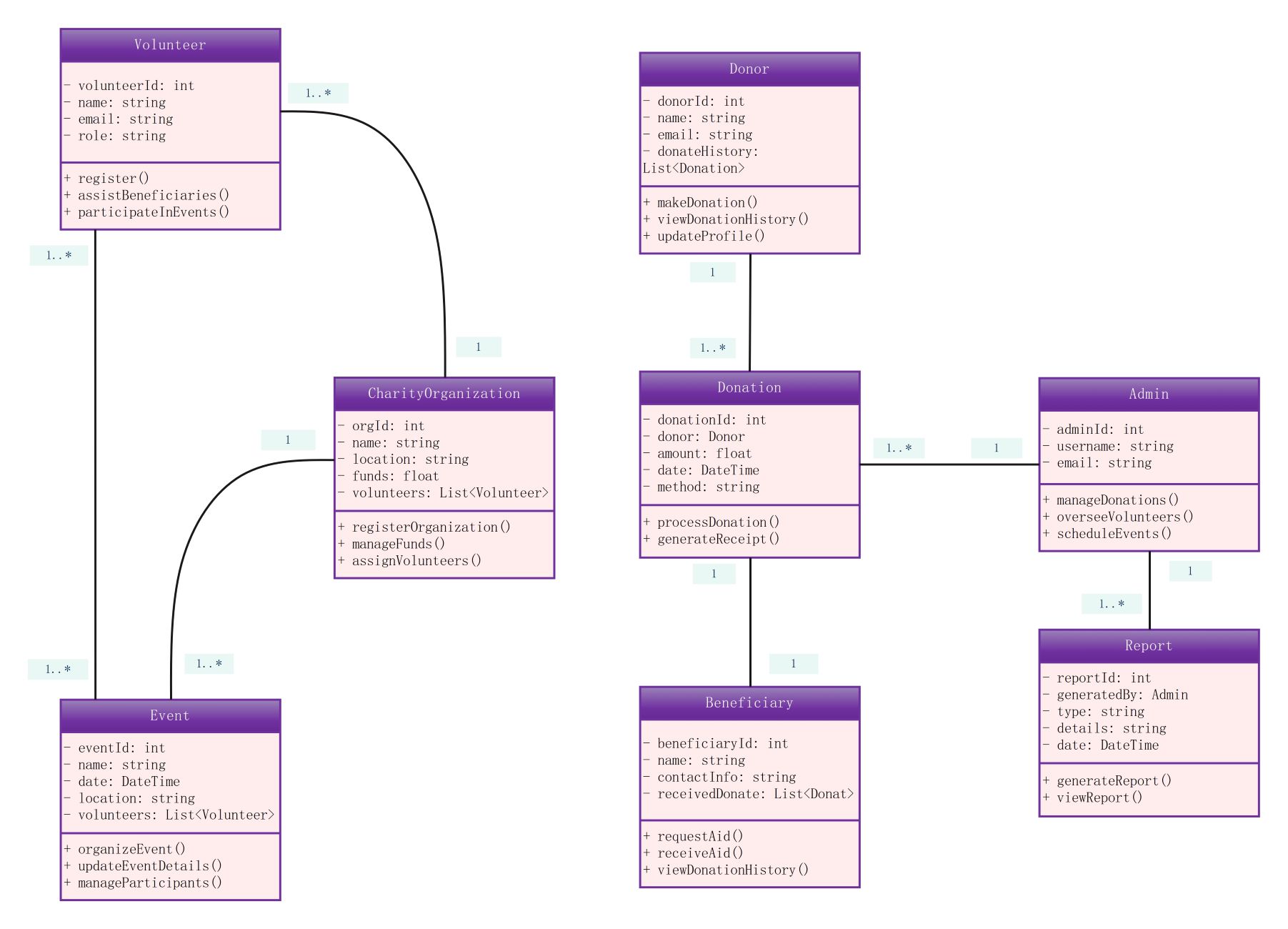
This class diagram provides a structural blueprint for a charity management system. It maps out essential entities like donors, volunteers, and beneficiaries. Developers use this to create robust database schemas and application logic for nonprofit organizations. It ensures all data relationships are logical and efficient.
Volunteer
The Volunteer class manages individuals who offer their time and skills. It tracks personal details and their involvement in various charity events. This section ensures the organization can coordinate manpower effectively for successful initiatives.
- volunteerId: Unique identifier for each person
- name: Full name of the volunteer
- email: Contact information
- role: Specific duties or skills
- Methods: register(), assistBeneficiaries(), participateInEvents()
Donor and Donation
These classes manage the financial backbone of the charity. The donor class stores contributor info, while the donation class tracks specific transactions. This link ensures precise financial reporting and helps maintain donor relationship records.
- donorId: Identification for contributors
- amount: Value of the financial gift
- date: When the contribution was made
- method: Payment type used
- Methods: makeDonation(), processDonation(), generateReceipt()
Charity Organization and Event
This section defines the core administrative units of the charity. It manages the organization's funds and the specific events they host. It links volunteers to specific tasks, ensuring every charitable event is well-staffed and organized.
- orgId: Organization identifier
- funds: Available financial resources
- eventId: Unique ID for activities
- location: Physical or virtual venue
- Methods: registerOrganization(), manageFunds(), organizeEvent()
Admin and Report
The Admin class handles system-wide management and oversight. It is responsible for generating reports that provide insights into the charity's performance. These reports are crucial for transparency and showing the impact of donations to stakeholders.
- adminId: Security identifier for staff
- username: Login credentials
- reportId: Reference for generated data
- details: Specific metrics and results
- Methods: manageDonations(), overseeVolunteers(), generateReport()
FAQs about this Template
-
Why is a class diagram important for a charity management system?
A class diagram is vital because it organizes the complex data of a nonprofit. It defines how donors, volunteers, and funds interact. By visualizing these relationships, developers can build a more secure and efficient system. This structure reduces errors in financial tracking and improves the overall transparency of the organization's operations for all members.
-
How do you track volunteer participation in this system?
Volunteer participation is tracked through the relationship between the Volunteer and Event classes. The Volunteer class stores individual profiles and roles. When an event is organized, volunteers are assigned to it, and their attendance or contributions are recorded. This allows the system to generate detailed reports on volunteer hours and the effectiveness of their assistance.
-
What role does the Beneficiary class play in the diagram?
The Beneficiary class represents the end recipients of the charity's aid. It tracks their specific needs and the donations they receive. By linking beneficiaries to the donation class, the system ensures that funds are allocated correctly. This level of detail helps administrators verify that help reaches those in need and maintains strict accountability for donors.

 (AI & Web)