About this Object diagram for Internet banking template
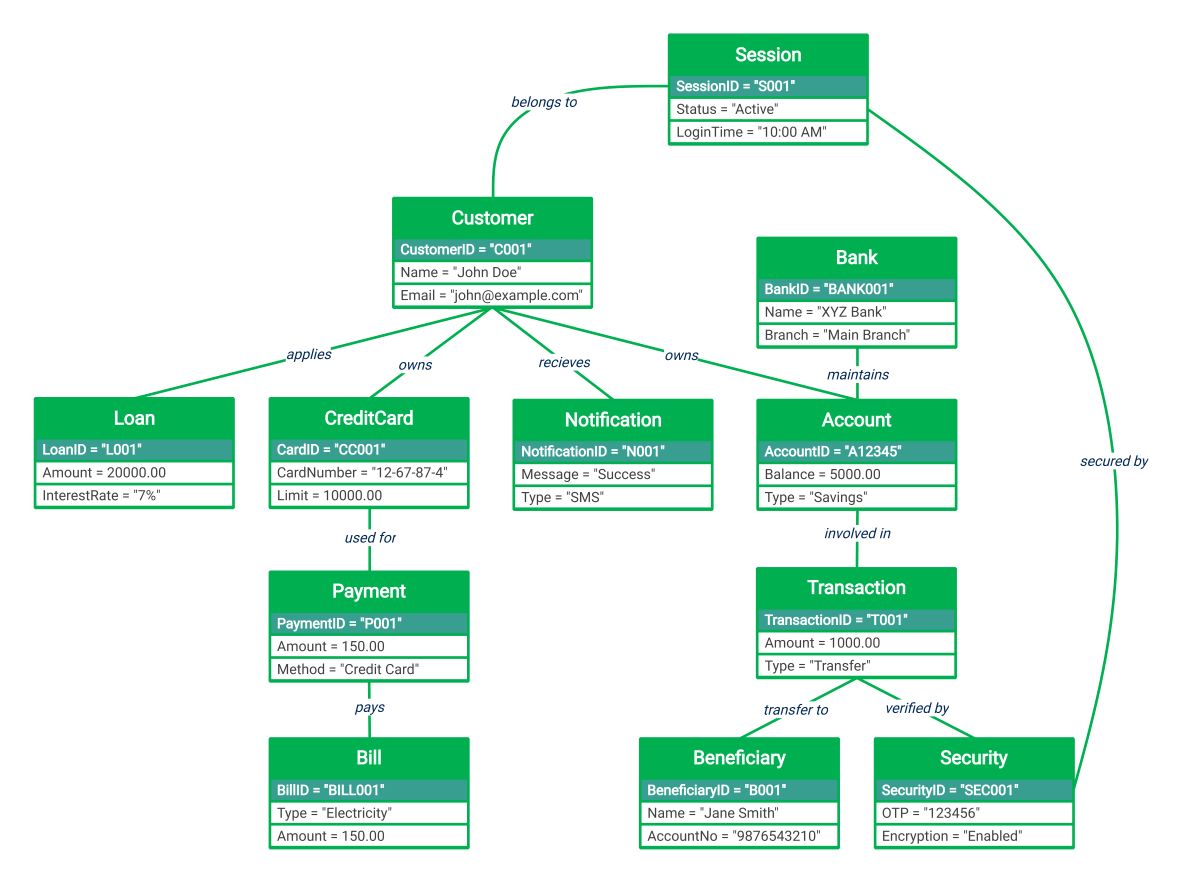
This UML object diagram template illustrates the real-time relationships between specific entities in a digital banking system. It maps out customer interactions, session security, and financial transactions to ensure system integrity and clarity for developers.
Customer and Session Management
The customer acts as the central entity in this banking model. Each user session is tracked to maintain security and monitor active login times. This ensures that every action is linked to a verified identity.
- CustomerID and Contact Details
- Active Session Status
- Login Time Tracking
- Relationship mapping to specific users
Accounts and Transactions
Bank accounts represent the financial core where balances are stored. Transactions record the movement of funds between accounts and beneficiaries. This section highlights how the bank maintains records of every individual transfer or savings update.
- Savings Account Balance
- Transaction Transfer Details
- Beneficiary Information
- Bank Branch Management
Payments and Credit Services
This segment details how customers manage debt and outgoing expenses. It covers loan applications and credit card usage for bill payments. These objects show the flow from a credit limit to a specific utility bill payment.
- Loan Interest Rates
- Credit Card Limits
- Payment Methods
- Electricity Bill Details
Security and Notifications
Security is vital for protecting user data and verifying transfers. This part of the diagram shows how one-time passwords and encryption secure transactions. Success notifications are then sent to keep the customer informed about activities.
- One-Time Password (OTP)
- Encryption Protocols
- SMS Success Notifications
- Transaction Verification
FAQs about this Template
-
What is the purpose of an object diagram in internet banking?
An object diagram serves as a static snapshot of the system's instances at a particular moment. In internet banking, it helps developers visualize specific examples of data, such as a real customer's account balance or an active transaction. This clarifies how classes interact in practice, making it easier to identify potential logic errors or data flow bottlenecks during the design phase.
-
How does the diagram represent banking security measures?
Security is represented through specific security objects linked to transactions and user sessions. The diagram illustrates attributes like encryption status and One-Time Password values. By showing that a transaction must be verified by a security object before completion, the diagram emphasizes the multi-layered defense strategy required to protect sensitive financial data and prevent unauthorized access within the banking portal.
-
Why are beneficiaries and notifications included in this model?
Beneficiaries and notifications are critical for the end-user experience and record-keeping. Including beneficiary objects shows exactly where funds are being transferred, which is essential for auditing. Notifications provide immediate feedback to the customer, confirming that a transaction was successful. Together, these elements ensure the banking system is transparent, user-friendly, and maintains a clear trail for every financial action performed online.

 (AI & Web)