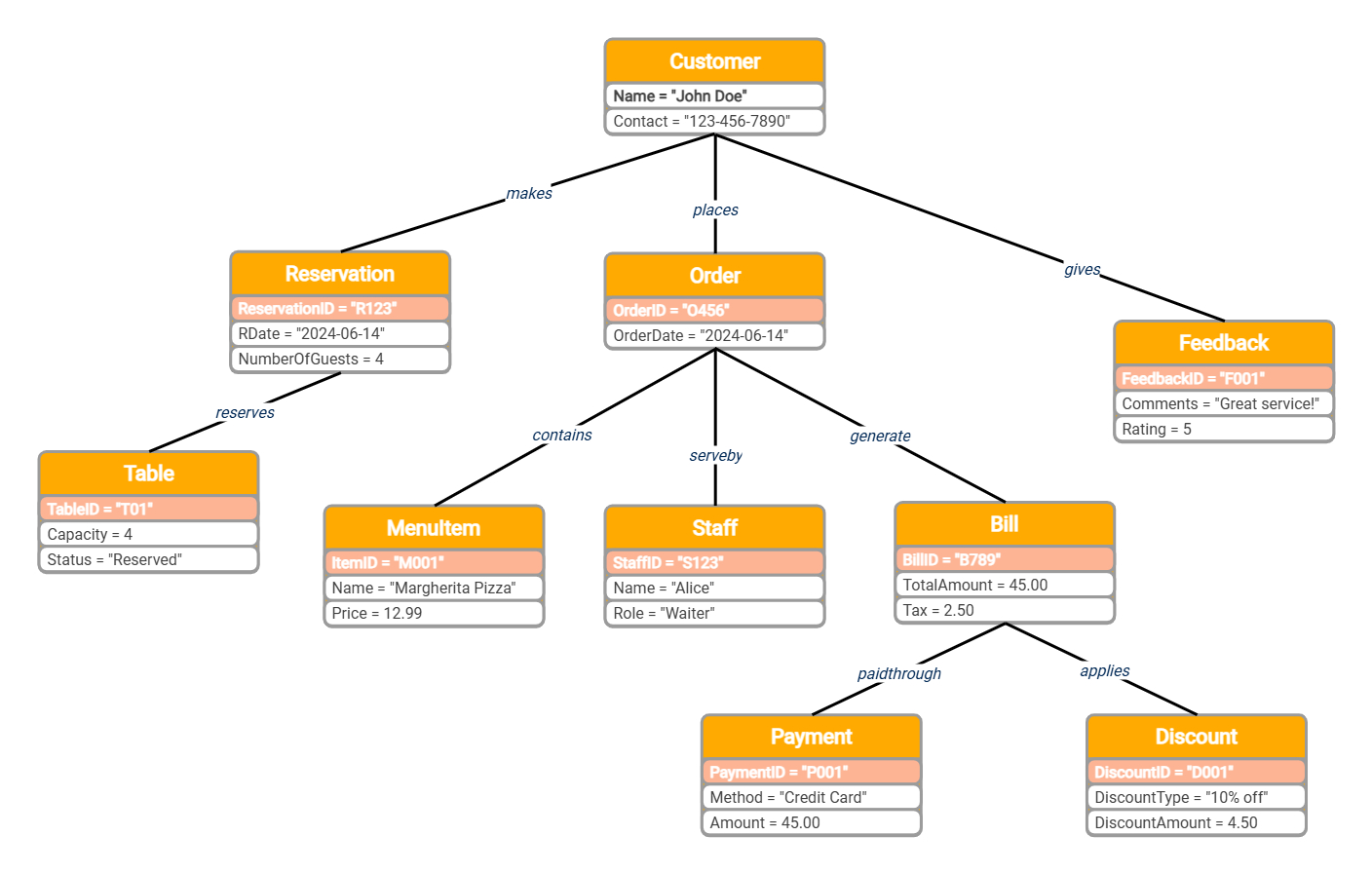
About this object diagram for the restaurant management system template
This object diagram template provides a clear visual snapshot of a restaurant's operational flow. It maps out the real-time relationships between customers, staff, and financial transactions. Use this tool to design robust management software systems that improve guest satisfaction and service speed.
Customer Interactions
The customer acts as the central hub of the restaurant experience. This section captures how a specific diner interacts with the system to book tables, place food orders, and leave reviews after their meal.
- Name: John Doe
- Contact: 123-456-7890
- Action: Makes a reservation
- Action: Places Order
- Action: Gives Feedback
Reservation and Seating
This node details the process of securing a spot within the dining area. It links specific booking data to physical table assets to ensure that guest capacity matches the available restaurant resources during a shift.
- ReservationID: R123
- Date: 2024-06-14
- Guests: 4
- TableID: T01
- Status: Reserved
Order Fulfillment
Order fulfillment tracks the journey of a meal from the menu to the table. It connects the customer's choice with the specific staff member responsible for providing service during the unique dining event.
- OrderID: O456
- MenuItem: Margherita Pizza
- Price: 12.99
- Staff Name: Alice
- Staff Role: Waiter
Billing and Payment
The billing section manages the financial conclusion of the visit. It calculates the total amount, including taxes and discounts while recording the specific payment method used by the customer to settle their bill.
- BillID: B789
- Total Amount: 45.00
- Tax: 2.50
- Payment Method: Credit Card
- Discount: 10% off
FAQs about this Template
-
What is the purpose of an object diagram in a restaurant system?
An object diagram acts as a snapshot of the restaurant system at a specific moment. It shows how actual objects, like a specific customer or order, relate to one another. This helps developers verify that the class structure can handle real-world scenarios. It is essential for testing the logic of table assignments and billing before the full software is built.
-
How does this diagram help manage restaurant staff roles?
The diagram links specific orders to staff members, such as a waiter named Alice. By visualizing these relationships, managers can track which employee is responsible for different service tasks. This clarity helps in designing features for performance monitoring and shift management. It ensures that every action within the system is accountable to a specific user role defined in the software.
-
Can I customize this object diagram for different restaurant types?
Yes, this template is highly flexible and can be adapted for fast-food or fine-dining setups. You can add new objects like delivery drivers or kitchen displays to reflect more complex workflows. Modifying the attributes, such as menu prices or discount types, allows the diagram to match your specific business model. It serves as a strong foundation for any food service application.

 (AI & Web)