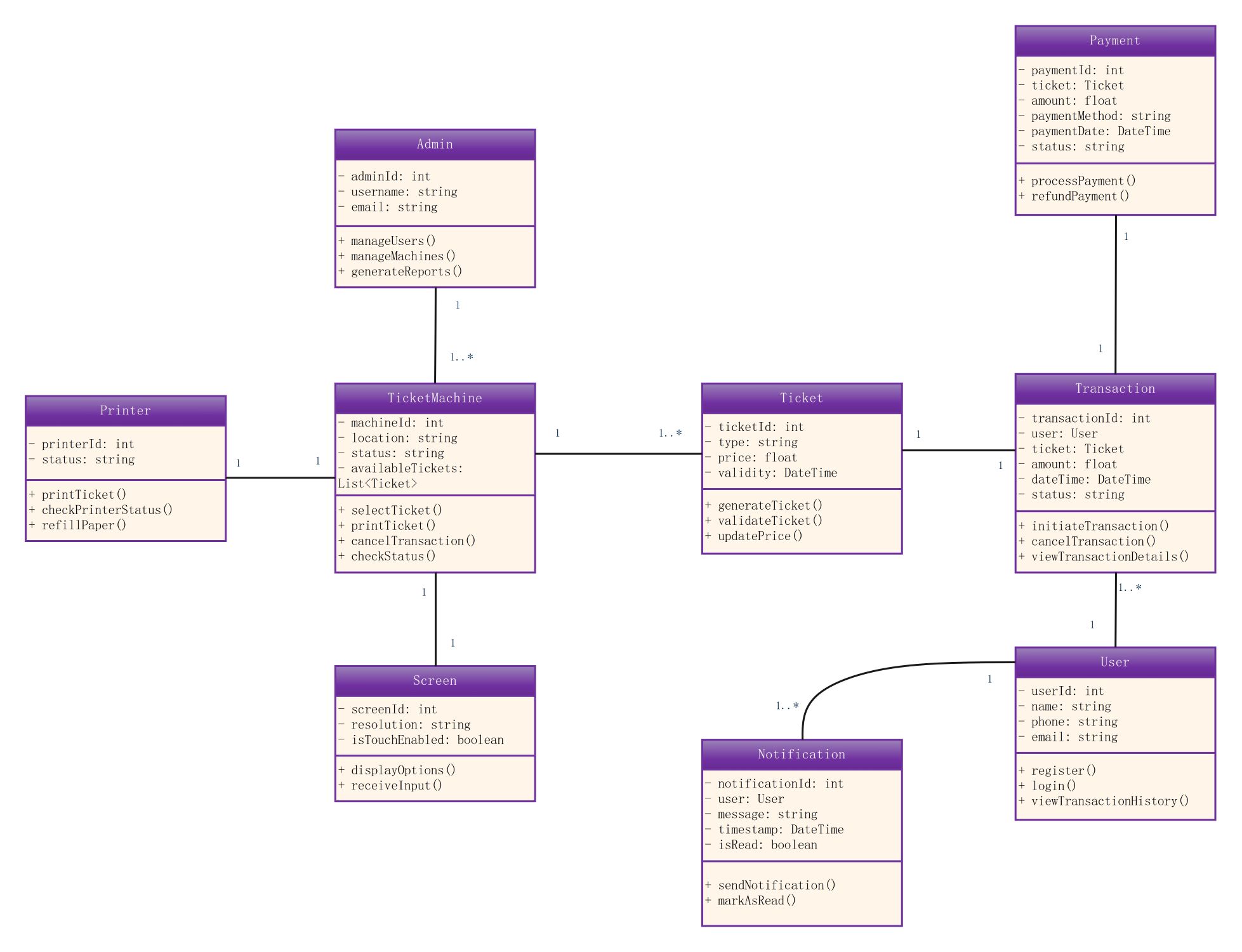
About this Class diagram for ticket vending machine template
This template provides a comprehensive blueprint for designing automated ticketing software. It captures essential attributes and methods required for machine operations. Software architects use this diagram to map out logic before coding begins. This ensures a robust and scalable final product for any kiosk application.
Machine Hardware Interface
This section focuses on physical components like the Ticket Machine, Screen, and Printer. It defines how the software controls hardware output to provide tickets and display information. This ensures a smooth user experience during the purchase.
- TicketMachine: Manages machine ID, location, and status.
- Printer: Handles printing tasks and paper status monitoring.
- Screen: Manages resolution and receives touch inputs from the customer.
Administration and Ticket Logic
Administrative functions allow staff to oversee machine health and generate vital reports. The ticket class stores specific data like pricing and validity. These nodes ensure the system stays updated with the current transit or entry data.
- Admin: Manages users and generates system reports.
- Ticket: Defines ticket types, prices, and expiration dates.
Transaction and Payment Processing
Transactions connect users to their selected tickets through secure payment gateways. This section tracks transaction IDs and statuses while handling refunds. It ensures every sale is recorded and matched with a successful financial payment status.
- Transaction: Initiates and views specific purchase details.
- Payment: Processes payments and manages refund requests.
User Management and Notifications
User profiles store contact details and login information for repeat customers. The notification system alerts users about their transaction status or updates. These classes facilitate a personalized experience and keep the user informed during the interaction.
- User: Handles registration, login, and transaction history.
- Notification: Sends messages and timestamps to the user.
FAQs about this Template
-
What is the main purpose of a class diagram for a ticket vending machine?
This diagram serves as a structural blueprint for developers and engineers. It defines the classes, attributes, and operations within the ticketing system. By visualizing relationships, teams can identify potential bottlenecks or logic gaps before implementation. This ensures the machine handles ticket selection and payments accurately. It also provides a clear reference for future system updates or maintenance tasks.
-
How does the Admin class interact with the Ticket Machine?
The Admin class represents the management side of the vending system. It has a one-to-many relationship with the Ticket Machine. This allows a single administrator to manage multiple machines across different locations. The admin can check machine status, generate sales reports, and manage user accounts. This centralized control is essential for maintaining a network of ticket kiosks in large public areas.
-
Can this diagram be used for different types of vending machines?
Yes, this template is highly adaptable for various automated systems. While designed for tickets, you can easily modify the classes for food, parking, or laundry machines. You simply change the Ticket class to reflect a different product. The core logic for payments, transactions, and hardware interaction remains similar. This flexibility makes it a valuable starting point for any vending software design project.

 (AI & Web)