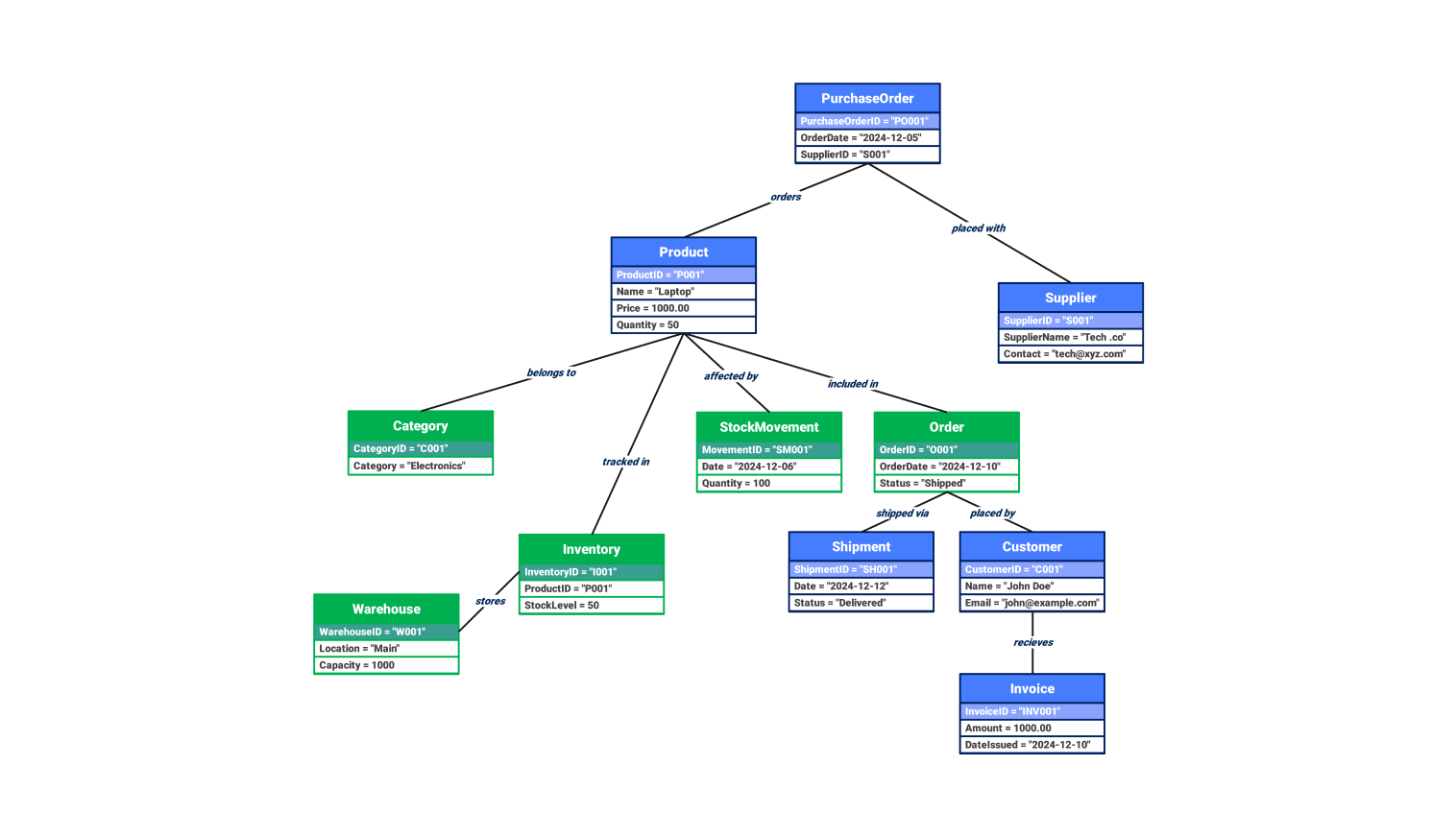
About this Object diagram for inventory management system template
This template showcases a detailed snapshot of an active inventory system. It illustrates how specific items, warehouses, and customer orders interact. Designers use this diagram to verify data structures and ensure that all object relationships align with business requirements during the development phase.
Procurement and Supply Entities
This section focuses on how goods enter the system through official procurement channels. It defines the specific link between a purchase order and the supplier responsible for delivering necessary stock to the warehouse.
- PurchaseOrder: Captures specific order dates and ID codes.
- Supplier: Stores vendor names and contact information.
- Product: Details the item name, unit price, and current quantity.
Inventory and Storage Management
Efficient storage requires clear mapping of where products reside and how they are classified. These nodes help monitor stock levels within specific physical locations while grouping items into logical categories for easier tracking.
(37 words)- Category: Organizes items into groups like Electronics.
- Inventory: Tracks the current stock level for specific product IDs.
- Warehouse: Defines the physical location and total storage capacity.
Sales and Fulfillment Workflow
The sales cycle tracks the journey from a customer request to final delivery and billing. This part of the diagram ensures that orders connect correctly to shipments, customer profiles, and financial transaction records.
- Order: Records the transaction status and important dates.
- Shipment: Monitors the transit progress and delivery status.
- Customer: Maintains individual buyer details and email records.
- Invoice: Documents the final amount due and issuance date.
FAQs about this Template
-
What is the main purpose of an object diagram in inventory management?
The main purpose of an object diagram is to provide a concrete snapshot of the system's state at a specific moment. While class diagrams show general structures, object diagrams use actual data examples to test logic. This helps developers identify potential flaws in relationship links, such as how a specific warehouse instance stores a particular inventory batch during a real transaction.
-
How does this diagram differ from a class diagram for the same system?
A class diagram represents the blueprint or the abstract rules of the inventory system, showing types and general relationships. In contrast, this object diagram shows instances of those classes with real values, like Laptop or Main Warehouse. It acts as a verification tool to ensure the abstract design works correctly when populated with actual business data during operations.
-
Why should I include shipment and invoice objects in this diagram?
Including shipment and invoice objects is vital for full traceability within the supply chain. These objects bridge the gap between order placement and customer receipt. By modeling these instances, you can visualize how a single order triggers a logistics event and a financial record. This ensures that your system design supports the entire end-to-end business process without missing steps.

 (AI & Web)