About this Object diagram for the online auction system template
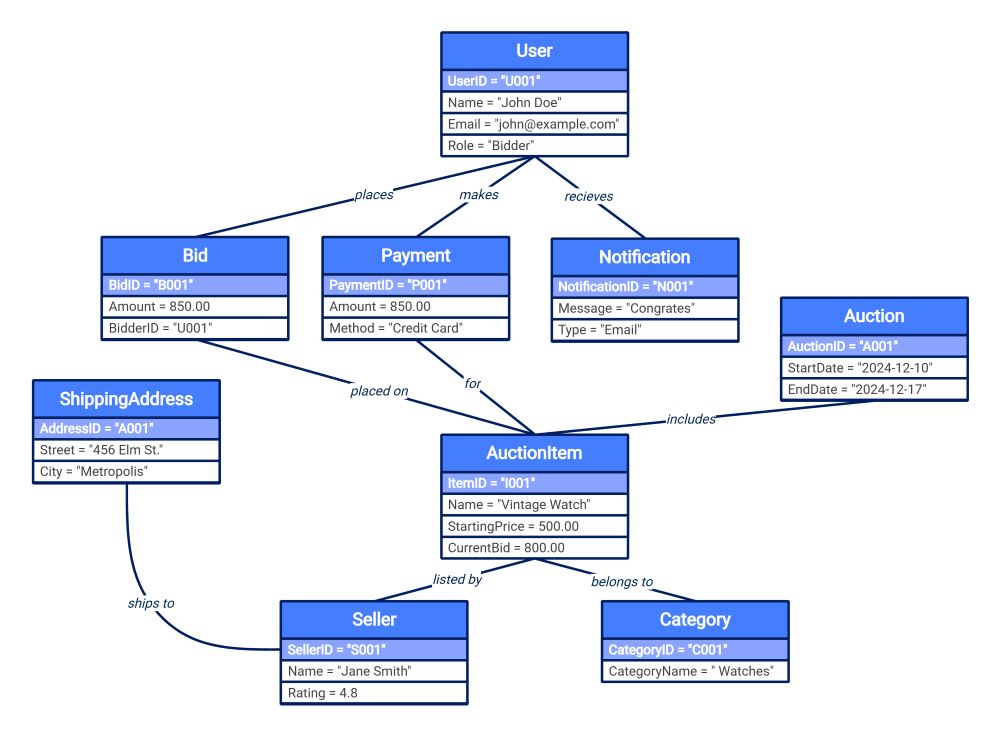
This template highlights the live interactions within a digital bidding platform. It visually maps how user instances, item data, and financial records connect to facilitate a smooth auction process for both buyers and professional sellers.
User and Interaction Instances
The User node represents the primary bidder within the system ecosystem. This section illustrates how specific individuals engage with the platform by placing bids, making payments, and receiving automated notifications regarding their active auction status.
- User (John Doe) identified as a Bidder
- Bid (B001) for the current item
- Payment (P001) using a credit card
- Notification (N001) sent via email
Product and Listing Details
The AuctionItem node captures the specific details of the merchandise currently up for sale. It connects the item to its designated category and the seller responsible for managing the listing and maintaining high service ratings.
- AuctionItem (Vintage Watch) with current bid
- Category (Watches) for organized browsing
- Seller (Jane Smith) with a 4.8 rating
Auction Schedule and Delivery
This section outlines the temporal and physical logistics involved in a successful transaction. It connects the auction event timing with the necessary shipping information required to complete the fulfillment process once the bidding period concludes.
- Auction (A001) with start and end dates
- ShippingAddress (A001) in Metropolis
- Linkage between items and event timelines
FAQs about this Template
-
How does an object diagram differ from a class diagram in an auction system?
A class diagram acts as a general blueprint defining rules for all users and items. In contrast, an object diagram shows a specific snapshot of actual instances, like a named user placing a precise dollar amount on a specific watch. This helps developers verify if the abstract class rules work correctly in practical, real-world scenarios.
-
What role do notification objects play in maintaining system transparency?
Notification objects represent the communication bridge between the system and its users. By tracking specific message instances like Congrats, developers can ensure the system triggers alerts at the right time. This visualization is crucial for verifying that bidders receive timely updates on their wins, payments, or when they have been outbid by others.
-
Why is it important to link the AuctionItem to both Category and Seller?
Linking items to categories and sellers ensures data integrity within the marketplace. The category instance allows for efficient searching and filtering for buyers. Meanwhile, the seller link tracks accountability and performance ratings. Visualizing these connections helps designers ensure that every product listed is properly categorized and attributed to a verified user responsible for shipping.

 (AI & Web)