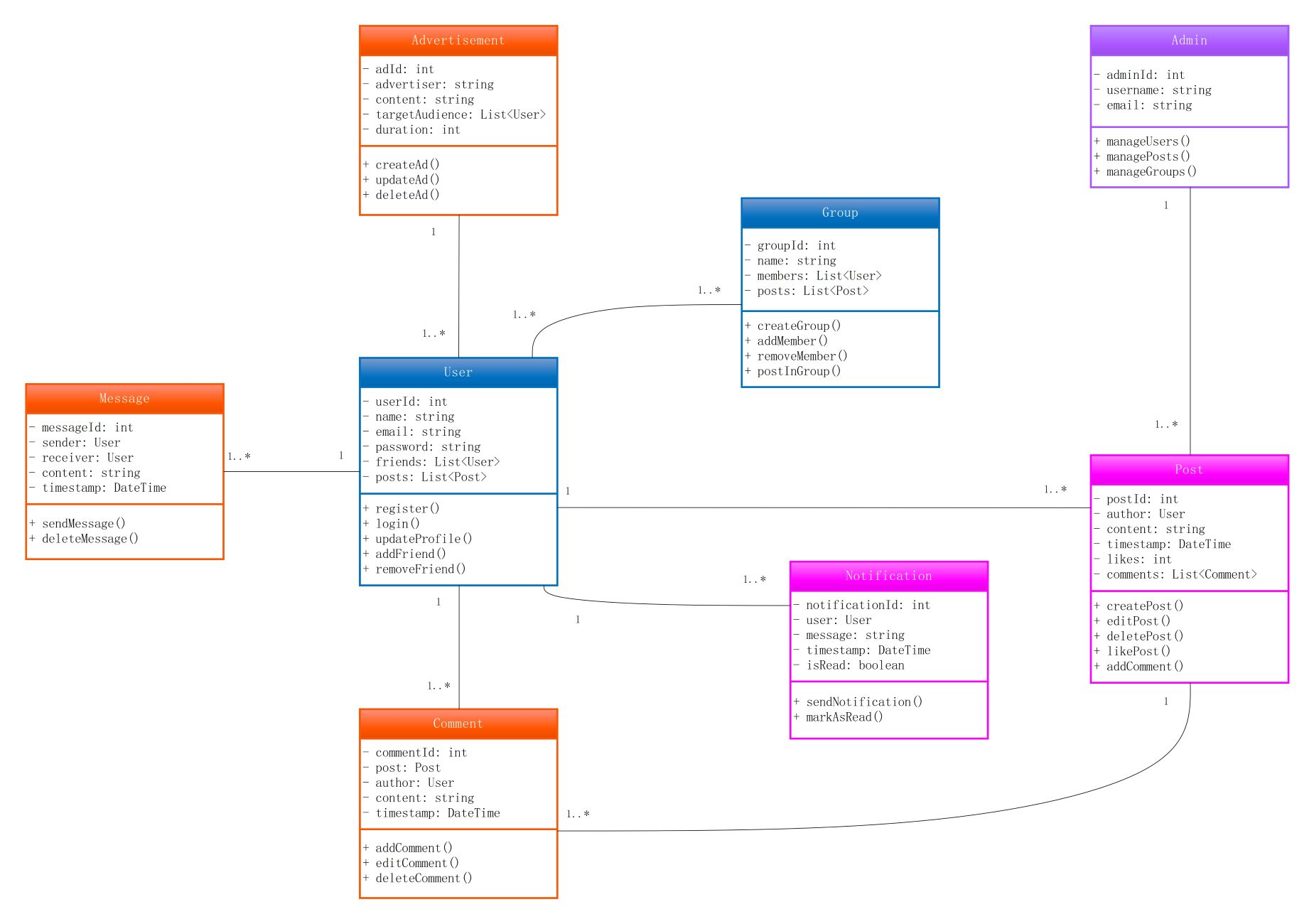
About this class diagram for social media platform template
This template provides a clear architectural roadmap for building modern social networks. It maps out core entities like users and content. Developers use it to understand data logic and relationships before starting the coding process. This ensures a stable and organized backend system.
The User Class
The User class is the central part of this social media model. It manages personal data and social connections. This entity allows people to sign up, update profiles, and build friend lists. It interacts with every other system component.
- userId, name, email, password
- List of friends and posts
- register() and login() methods
- updateProfile(), addFriend(), and removeFriend()
Posts and Comments
These classes handle how users share and react to content on the feed. The Post class tracks likes and timestamps. Meanwhile, the Comment class links back to specific posts and authors. Together, they manage the platform's engagement and interactions.
- postId, author, content, timestamp, likes
- createPost(), editPost(), deletePost(), likePost()
- commentId, post reference, author, content
- addComment(), editComment(), deleteComment()
Admin and Communication Entities
The Admin class provides oversight for users and groups. Communication is handled by Message and Notification classes. These ensure users stay connected through private chats and real-time alerts. They are essential for a functional, moderated social environment.
- adminId, manageUsers(), managePosts()
- messageId, sender, receiver, sendMessage()
- notificationId, timestamp, markAsRead()
- groupId, members list, createGroup()
FAQs about this Template
-
How does this class diagram help in social media app development?
This diagram acts as a precise blueprint for the entire application's data structure. It defines how entities like users and posts relate, preventing architectural errors early on. By visualizing these links, developers can create efficient database schemas. This clarity speeds up the coding phase and ensures that the backend can handle complex social interactions smoothly.
-
What are the key relationships between users and content in this model?
In this model, users have a one-to-many relationship with posts, comments, and messages. This means a single user can create multiple pieces of content. The diagram also shows how notifications and advertisements target specific users based on their activity. These connections are vital for maintaining data integrity and providing a personalized experience for every platform member.
-
Can I modify this template for different types of social networks?
Yes, this template is highly customizable for various niche networks. You can add new classes like "Marketplace" or "LiveStreams" to extend functionality. By adjusting the attributes and methods within the existing User or Group classes, you can tailor the logic to fit your specific business needs while keeping the core social structure intact.

 (AI & Web)