About this Use Case Diagram for News Portal template
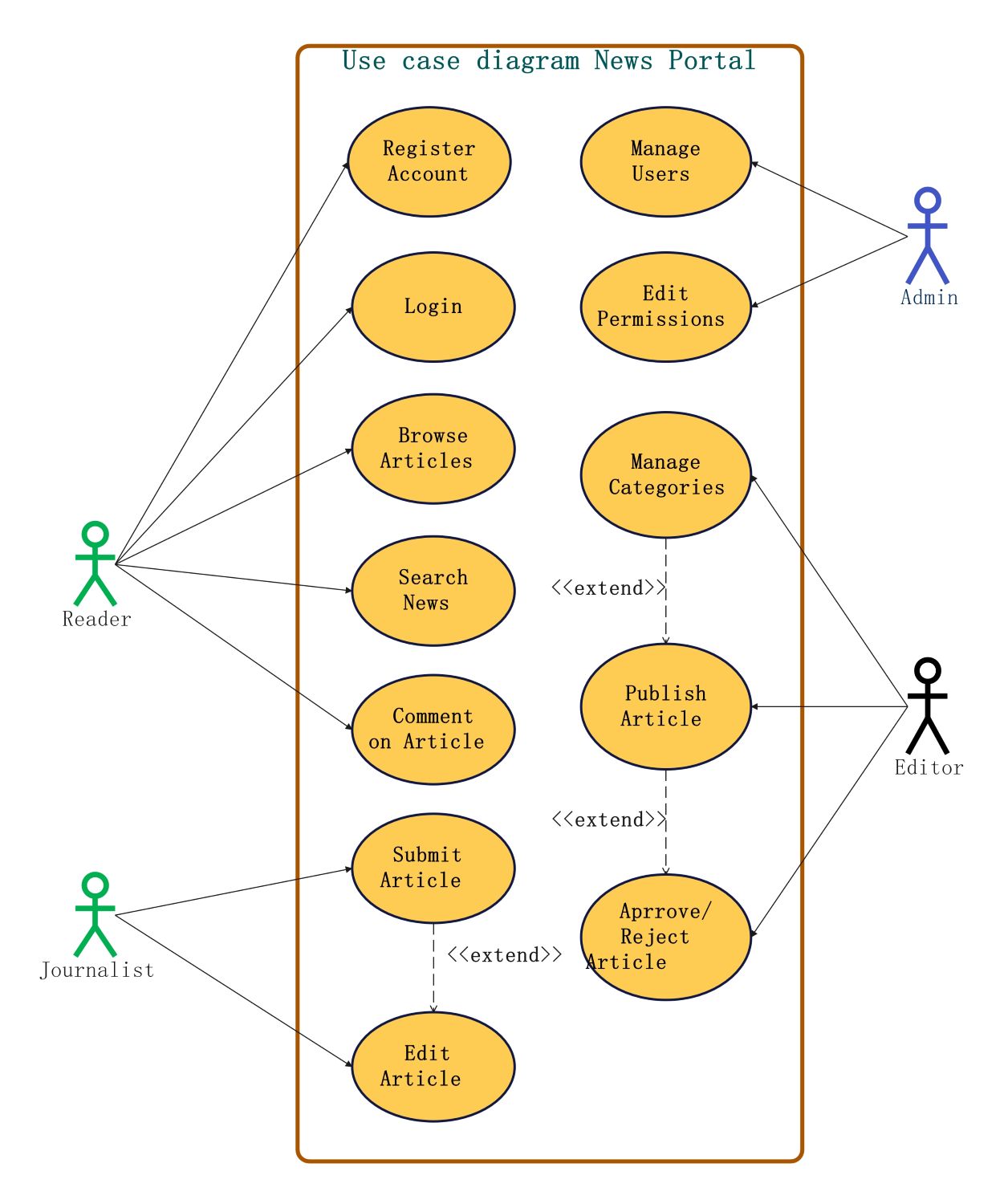
This template highlights the functional requirements of a modern news portal. It organizes interactions into distinct roles, showing how users access, create, and manage digital content. Use this visual guide to build robust software architecture for your media projects.
Reader Interactions
The Reader is the primary consumer of the news portal content. This role focuses on account management and content consumption activities. These actions ensure that the audience can engage with news articles effectively through various features.
- Register Account
- Login
- Browse Articles
- Search News
- Comment on Article
Journalist Interactions
Journalists are the content creators of the platform. Their workflow includes creating and refining drafts before submission. This role is crucial for maintaining a steady stream of fresh news and ensuring that stories are ready for review.
- Submit Article
- Edit Article
Admin Interactions
The Admin manages the underlying system and user access. This role oversees the security and organization of the portal by controlling who can enter the system. They focus on backend management and maintaining high-level site permissions.
- Manage Users
- Edit Permissions
Editor Interactions
Editors serve as the quality control layer of the news portal. They manage the categorization of content and decide which articles go live. Their role bridges the gap between journalist submissions and the final published feed.
- Manage Categories
- Publish Article
- Approve or Reject Article
FAQs about this Template
-
Why is a use case diagram important for a news portal?
A use case diagram is essential because it identifies every possible interaction between users and the news platform. It helps stakeholders understand the scope of the project early in the development phase. By mapping out roles like editors and readers, you can define clear access boundaries. This ensures that the final software meets all functional requirements while maintaining a secure environment.
-
How do journalists and editors interact in this diagram?
In this specific diagram, journalists focus on the initial stages of content creation, such as submitting and editing articles. Once a journalist submits a draft, the editor takes over to review the work. The editor has the authority to approve, reject, or categorize the article. This separation of duties ensures that news content is verified and polished before reaching the public reader.
-
What are the primary benefits of the Admin role in a news portal?
The Admin role is vital for maintaining the security and integrity of the news portal. They handle user management and permission editing, which prevents unauthorized access to sensitive publishing tools. By managing user roles, admins ensure that journalists and editors have the right tools to do their jobs. This centralized control helps in troubleshooting account issues and keeping the platform running smoothly.

 (AI & Web)