About this Network Diagram for Network Virtualization template
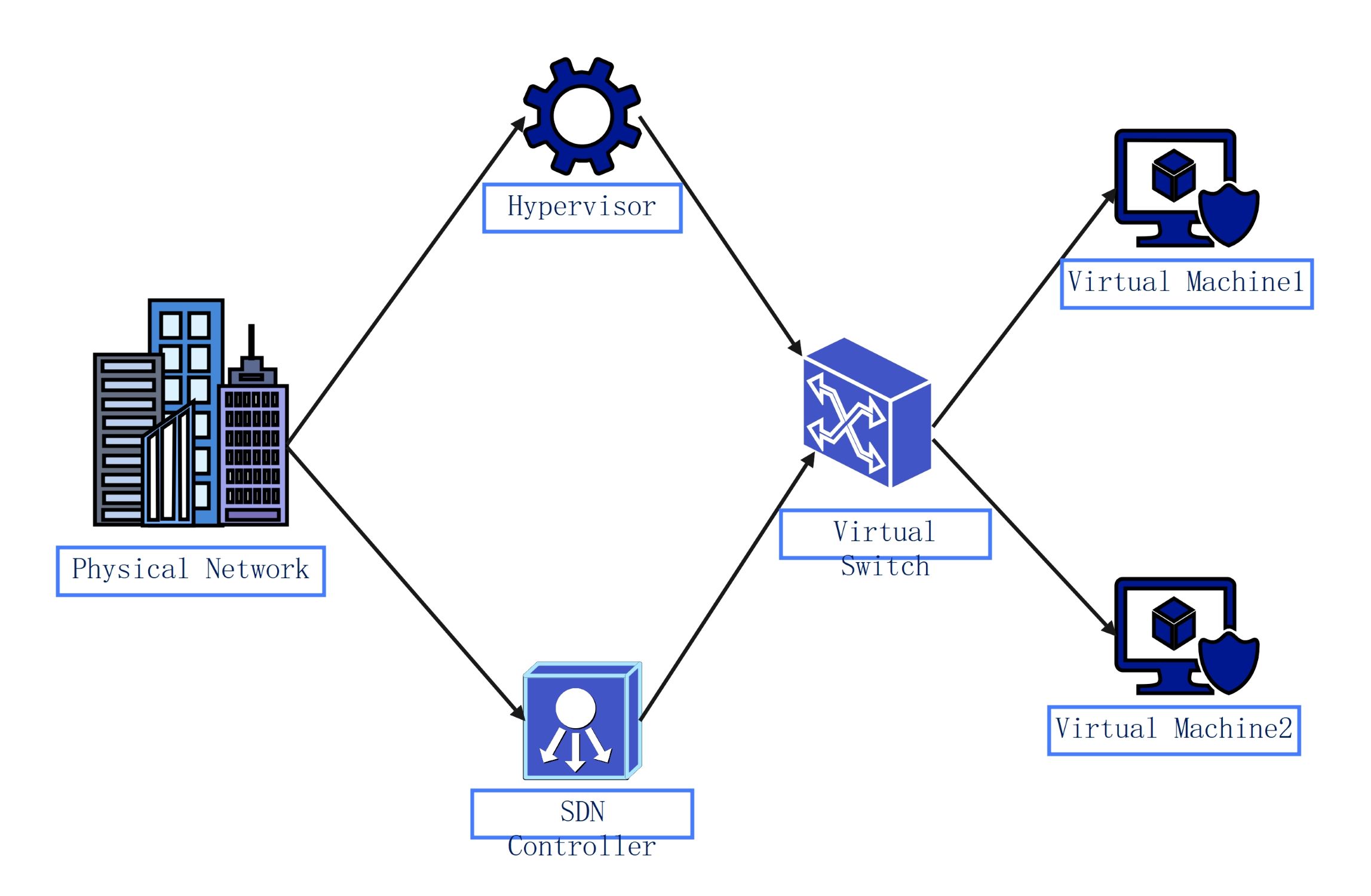
This template showcases the relationship between physical infrastructure and virtualized components. It helps engineers visualize how hypervisors, SDN controllers, and virtual switches work together. Use this layout to design or document secure, software-defined network environments effectively.
Physical Network
The physical network acts as the foundation for all virtualized services. It represents the actual hardware, including servers and cables, that supports data flow. Keeping this layer stable is vital for maintaining high performance across all virtual layers.
- Physical Infrastructure
- Hardware Connectivity
- Data Center Assets
Control Layer
The hypervisor and SDN controller manage how the system operates. The hypervisor creates the virtual space, while the SDN controller directs traffic logic. These tools let administrators manage the entire network through software instead of manual hardware changes.
- Hypervisor Management
- SDN Controller Logic
- Software-Defined Control
Virtual Connectivity
A virtual switch connects machines within the host environment. It directs data packets to the right virtual destination without needing extra physical ports. This component ensures that traffic between virtual machines remains isolated, efficient, and highly secure.
- Internal Traffic Routing
- Virtual Port Management
- Isolation Controls
Virtual Endpoints
Virtual machines are the final units that run specific applications. They act like physical computers but reside entirely in a digital environment. These machines share physical hardware resources while remaining independent from one another to ensure data privacy.
- Virtual Machine 1
- Virtual Machine 2
- Application Hosting
FAQs about this Template
-
What are the main benefits of using a network virtualization diagram?
A network virtualization diagram provides a clear visual map of how software-defined components interact with physical hardware. This clarity helps administrators identify potential bottlenecks and security risks quickly. It also simplifies the onboarding process for new team members. By seeing the whole system at once, you can make better decisions about resource allocation and future infrastructure upgrades for your business.
-
How does an SDN controller function within this diagram?
The SDN controller acts as the brain of the network. It tells the virtual switches and other components how to handle traffic based on software policies. Instead of configuring each device one by one, you manage everything from this central point. This automation reduces human error and allows for rapid changes in network behavior to meet changing traffic demands or security needs.
-
Why is the hypervisor essential for network virtualization?
The hypervisor is critical because it creates the abstraction layer between the physical server and the virtual machines. It manages the hardware resources like CPU and memory, ensuring each virtual machine gets what it needs to run. Without the hypervisor, you could not host multiple independent environments on a single physical machine. It provides the necessary foundation for all software-defined networking tasks.

 (AI & Web)