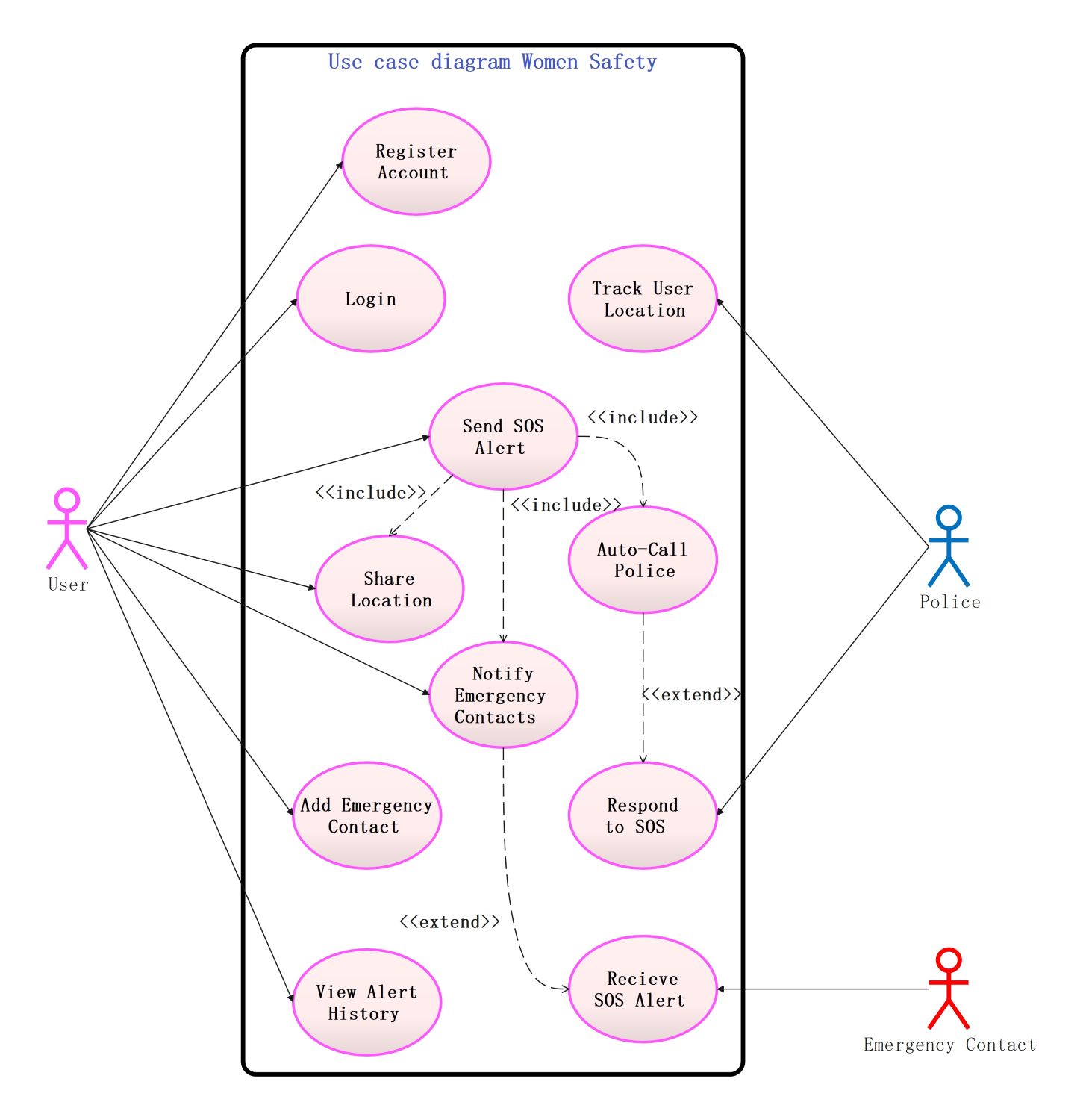
About this Women's Safety App template
This UML use case diagram helps developers visualize the key functions of a security application. It maps out how users, emergency contacts, and the police interact within the system to provide a seamless safety net during critical moments.
Core User Functions
The user acts as the primary person who sets up and operates the safety system. They manage their personal profile to ensure the app is ready for any emergency situation. These steps form the app's foundation.
- Register Account
- Login
- Add Emergency Contact
- View Alert History
Emergency Alert Workflow
This section details the critical actions triggered during a distress event. When a user sends an SOS, the system automatically shares their live data with responders. This ensures help reaches the correct location without delay or confusion.
- Send SOS Alert
- Share Location
- Notify Emergency Contacts
- Auto-Call Police
Responder Interaction Points
Responders include police officers and trusted family members who receive the distress signals. They use the app's tracking tools to find the user in real time. This connection is vital for providing immediate physical assistance to someone.
- Track User Location
- Respond to SOS
- Receive SOS Alert
FAQs about this Template
-
How does the SOS alert feature work in this app?
When a user activates the SOS alert, the application immediately starts a sequence of protective actions. It captures the user's current GPS coordinates and sends them to pre-selected emergency contacts. Simultaneously, the system can automatically place a call to the local police department. This multi-channel approach ensures that help is notified instantly through both text-based location data and direct voice communication.
-
Why is real-time location tracking essential for safety?
Real-time location tracking allows responders to find a person in distress even if they are moving. Standard GPS pins only show a single moment, but live tracking provides a continuous update on the user's whereabouts. This is crucial during kidnappings or if a person is walking through unfamiliar areas. It gives emergency services the exact path to follow, significantly reducing the time needed to reach the victim.
-
Can I customize my emergency contacts in the system?
Yes, the system allows users to manage their own list of trusted individuals who will receive alerts. You can add or update your emergency contacts at any time through the settings menu. Most safety apps recommend choosing at least three reliable people who are likely to be available. By keeping this list updated, you ensure that your distress signals always reach people who can take immediate action.

 (AI & Web)