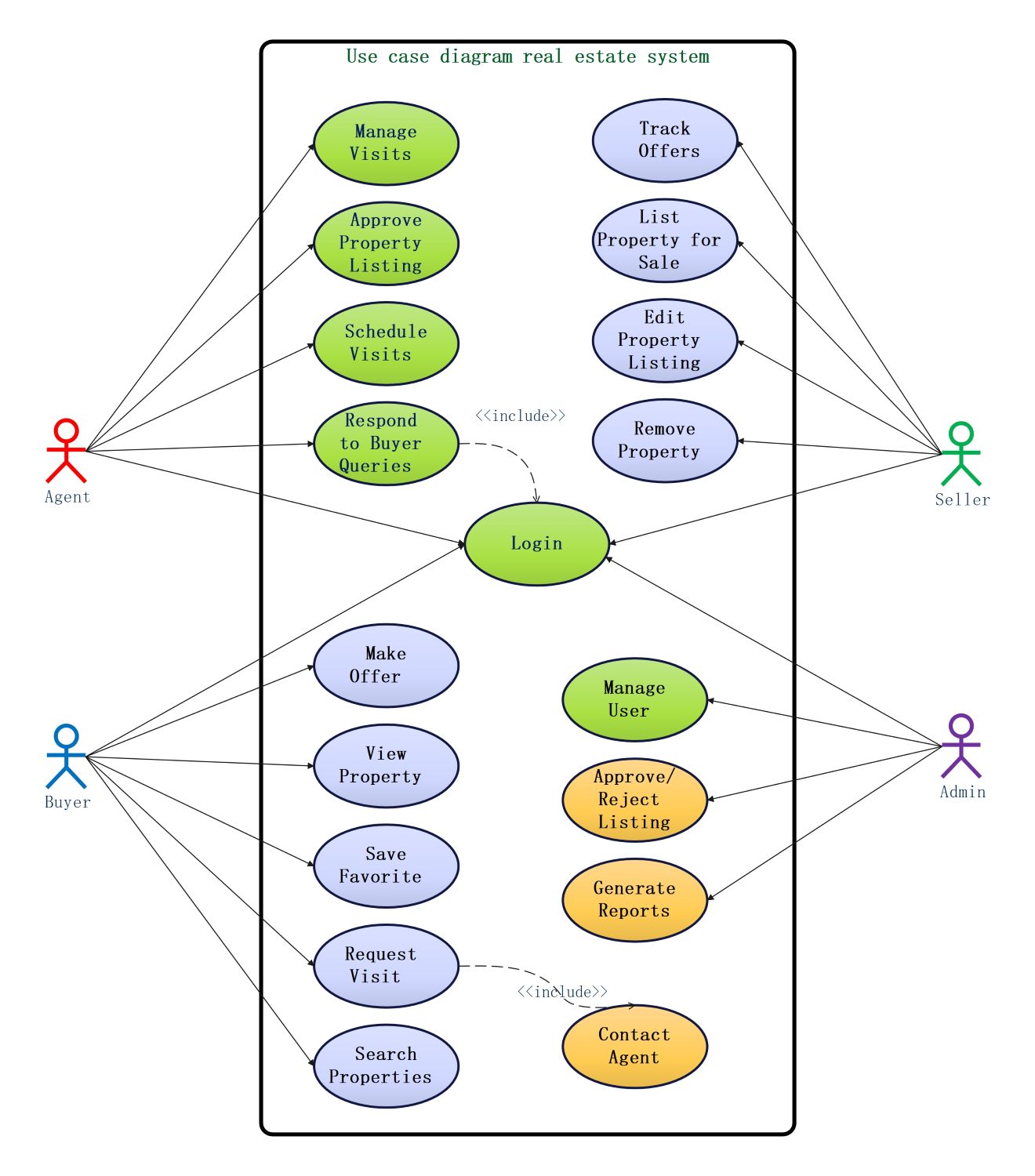
About this use case diagram for real estate system template
This template serves as a structural blueprint for building or analyzing property management software. It highlights how different actors interact with the system to complete tasks. Using this diagram helps teams communicate requirements clearly and prevents functional gaps during the software development lifecycle.
Agent Use Cases
The agent role focuses on managing property listings and facilitating communication between parties. This section outlines how agents approve listings, schedule visits with buyers, and handle professional inquiries to close real estate deals.
- Manage Visits
- Approve Property Listing
- Schedule Visits
- Respond to Buyer Queries
- Login
Seller Use Cases
Sellers interact with the system to market their properties and monitor potential interest. They use these functions to list new homes, edit existing details, track incoming offers, and remove properties after a sale.
- Track Offers
- List Property for Sale
- Edit Property Listing
- Remove Property
- Login
Buyer Use Cases
Buyers use the platform to find and purchase their ideal homes through search and filtering tools. These use cases cover the entire journey from browsing listings to saving favorites and making formal offers.
- Search Properties
- View Property
- Save Favorite
- Request Visit
- Make Offer
- Login
Admin Use Cases
The administrator maintains the integrity and security of the real estate platform for all users. Their responsibilities include managing user accounts, verifying property listings for accuracy, and generating reports to monitor system performance.
- Manage User
- Approve/Reject Listing
- Generate Reports
- Login
FAQs about this Template
-
Why is a use case diagram important for a real estate system?
A use case diagram is essential because it provides a high-level overview of the system's functional requirements. It helps stakeholders visualize how users like buyers and agents interact with the platform. By identifying these relationships early, development teams can avoid missing critical features. This visual guide ensures the final software aligns perfectly with the complex needs of the real estate market.
-
What roles should be included in a real estate use case diagram?
A standard real estate system should include four primary roles: buyers, sellers, real estate agents, and system administrators. Buyers focus on searching and viewing homes, while sellers manage their listings. Agents act as intermediaries who facilitate showings and respond to questions. Administrators oversee the entire platform by managing accounts and generating reports. Including all these roles ensures a complete system view.
-
How do include relationships work in this specific diagram?
In this diagram, the include relationship indicates that one use case is a mandatory part of another. For instance, the 'Request Visit' action includes 'Contact Agent' because a buyer must communicate with an agent to see a property. Similarly, most primary actions include a 'Login' step. This structure ensures that only authorized users can perform specific tasks like listing properties or making offers.

 (AI & Web)