




Quick answer: BPMN diagrams describe a business process with standardized events, activities, gateways, message flows, and swimlanes. The examples below help you choose the right process model for operational workflows such as orders, healthcare, hiring, and support escalation.
Best for: Best for analysts, operations teams, project managers, and students who need a clear process map that different teams can review together.
How to choose: Choose a simple order-flow BPMN for linear handoffs, a hospital or support example for approvals and exceptions, and a swimlane-heavy process when responsibilities across teams are the main issue.
Key takeaways:
- Use BPMN when roles, decisions, exceptions, and handoffs must be shown precisely.
- Start with the main path, then add gateways, loops, and exception flows only where needed.
- Swimlanes make accountability easier to read across departments or systems.
- EdrawMax provides BPMN shapes, connectors, templates, and export options for process documentation.
At a glance: BPMN (Business Process Model and Notation) is a standardized notation for modeling business processes. BPMN 2.0.2 defines elements such as events, activities, gateways, sequence flows, message flows, pools, and lanes; examples are most useful when they show not just the happy path but also decisions, exceptions, handoffs, and parallel work.
In this article
What is a Business Process Model and Notation?
This section defines bpmn examples for business process mapping in practical terms and explains what details to prepare before choosing or editing a template.
BPMN is a graphical notation system that facilitates process mapping in a universally interpretable way. It simplifies complex workflows, making them actionable for teams focused on efficiency, collaboration, and growth.
Features and Elements of BPMN
- Event Types: Highlight what triggers processes, what occurs mid-process, and how processes end.
- Hierarchical Detailing: Supports high-level overviews and granular subprocess mapping.
- Resource Mapping: Swimlanes delineate roles, offering transparency in resource allocation.
- Looping and Parallel Flows: Allow depiction of iterative and concurrent tasks.
- Integration with Data Systems: Links diagrams with data inputs for real-time updates.
Benefits of Using BPMN
- Scalability: Adapts to both startup operations and enterprise-wide process needs.
- Cross-functional Visibility: Encourages cooperation among diverse teams.
- Improved Workflow Testing: Identifies potential failures during the modeling stage.
- Informed Decision-Making: Data-backed process designs guide strategic planning.
- Digital Transformation Support: Provides a blueprint for digitizing traditional workflows.
Top BPMN Examples with Explanation
Use this section as a selection guide: compare each example by scenario, detail level, and customization effort before opening a template in EdrawMax.
Pizza Order and Delivery BPMN Diagram
Use when: Choose Pizza Order and Delivery BPMN Diagram when its structure matches your audience, scope, and level of detail. Customize: update labels, symbols, measurements, colors, and notes in EdrawMax.


The pizza-ordering process is visualized in this BPMN diagram, detailing roles such as the clerk, chef, and delivery person. Tasks are grouped in swimlanes, featuring the flow of events, decisions, and communication.
It pinpoints inefficiencies like wait times and suggests automation for payments. Clear role definitions aid in communication and training.
Though tailored for food service, BPMN diagrams are versatile, modeling workflows across industries.
Hospital Drug Dispensing Process
Use when: Choose Hospital Drug Dispensing Process when its structure matches your audience, scope, and level of detail. Customize: update labels, symbols, measurements, colors, and notes in EdrawMax.

This BPMN diagram details the activity flow and communication between the ward and pharmacy.
It focuses on the decision about drug availability and the alternative paths taken based on stock. You can uncover bottlenecks and areas where the drug dispensing process can be improved.
Hospital administrators, pharmacists, and ward staff can use it to review and enhance workflows. It’s also valuable for training, optimizing processes, or exploring automation. Visualizing the process ensures efficient medication delivery and boosts patient care.
BPMN Example for Order Fulfillment
Use when: Choose BPMN Example for Order Fulfillment when its structure matches your audience, scope, and level of detail. Customize: update labels, symbols, measurements, colors, and notes in EdrawMax.

This BPMN diagram tracks the flow of activities, showing sequential and parallel paths while highlighting each party's responsibilities. It carefully details the order fulfillment process involving a customer, reseller, manufacturer, and payment organization.
Visualizing wait times and dependencies helps businesses spot bottlenecks and improve communication. Resellers understand their part in the process, manufacturers see their contribution, and payment organizations gain insight into their role.
This transparency boosts collaboration and leads to quicker deliveries and better customer satisfaction.
Employment Application BPMN

This BPMN diagram effectively uses standard notations to map the candidate hiring journey from application to recruitment.
It captures events, activities, decision points, and the flow between candidate and employer. By visualizing the process, it shows delays, decision points, and potential candidate paths.
It is an excellent tool for HR teams, recruiters, and hiring managers to improve the process, onboard employees, or communicate hiring steps to candidates.
Customer Support Escalation Process
Use when: Choose Customer Support Escalation Process when its structure matches your audience, scope, and level of detail. Customize: update labels, symbols, measurements, colors, and notes in EdrawMax.

This simple BPMN example displays a customer support escalation process using swimlanes and BPMN symbols. It describes how customer issues are handled, detailing interactions at each support level.
The diagram points out key decision points and paths depending on the issue's complexity. It helps businesses improve response time and enhance the customer support process.
Customer support teams, new staff, and customers can use it to understand the process and spot weaknesses.
How to Create a BPMN Diagram with EdrawMax?
This workflow is useful after you choose a starting example. In EdrawMax, edit symbols, labels, dimensions, connectors, colors, and export settings to match your real use case.
Accurate visualization of workflows is essential for BPMN diagrams. EdrawMax makes this easy with a user-friendly interface, templates, and full BPMN 2.0 support.
 Get 500 free AI tokens
Key Features of EdrawMax for BPMN
- Pre-designed Templates: Access a bunch of built-in BPMN diagram templates to speed up your process.
- Drag-and-Drop Functionality: Simplifies adding BPMN symbols like tasks, gateways, and events to your model.
- Cross-Platform Access: Design on Windows, Mac, Linux, and even online without device restrictions.
- Export Options: Save your diagram in multiple formats such as PDF, Visio, and SVG.
- Symbol Library: Includes all standard BPMN notations, such as message flows, data objects, and pools.
How to Make a BPMN Diagram Easily
Use when: Choose How to Make a BPMN Diagram Easily when its structure matches your audience, scope, and level of detail. Customize: update labels, symbols, measurements, colors, and notes in EdrawMax.
Get 500 free AI tokens
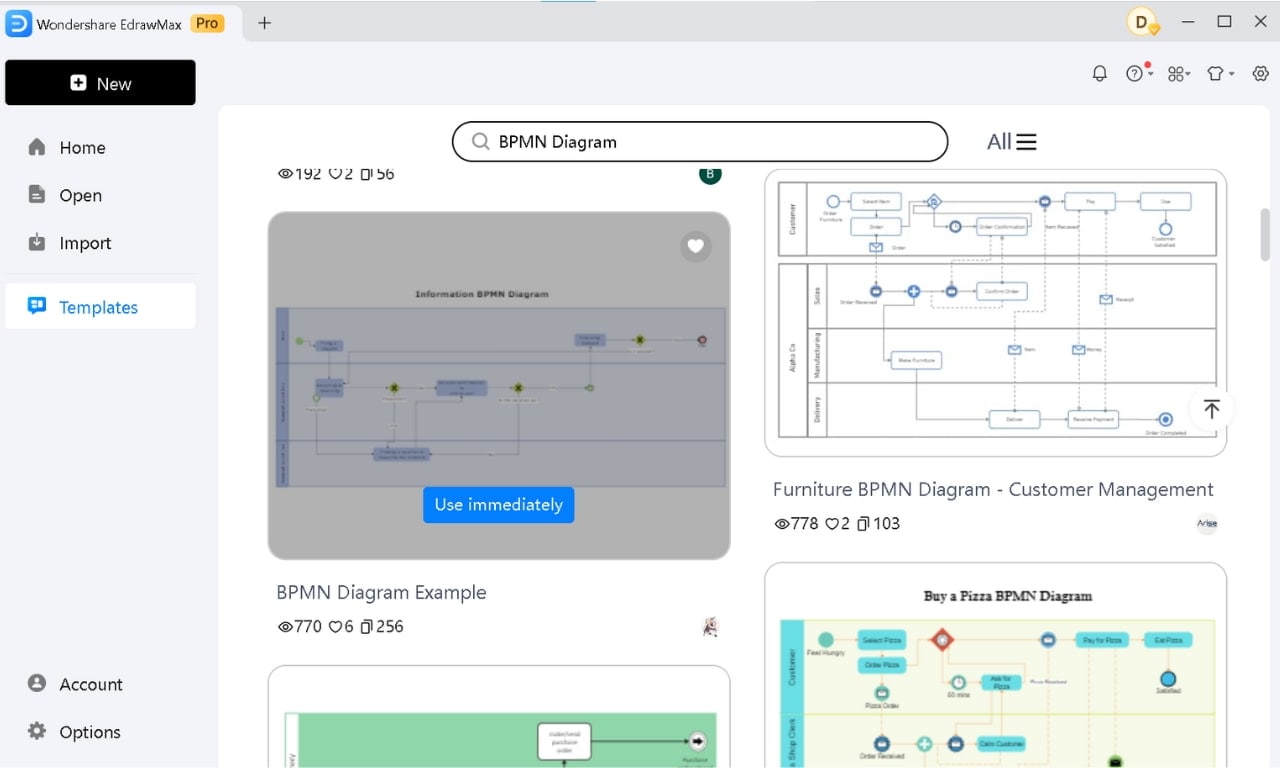
Step 1 Get Started with a Template
- From your EdrawMax Home screen, navigate to the Templates section.
- Search for the BPMN Diagram and pick a BPMN template that matches your task.
- Click Use immediately to start personalizing your BPMN Diagram.
Step 2 Customize Your Diagram
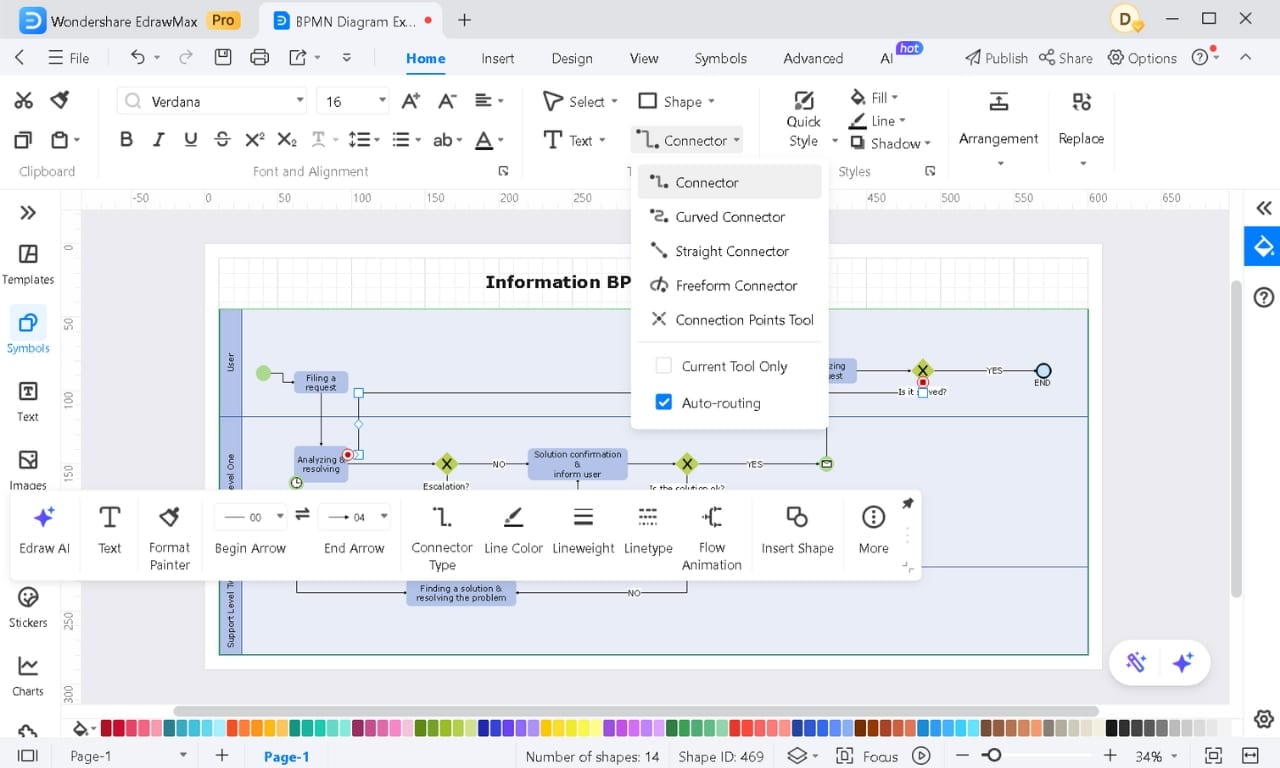
- Pick the required BPMN elements from the Symbols library on the left and drag them onto your canvas.
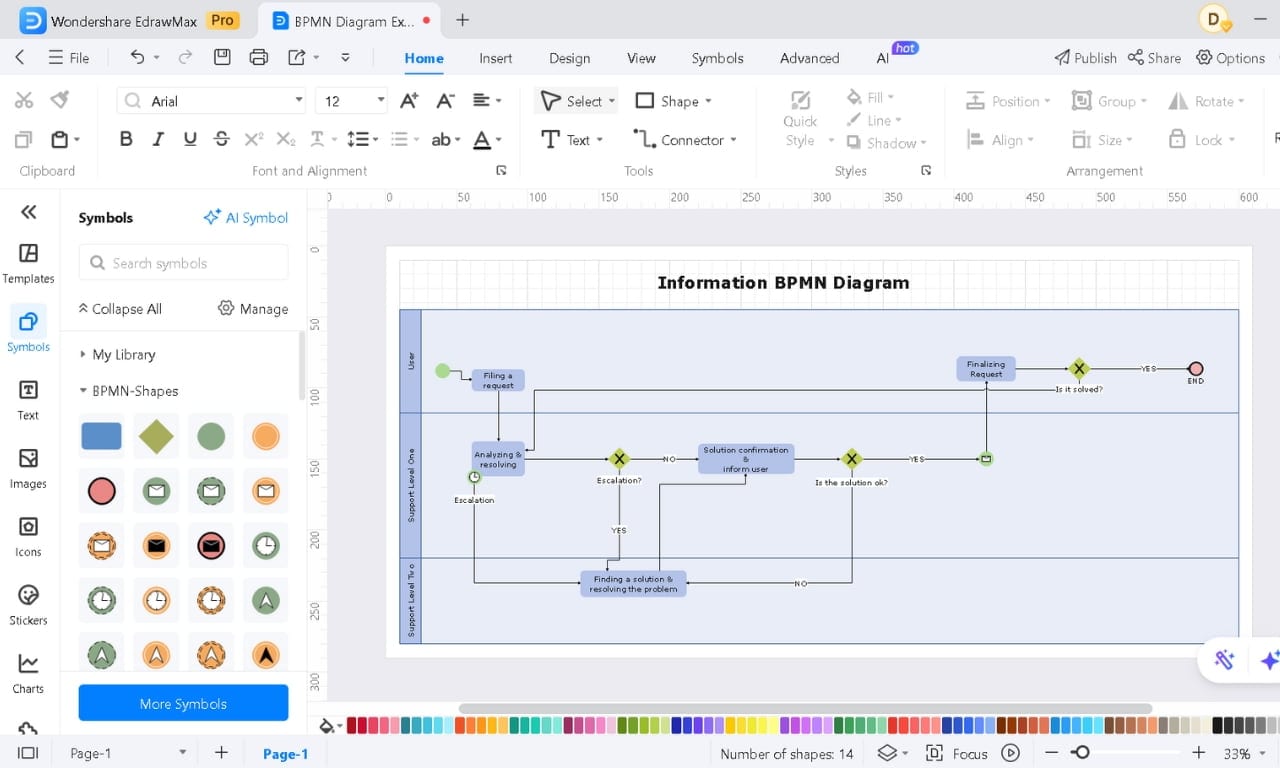
- Click on a shape to adjust its appearance. Customize style, color, line, etc., easily.
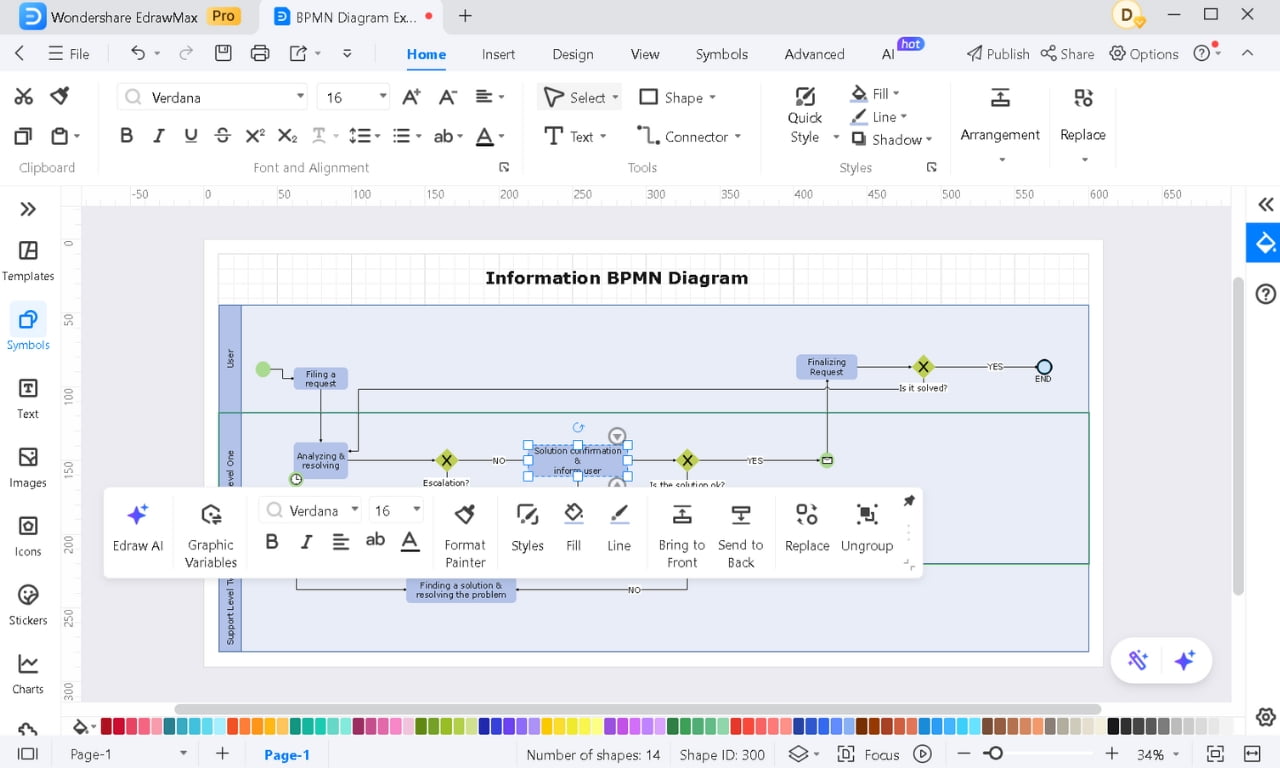
- Double-click to add/change text and describe the activity or decision. Ensure each shape is labeled with a clear and brief description.
- Use automatic connectors to link shapes together. Select a connector line and modify its type, color, weight, and more.
- Arrange the shapes logically to improve readability.
Step 3 Export Your Diagram
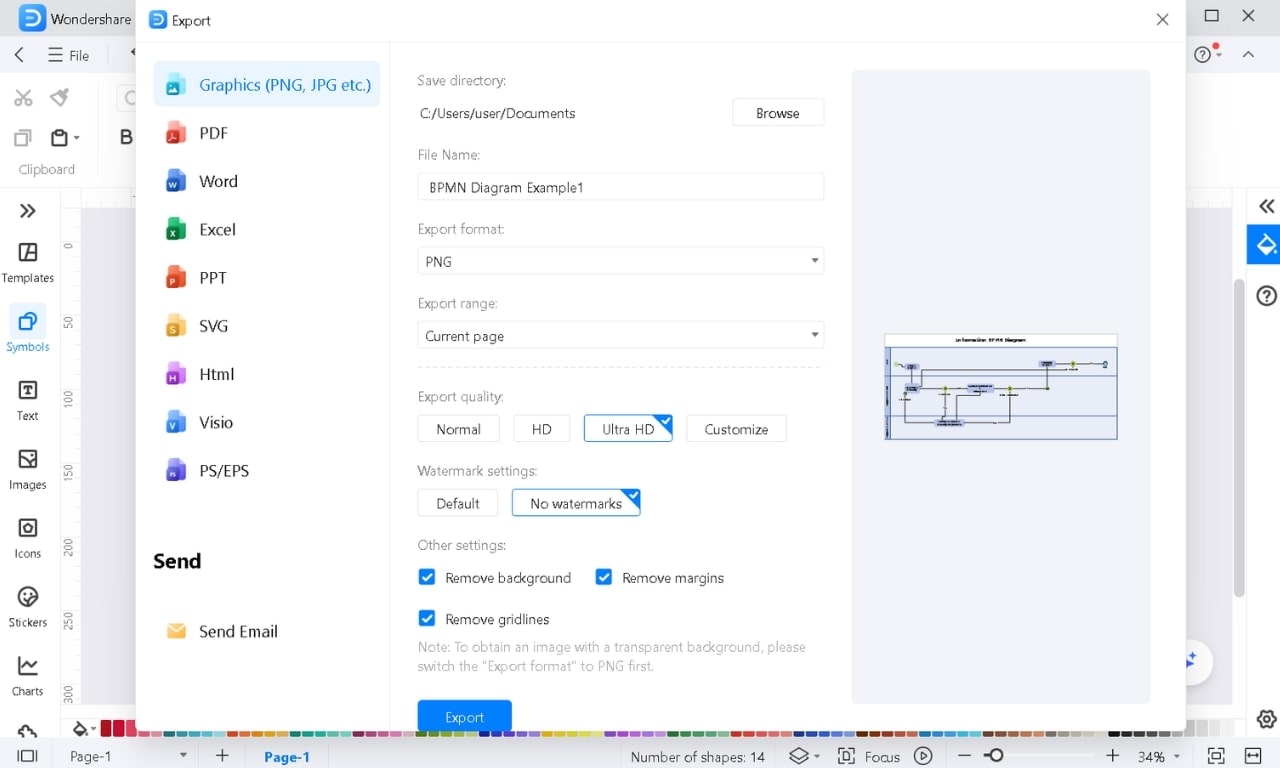
- Once your diagram is finished, export it as PDF, PNG, JPG, SVG, etc.
- Open the File menu, select Export to Graphics, and pick the format and settings to download it instantly.
Get 500 free AI tokens
Top Tips for Creating Effective BPMN Diagrams
- Start Simple: To learn BPMN, begin with a basic example, like a pizza order. Once you've mastered it, move on to more complex processes.
- Understand Each Element: Learn the purpose of BPMN symbols. For example, gateways help split or join flows. Knowing their function keeps your diagrams clear.
- Know Your Audience: Adjust the detail based on who’s viewing the diagram. Include more specifics for technical teams, and focus on key steps for managers.
- Test the Flow: Review your diagram. Ensure the process flows logically and check for missing or unnecessary steps.
- Pay Attention to Details: Label sequence flows and add annotations where needed. This helps make your diagram easy to follow.
Conclusion
So, don’t wait to explore its features and start building better workflows.
AI Diagram Generator
Enter your prompt. Upload files if needed. Generate diagrams, charts, or slides instantly.


What is the best way to use bpmn examples for business process mapping?
BPMN diagrams describe a business process with standardized events, activities, gateways, message flows, and swimlanes. The examples below help you choose the right process model for operational workflows such as orders, healthcare, hiring, and support escalation.
Who should use bpmn examples for business process mapping?
Best for analysts, operations teams, project managers, and students who need a clear process map that different teams can review together.
Can I customize these examples in EdrawMax?
Yes. You can open an editable template in EdrawMax, adjust text, symbols, layout, colors, and dimensions, then export it for documents, presentations, or sharing.


