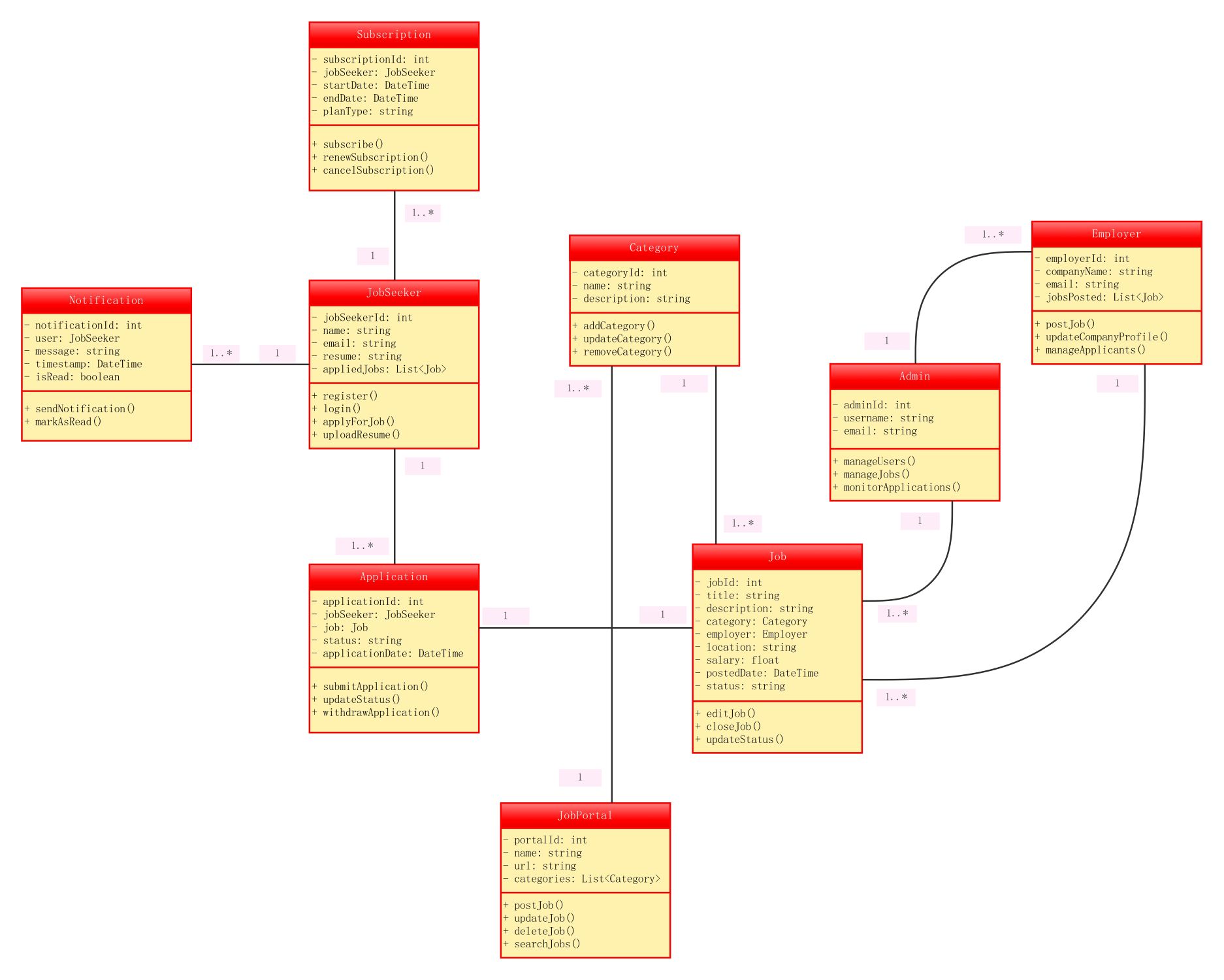
About this Class Diagram for Job Portal System template
This template provides a clear visual blueprint for building a recruitment platform. It outlines essential classes like job seekers, employers, and job postings. Use this diagram to organize your database architecture and streamline system development.
JobSeeker Class
The JobSeeker class represents individuals looking for work. It stores personal data and handles essential actions like logging in or applying for jobs. This entity is central to the user-facing side of the recruitment portal.
- jobSeekerId: int
- name: string
- email: string
- resume: string
- applyForJob()
- uploadResume()
Employer Class
The Employer class defines the organization or recruiter posting vacancies. It manages company details and interacts with job listings. This class is crucial for connecting hiring managers with potential candidates through the system.
- employerId: int
- companyName: string
- email: string
- postJob()
- updateCompanyProfile()
- manageApplicants()
Admin Class
Administrators manage the overall health and safety of the job portal. This class handles high-level operations such as user moderation and application monitoring. It ensures the system remains clean, functional, and secure for all users.
- adminId: int
- username: string
- manageUsers()
- manageJobs()
- monitorApplications()
Job and Application Classes
The Job class holds specific details about vacancy listings, while the Application class tracks seeker progress. Together, they form the core data flow of the hiring process, linking the seeker's intent with the employer's needs.
- jobId: int
- title: string
- salary: float
- status: string
- submitApplication()
- updateStatus()
FAQs about this Template
-
How does a class diagram help in developing a job portal?
A class diagram acts as a structural blueprint for developers and architects. It defines how different system components like job seekers and employers interact within the database. By mapping these relationships early, you can avoid costly design errors. This visual tool simplifies complex coding tasks, ensures data consistency across the platform, and helps teams understand the overall software logic clearly.
-
What are the primary entities in a recruitment system UML?
The primary entities include the Job Seeker, Employer, and Admin. These actors interact with core data objects like Jobs, Applications, and Notifications. Each entity contains specific attributes, such as names or IDs, and methods like posting a job or uploading a resume. Understanding these core classes is essential for creating a functional and scalable recruitment system that meets user needs.
-
Can this diagram be customized for specific niche job boards?
Yes, this template is highly flexible and can be tailored for specialized industries. You can easily add new classes like Portfolio for creative jobs or Certifications for technical roles. Customizing the attributes and methods allows you to address specific requirements for niche markets. This adaptability makes it a valuable starting point for any unique recruitment software project you plan.

 (AI & Web)