




Cleopatra VII Philopator remains one of the most iconic figures in history — a queen whose beauty, intelligence, and political genius reshaped Egypt’s destiny. But behind her legacy lies a complex family tree filled with royal alliances, rivalries, and power struggles. The Cleopatra family tree reveals the Ptolemaic dynasty’s deep Greek roots, as well as the intricate relationships that defined Egypt’s final royal generations.
In this article, you will learn about:
- The origins and rise of the Ptolemaic dynasty in Egypt.
- The key members of Cleopatra’s family and their influence.
- How family rivalries and alliances led to the end of Egypt’s pharaonic era.
In the end, you will be able to understand the legacy of the great Cleopatra and her works throughout her reign. Let’s get started!
In this article
Cleopatra Family Tree and Important Members
The story of Cleopatra’s family begins with the Ptolemaic dynasty, a royal Greek family that ruled Egypt after the death of Alexander the Great. The dynasty was founded by Ptolemy I Soter, one of Alexander’s generals, who became ruler of Egypt around 305 BC.
The Ptolemies blended Greek and Egyptian cultures while fiercely maintaining power through intermarriage — often between siblings — to preserve their bloodline and throne. Here is the complete family tree of the great Cleopatra VII.
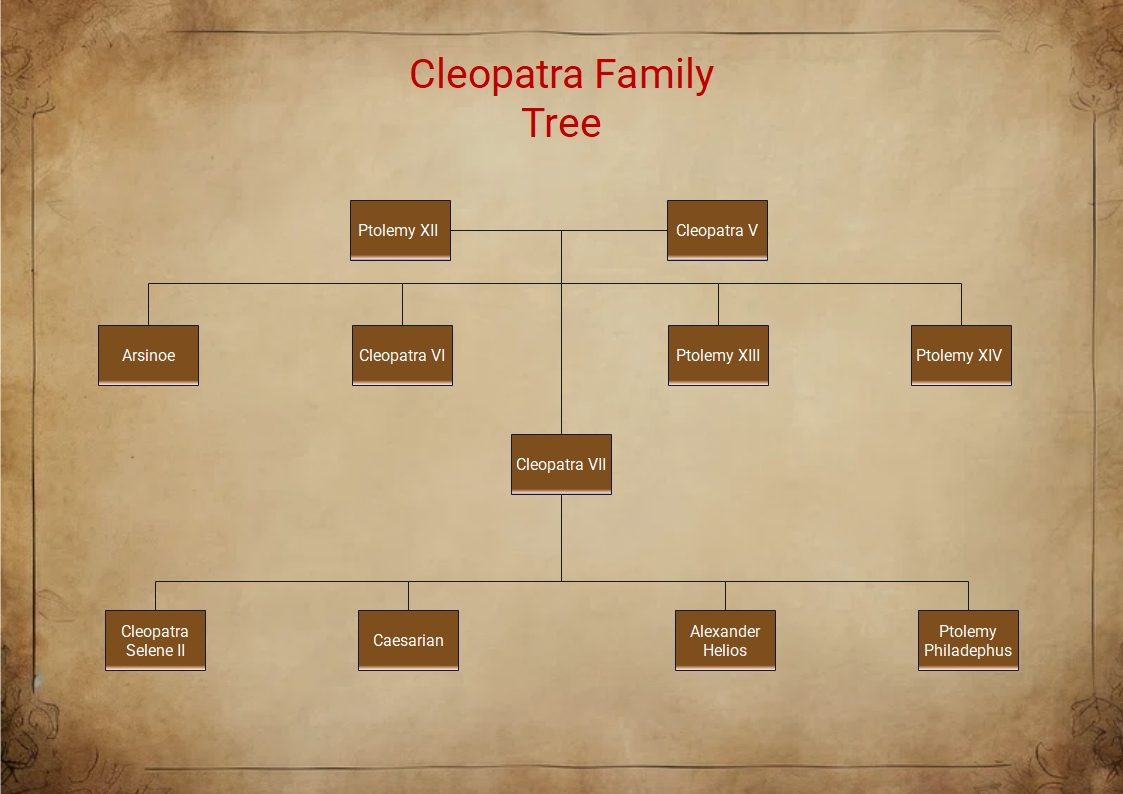


1. Ptolemy I Soter (367–283 BC)
Ptolemy I, a Macedonian Greek general and trusted companion of Alexander the Great, founded the Ptolemaic Kingdom. After Alexander’s death, he took control of Egypt and declared himself Pharaoh. He established Alexandria as the capital and laid the foundation for centuries of Greek rule in Egypt.
Notable achievements
- Founder of the Library of Alexandria.
- Introduced Greek administration and culture to Egypt.
- The royal practice of sibling marriage began to keep power centralized.
2. Ptolemy II Philadelphus (309–246 BC)
The son of Ptolemy I and Berenice I, Ptolemy II, continued his father's legacy. His marriage to his sister Arsinoe II shocked Greek society but reinforced dynastic control.
Notable achievements:
- Expanded trade and strengthened Egypt’s economy.
- Completed the construction of the Pharos Lighthouse of Alexandria.
- Supported the arts and sciences, turning Alexandria into a global center of learning.
3. Later Ptolemies and Dynastic Decline
Over the next two centuries, the dynasty was marked by political instability and family conflicts. Successive rulers named Ptolemy and Cleopatra often fought for power. By the first century BC, Egypt was weakened by corruption, wars, and Roman interference.
4. Ptolemy XII Auletes (117–51 BC)
Cleopatra VII’s father, Ptolemy XII Auletes, known as “The Flute Player,” ruled Egypt during a time of great political turmoil. He maintained power by bribing Roman leaders for support. His rule was marked by economic instability and rebellion among Egyptians who resented his dependence on Rome.
Notable family connections:
- Married Cleopatra V Tryphaena, his sister and queen.
- Fathered several children, including Cleopatra VII, Berenice IV, Arsinoe IV, Ptolemy XIII, and Ptolemy XIV.
5. Cleopatra V Tryphaena (Unknown–69 BC)
Cleopatra VII’s mother, Cleopatra V Tryphaena, was also her father’s sister. Although little is known about her life, she played a crucial role in the continuity of the dynasty’s royal bloodline.
6. Cleopatra VII Philopator (69–30 BC)
The most famous member of her family, Cleopatra VII, became queen at 18 after her father's death. She co-ruled with her brother, Ptolemy XIII, but eventually became the sole ruler after a civil war. Her alliances — and romantic relationships — with Julius Caesar and Mark Antony shaped the final years of the Ptolemaic dynasty.
Key highlights
- Strengthened Egypt’s economy and navy.
- Mastered multiple languages and represented both Greek and Egyptian traditions.
- Formed a powerful alliance with Rome through diplomacy and intellect.
- Her tragic death in 30 BC marked the end of pharaonic Egypt and the beginning of Roman rule.
7. Ptolemy XIII Theos Philopator (61–47 BC)
Cleopatra’s younger brother and co-ruler, Ptolemy XIII, initially ruled alongside her but later turned against her, influenced by court advisors. Their conflict escalated into a civil war, leading to the famous Battle of the Nile, where Caesar supported Cleopatra’s victory.
8. Ptolemy XIV and Ptolemy XV (Caesarion)
After the death of Ptolemy XIII, Cleopatra ruled with her younger brother Ptolemy XIV until his death, likely orchestrated by Cleopatra herself.
She then ruled jointly with her son, Ptolemy XV Caesarion, whom she claimed was fathered by Julius Caesar. Caesarion was the last Pharaoh of Egypt.
After Cleopatra and Antony’s defeat by Octavian (later Augustus), Caesarion was executed, ending the Ptolemaic dynasty.
9. Siblings and Rivals
Berenice IV: Cleopatra’s older sister, who briefly ruled Egypt after their father’s exile. She was executed when he reclaimed the throne.
Arsinoe IV: Another sister of Cleopatra, who opposed her rule and was later executed by Mark Antony at Cleopatra’s request.
The Legacy of Cleopatra’s Lineage
The Ptolemaic dynasty blended Greek intellect with Egyptian culture, leaving behind monuments, libraries, and advancements that influenced both civilizations. Cleopatra’s reign, though tragic, symbolized a bridge between the ancient world and the emerging Roman Empire. Her family’s story remains one of ambition, betrayal, and timeless allure — a royal saga that defined an era.
How to Create a Family Tree Using EdrawMax
Visualizing complex dynasties like Cleopatra’s is made easier with EdrawMax, a versatile diagramming and visualization tool developed by Wondershare. Designed for professionals, educators, and researchers, EdrawMax simplifies the process of creating family trees, organizational charts, and historical diagrams.
With its intuitive drag-and-drop interface, users can design detailed family trees like that of Cleopatra's Ptolemaic dynasty in minutes. The tool supports over 280 diagram types, including flowcharts, timelines, and mind maps, making it perfect for both academic and creative projects.
Key Features of EdrawMax
Comprehensive Templates: Ready-made templates for family trees and historical charts.
- Multiple Diagram types: EdrawMax helps you generate multiple diagrams, including family trees, org charts, block diagrams, and many more.
- Collaboration Tools: It helps you share, comment, and co-edit diagrams in real time. You can take the direct printouts of the designs from the tool.
- Cross-Platform Support: EdrawMax is a perfect choice for any device you use. It works on Windows, macOS, Linux, and web browsers.
- Template Library: The large template library helps you generate quick designs. You can use these templates to create your own diagrams.
With EdrawMax, visualizing Cleopatra’s lineage becomes clear, accurate, and engaging — helping bring ancient history to life.
Step-by-Step Guide to Create a Family Tree
Here is the step-by-step guide to creating a family tree using EdrawMax. Follow these steps to create a smooth family tree.
 Get 500 free AI tokens
Step1 Open the Empty Canvas
- Launch EdrawMax on your computer and click on the new tab located on the left sidebar.
- Select Blank Drawing on the Homepage to open the empty canvas where you need to start drawing.

Step2 Add Elements Needed
- Go to the Elements Library and find suitable elements to place on the empty canvas.
- Adjust the size and position of the elements on your canvas, arranging them according to your desired family hierarchy or generation layouts.

Step3 Add Details for Each Family Member
- Click on each element added to put details for each family member, like names, dates, and other information.
- Since we don't have many images available for the Cleopatra family, we are good to go with their names and eras.

Step4 Add Relationships Among the Family Members
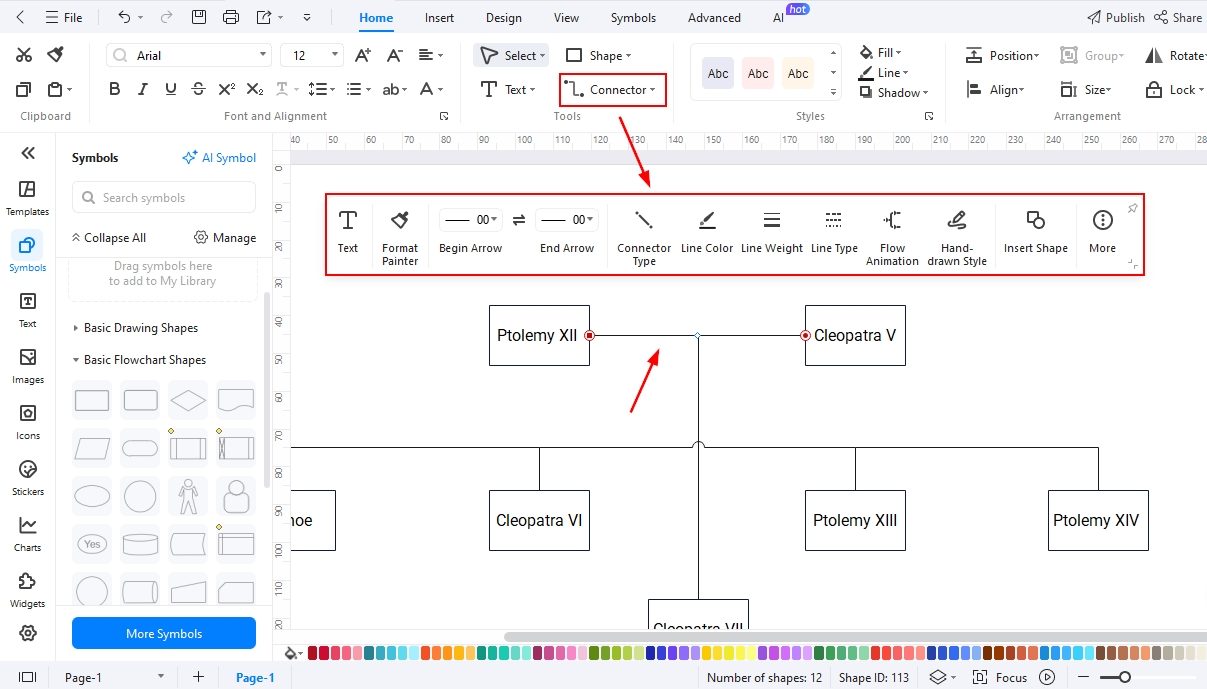
- Use Connector Lines from the toolbar to represent relationships between parents, children, and siblings visually.
- Label the connectors or use text boxes to indicate relationship types, such as “Father,” “Mother,” “Son,” or “Daughter.”
Step5 Export Your File
- Once your family tree is complete, click on the File tab and select Export & Send to choose your preferred format—such as PDF, PNG, or Word.
- Save your final file to your device or cloud storage, and share it with family members for printing or digital viewing.
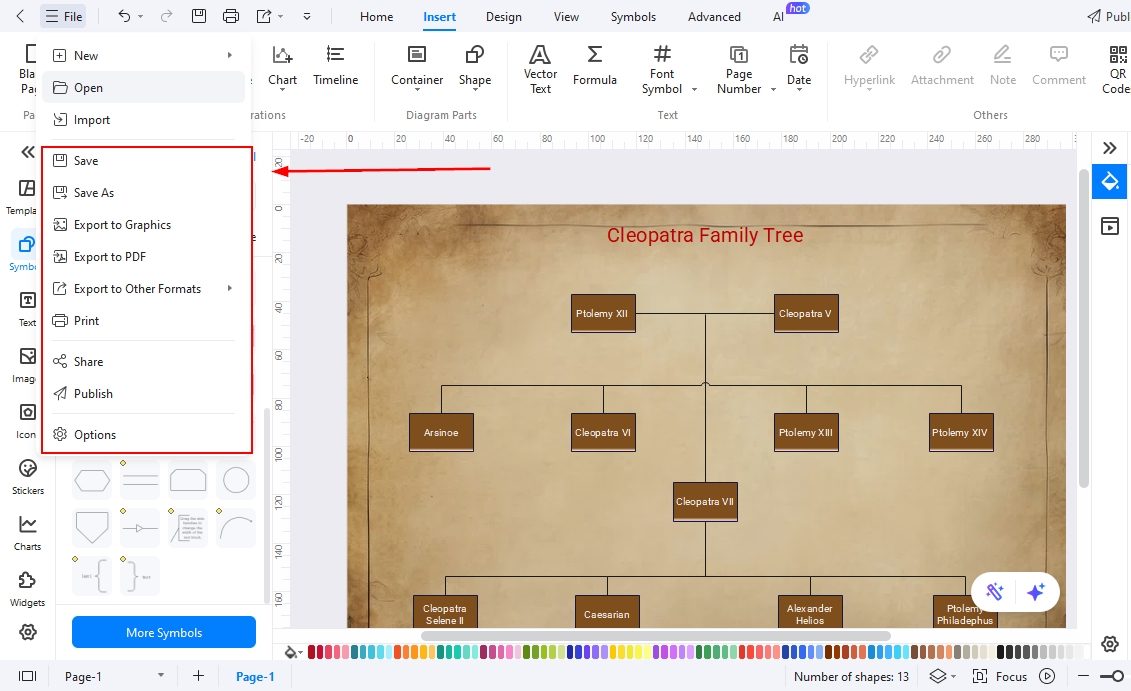
Here is the complete family tree for you. That's how easy it could be to use EdrawMax to create a family tree. Try yours and engage your audience.
Final Words
The Cleopatra family tree showcases the grandeur and complexity of Egypt’s final royal dynasty. From Ptolemy I’s founding rule to Cleopatra VII’s legendary reign, every generation shaped the ancient world’s course.
By mapping this intricate lineage with EdrawMax, history enthusiasts can visually trace power, politics, and legacy through time. This powerful tool transforms ancient genealogies into interactive visuals, making Egypt’s royal history not only easier to understand but fascinating to explore.
AI Diagram Generator
Enter your prompt. Upload files if needed. Generate diagrams, charts, or slides instantly.





 (AI & Web)